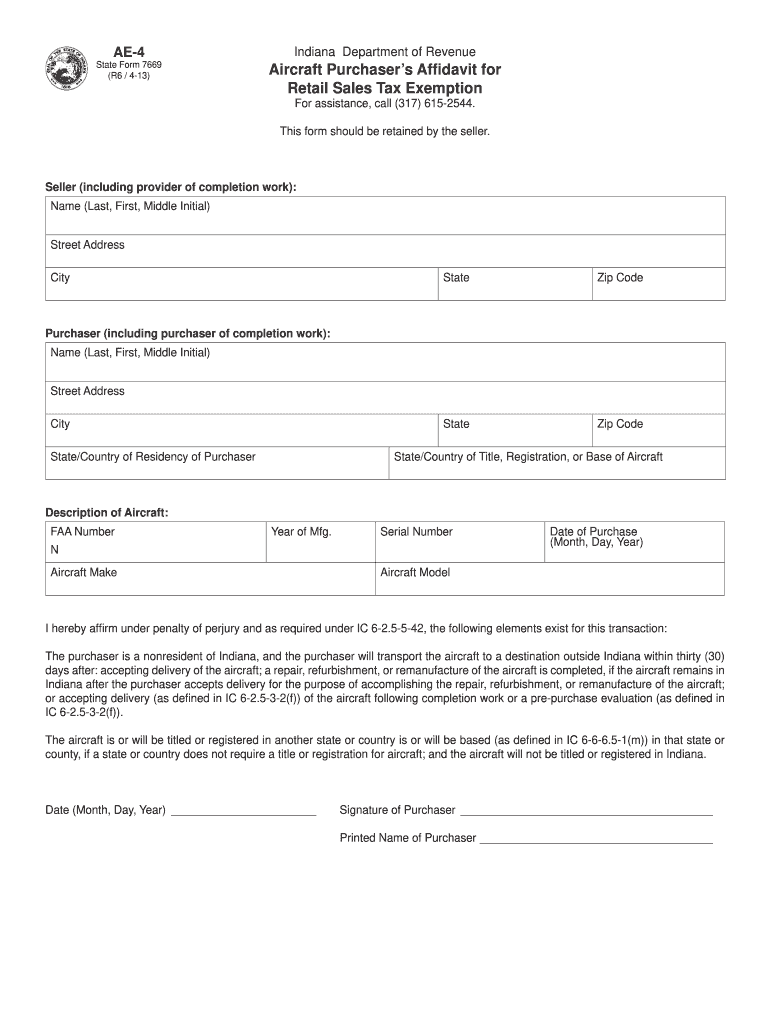
AE-4 Indiana Department of Revenue State Form 7669 R6 / 4-13 Aircraft Purchaser s Af davit for Retail Sales Tax Exemption For assistance call 317 615-2544. This form should be retained by the seller. Seller including provider of completion work Name Last First Middle Initial Street Address City State Zip Code Purchaser including purchaser of completion work State/Country of Residency of Purchaser Description of Aircraft FAA Number Year of Mfg. Serial Number N Aircraft Make Date of Purchase Month.
Loading

Open form follow the instructions

Easily sign the form with your finger

Send filled & signed form or save
How to fill out the IN AE-4 online
Completing the IN AE-4 form is essential for claiming a retail sales tax exemption for aircraft purchases. This guide provides clear, step-by-step instructions to assist you in accurately filling out the form online, ensuring a smooth submission process.
Follow the steps to complete the IN AE-4 form online.
- Press the ‘Get Form’ button to access the IN AE-4 form and open it in your preferred editor.
- Begin by filling out the seller's information. Enter the seller's name (last, first, middle initial), street address, city, state, and zip code.
- Next, complete the purchaser's information. Fill in the purchaser's name (last, first, middle initial), street address, city, and state or country of residency.
- Provide the state or country of title, registration, or base of the aircraft. This is important for tax exemption purposes.
- In the 'Description of Aircraft' section, enter the FAA number, year of manufacture, serial number, aircraft make, and aircraft model.
- Record the date of purchase by specifying the month, day, and year.
- Affirm the purchase statement under penalty of perjury. Ensure that you check the necessary conditions regarding the purchaser's residency and the aircraft's registration.
- Date the form by entering the month, day, and year of signing.
- Provide the signature and printed name of the purchaser. Ensure that this information is accurate as it constitutes a legal affirmation.
- After completing the form, you have the options to save changes, download, print, or share the completed IN AE-4 form as needed.
Complete and submit your documents online to benefit from tax exemptions on your aircraft purchase.
Experience a faster way to fill out and sign forms on the web. Access the most extensive library of templates available.
Related content
by H Vitzthum · 2023 · Cited by 16 — Our findings identify AE4 as an essential part of...
Sep 29, 2005 — AE4 ; Atom Count, 44 ; Chiral Atom Count, 0 ; Bond Count, 43 ; Aromatic...
Posicione o dial do programa AE em 4. (modo de gravação automática). NOTA. Se a imagem...
Get answers to your most pressing questions about US Legal Forms API.
Is the bal-27 a good gun?
Many players consider the bal-27 to be an excellent choice due to its balanced stats and performance in combat. It excels in versatility, turning it into a dependable weapon whether you engage at close quarters or longer distances. Its manageable recoil and rapid fire rate contribute to its reputation as a favored weapon among call-of-duty enthusiasts. Ultimately, if you enjoy fast-paced action in the IN AE-4, the bal-27 definitely deserves a spot in your loadout.
What gun is the BAS B based on?
The BAS B is based on the design of the UMP submachine gun, creating a hybrid that combines the qualities of both SMGs and assault rifles. This firearm offers a balance of firepower and mobility, making it suitable for various tactical situations. Players often choose the BAS B for its adaptability and ease of use. Exploring the features of the BAS B can significantly enhance your performance in critical battles like those in the IN AE-4.
What gun is the bal-27?
The bal-27 is a lightweight assault rifle featured prominently in Advanced Warfare. It is known for its high rate of fire and manageable recoil, which allows for rapid follow-up shots. Players appreciate its reliability and performance in diverse combat scenarios. Using the bal-27 effectively can greatly improve your gameplay, especially in fast-paced missions like those experienced in the IN AE-4.
How to get the AE4 in Advanced Warfare?
To unlock the AE4 in Advanced Warfare, you typically need to complete specific challenges that are available during gameplay. This weapon provides players with agility, precision, and a unique firing style that enhances the overall gaming experience. You can also find it in supply drops and through game events aimed at making your arsenal more diverse. Securing the AE4 ultimately enriches your experience while navigating the IN AE-4 engagements.
What gun is the bal-27 based on?
The bal-27 is based on the iconic AR-15 rifle platform. This design offers a robust framework for performance in various combat situations. With its streamlined build, the bal-27 is optimized for accuracy and versatility, making it a popular choice in the realm of firearms today. Overall, the foundation of the bal-27 plays a crucial role in its effectiveness in situations like those faced in the IN AE-4.
How to make text solid in After Effects?
To make text solid in After Effects, you can select the text layer and apply a 'Fill' effect from the 'Effects' menu. Choose a color that matches your design. This solidification process enhances clarity and impact, particularly beneficial when creating bold statements in AE-4.
How do I add fill to text in After Effects?
To add a fill to text in After Effects, select the text layer and navigate to the 'Character' panel. Choose the 'Fill Color' option and pick your desired hue. Adjust the settings according to your design needs, ensuring your text stands out using AE-4 capabilities.
Where is fill and stroke in After Effects?
In After Effects, you'll find the 'Fill' and 'Stroke' options in the 'Effects & Presets' panel or directly in the layer's settings. Select your shape or text layer, and these options will be visible in the properties. Understanding their placement helps you manipulate shapes effectively in AE-4.
How do I fill content in After Effects?
Filling content in After Effects involves selecting the layer you want to modify. Then, go to the 'Effects' menu and choose 'Fill' from the available options. Customize the color and any gradients you want to use. This technique allows for vibrant content creation in AE-4.
How to fill text in After Effects?
To fill text in After Effects, click on the text layer and go to the 'Character' panel. Here, you can select a color for your text fill. Adjust additional settings, like opacity, to achieve your desired effect. Mastering this will greatly improve your graphics using AE-4.
Use professional pre-built templates to fill in and sign documents online faster. Get access to thousands of forms.
If you believe that this page should be taken down, please follow our DMCA take down process here.