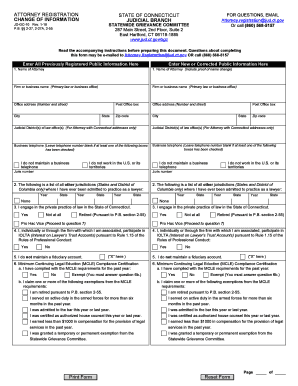
Get Ct Jd-gc-10 2012
How it works
-

Open form follow the instructions
-

Easily sign the form with your finger
-

Send filled & signed form or save
How to fill out the CT JD-GC-10 online
Filling out the CT JD-GC-10 form can be a straightforward process if you follow the right steps. This guide provides clear, step-by-step instructions tailored to assist users of all experience levels in completing the form accurately and efficiently.
Follow the steps to complete the CT JD-GC-10 form online.
- Click ‘Get Form’ button to obtain the form and open it in the editor.
- Enter all previously registered public information in the designated fields on the left side of the form. Ensure that your name, firm or business name, and office address are accurately filled out.
- Input new or corrected public information in the corresponding fields on the right side. This includes your current business address and office telephone number. If you do not maintain a business telephone, check the appropriate box.
- List all jurisdictions where you have been admitted to practice law in section 2. Be sure to include the year and state abbreviation. Remember, do not list federal court admissions or foreign countries.
- Respond to question 3 regarding whether you engage in the private practice of law in Connecticut. Check 'Yes', 'Not at all', or 'Retired' as applicable, and complete the following sections if you answer affirmatively.
- Indicate participation in IOLTA by selecting 'Yes' or 'No' in section 4. If applicable, provide further details following the instructions.
- In section 6, fill out your home address, office email address, and date of birth. This information remains non-public.
- If you maintain fiduciary accounts, complete section 7 with the required information about each account, marking any new or corrected accounts appropriately.
- Sign and date the certification section to confirm the accuracy of the information provided. Ensure your signature is present to prevent processing delays.
- After completing the form, retain a copy for your records and proceed to submit the original to the Statewide Grievance Committee.
Begin filling out your CT JD-GC-10 form online today to ensure a smooth registration process.
Get form
Yes, Connecticut is considered an attorney state for mortgages, which means having an attorney involved in the mortgage process is beneficial. The attorney can help navigate the intricacies of the CT JD-GC-10, ensuring all paperwork is in order. This involvement can help secure favorable terms and address any potential issues. Platforms like uslegalforms can assist in generating the necessary forms and facilitate communication with your attorney.