Get Il Dor Il-941-x 2014
How it works
-

Open form follow the instructions
-

Easily sign the form with your finger
-

Send filled & signed form or save
How to fill out the IL DoR IL-941-X online
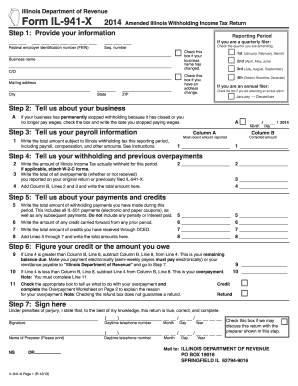
Filing the IL DoR IL-941-X is an important step for businesses that need to amend their Illinois withholding income tax returns. This guide provides clear, step-by-step instructions to help you complete the form online, ensuring your submission is accurate and timely.
Follow the steps to successfully complete your IL-941-X online
- Click ‘Get Form’ button to obtain the form and open it in the editor.
- Provide your information in the designated fields. Input your federal employer identification number (FEIN) and sequence number. If you are amending a quarterly return, select the appropriate quarter from the available options. Additionally, indicate if your business name has changed and provide your mailing address along with the corresponding city, state, and ZIP code. If you are an annual filer, check the box if you are amending an annual return.
- Detail your business status. If your business has permanently ceased withholding due to closure or because you no longer pay wages, check the box and write the date you stopped.
- Enter your payroll information. Write the total amount subject to Illinois withholding tax for the reporting period, and provide both the most recent amount reported and the corrected amount in the relevant columns.
- Report your withholding and previous overpayments. List the amount of Illinois Income Tax actually withheld, and provide the total of all overpayments. Additionally, add the amounts from the relevant lines and report the total.
- Outline your payments and credits. Record the total amount of withholding payments made during the period, any credits carried forward, and credits received through DCEO. Sum these amounts and report the total in the designated area.
- Calculate your balance or any overpayment. If your total amount owed is greater than your credits, note the amount due. If you have an overpayment, indicate the appropriate box and complete the Overpayment Worksheet to explain the reason for the overpayment before proceeding to the next step.
- Sign the form. Confirm that the information provided is true and correct by signing and entering the date. Provide your daytime telephone number and the name of the preparer, if applicable.
Complete your IL DoR IL-941-X online today to ensure your amended withholding tax return is filed correctly.
Get form
Related links form
To get a MyTax IL account, visit the Illinois Department of Revenue's website and follow the sign-up instructions for creating an account. You will need to provide personal information, including your Social Security number and email address, to complete the registration process. Once your account is set up, you can access various tax services and manage your filings conveniently. For optimal use of your account, remember to explore features related to the IL DoR IL-941-X.