Loading
Get Md El101 2020-2026
How it works
-

Open form follow the instructions
-

Easily sign the form with your finger
-

Send filled & signed form or save
How to fill out the MD EL101 online
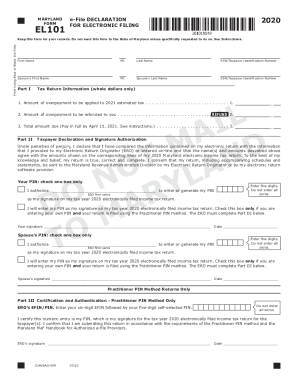
Completing the MD EL101 form is crucial for electronic filing of your Maryland income tax return. This guide provides clear, step-by-step instructions to help you navigate the form efficiently.
Follow the steps to successfully complete the MD EL101 online.
- Press the ‘Get Form’ button to access the MD EL101 form and open it in your designated online tool.
- Fill in your personal information at the top of the form, including your first name, middle initial, last name, and Social Security number or Taxpayer Identification Number.
- Provide your spouse's details if applicable, including their first name, middle initial, last name, and Social Security number or Taxpayer Identification Number.
- In Part I, indicate the amount of overpayment to be applied to your estimated tax and any refund amount, ensuring that you use whole dollars only.
- Complete Part II by authorizing your Electronic Return Originator (ERO) to enter your Personal Identification Number (PIN) by checking the appropriate box and providing your signature.
- If applicable, repeat the authorization process for your spouse's PIN using the designated fields.
- Complete Part III only if you are utilizing the Practitioner PIN method. Enter your ERO’s EFIN and their self-selected PIN.
- Review all the information for accuracy before saving changes. You can then opt to download, print, or share the completed form as required.
Begin filling out your MD EL101 online to ensure a smooth electronic filing experience.