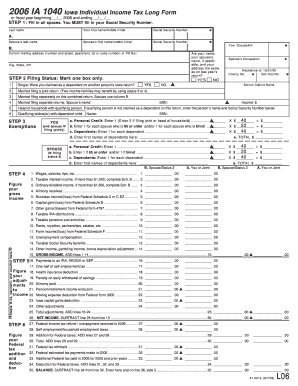
4. .00 .00 5. Business income/(loss) from Federal Schedule C or C-EZ ............. 5. .00 .00 6. Capital gain/(loss) from Federal Schedule D ................................... 6. .00 .00 7. Other gains/(losses) from Federal form 4797 .................................. 7. .00 .00 8. Taxable IRA distributions .
Loading
Open form follow the instructions
Easily sign the form with your finger
Send filled & signed form or save
How to fill out the IA DoR 1040 online
Filling out the IA DoR 1040 form online can be a straightforward process if you follow the right steps. This guide will walk you through each section and field, helping you complete your Iowa Individual Income Tax Long Form with confidence.
Follow the steps to successfully complete the IA DoR 1040 online.
- Click ‘Get Form’ button to obtain the form and open it in the editor.
- Fill in all required fields. Begin by entering your Social Security Number as it is mandatory. Include your first name, middle initial, and last name, followed by your spouse’s information if applicable.
- Provide your mailing address. Make sure to verify if your name, your spouse’s name, and your address are the same as on last year’s tax return.
- Select your filing status by marking one box. Options include: Single, Married Filing Jointly, Married Filing Separately, Head of Household, or Qualifying Widow(er) with Dependent Child.
- Complete the exemptions section by entering personal and dependent information. Make sure to enter the names and Social Security Numbers of any dependents.
- Calculate your gross income by reporting the amounts from your W-2s and other relevant income sources as specified in the corresponding lines.
- Determine adjustments to your income by listing any applicable deductions, such as IRA contributions or health insurance deductions.
- Calculate your federal tax addition and deductions, including any credits you may qualify for, such as earned income credit or tuition credits.
- Assess your total tax by summing all taxable income and subtracting any applicable credits.
- Finalize your tax return by reviewing all figures for accuracy. You will also need to sign your form, ensuring to declare under penalty of perjury that the information is accurate.
- Save your changes, and after completing the form, download or print it for your records. You can also share it as needed.
Start filling out your IA DoR 1040 online today to ensure your taxes are submitted on time!
Experience a faster way to fill out and sign forms on the web. Access the most extensive library of templates available.
Related content
IA 1040 Schedule 1 · Intro 1: What's New · Intro 2: Before You Begin · Intro 3: Who...
IA 1040 Instructions · Common Forms (parent section) Toggle submenu. Applications and...
Verificar que as polias do ventila- dor e do motor estão alinhadas. No caso de polias com...
Get answers to your most pressing questions about US Legal Forms API.
Where can I get a hard copy of 1040 instructions?
You can obtain a hard copy of the IA DoR 1040 instructions from the IRS website, or visit a local IRS office. These instructions provide essential guidance on filling out the form correctly. Additionally, you can find printable instructions from online resources like US Legal Forms.
What is a form IA 1040?
The IA DoR 1040 is the individual income tax form used in Iowa for reporting your earnings. It requires you to provide various financial details for accurate tax calculations. Understanding this form is vital, and resources like US Legal Forms can help clarify any doubts.
How do I get my 1040 form mailed to me?
To have your IA DoR 1040 form mailed to you, submit a request to the IRS or your tax preparer. Be sure to provide your current mailing address for proper delivery. Alternatively, US Legal Forms allows you to access your forms electronically to expedite the process.
How do I request 1040?
To request your IA DoR 1040, start by visiting the IRS website or contacting your tax preparer. You may need to provide your personal information for verification. If you're looking for efficiency, check platforms like US Legal Forms that simplify this process.
How can I request my 1040?
Requesting your IA DoR 1040 form can be done online or through a tax professional. You can also fill out a specific form to request your records directly from the IRS. For a faster turnaround, consider using services like US Legal Forms to access the form instantly.
Who gives you a 1040 form?
You usually receive the IA DoR 1040 form from the IRS or your tax preparer. If you file your taxes online, your tax software often generates this form for you. If you need additional forms, services like US Legal Forms provide easy access to them.
How can I get my 1040 fast?
To get your IA DoR 1040 form swiftly, consider utilizing online resources. Websites such as US Legal Forms streamline the process, allowing for instant access to your forms. This way, you avoid long waiting times associated with mail requests.
Can I pull my 1040 form online?
Yes, you can easily pull your IA DoR 1040 form online. Many state and federal tax websites provide a downloadable version of the form. Additionally, platforms like US Legal Forms offer a user-friendly interface for obtaining your necessary forms quickly.
Who is exempt from Iowa taxes?
Certain groups are exempt from Iowa taxes, including specific nonprofit organizations and certain pensioners. Additionally, residents with very low income may qualify for exemption. To ensure you qualify for an exemption, review the Iowa DoR guidelines or consult a tax professional.
Where's my IA refund?
To check the status of your IA DoR 1040 refund, visit the Iowa Department of Revenue’s website and use the 'Where's My Refund' tool. You'll need to enter specific details, such as your Social Security number and the amount of your expected refund. This tool offers a straightforward way to track your refund.
Use professional pre-built templates to fill in and sign documents online faster. Get access to thousands of forms.
If you believe that this page should be taken down, please follow our DMCA take down process here.
This form is available in several versions. Select the version you need from the drop-down list below.