Loading
Get Ne Dor 6mb 2014
How it works
-

Open form follow the instructions
-

Easily sign the form with your finger
-

Send filled & signed form or save
How to fill out the NE DoR 6MB online
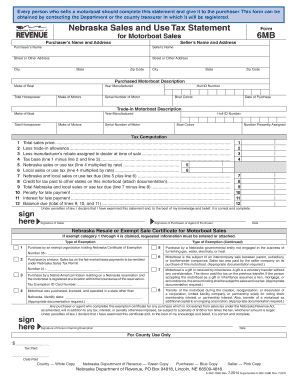
Filling out the Nebraska Sales and Use Tax Statement for Motorboat Sales, Form 6MB, is an important step for anyone selling or purchasing a motorboat. This guide provides clear, step-by-step instructions to ensure that users can complete the form accurately and efficiently online.
Follow the steps to successfully complete the NE DoR 6MB online.
- Press the ‘Get Form’ button to access the necessary form digitally.
- Enter the purchaser’s name and address in the designated fields. This includes details such as street address, city, state, and zip code.
- Complete the seller’s name and address similarly, filling in all required fields.
- Describe the purchased motorboat by entering information such as the make of the boat, year manufactured, total horsepower, make of motors, hull ID number, serial number of the motor, boat colors, and the date of purchase.
- If applicable, provide details on any trade-in motorboat, including similar fields as previously mentioned for the purchased motorboat.
- Calculate the tax by entering the total sales price, trade-in allowance, manufacturer’s rebate, and follow the computation lines to arrive at the tax base and total sales tax due.
- Sign the form as the seller and the purchaser or their agent. Ensure the date is also filled in.
- Review the completed form for accuracy, then save changes, download, print, or share it as necessary.
Complete your motorboat sale documentation online today to ensure compliance and a smooth transaction.
Get form
Experience a faster way to fill out and sign forms on the web. Access the most extensive library of templates available.
Get This Form Now!
Use professional pre-built templates to fill in and sign documents online faster. Get access to thousands of forms.