Loading
Get Mn Dor Form Rev184b 2019-2026
How it works
-

Open form follow the instructions
-

Easily sign the form with your finger
-

Send filled & signed form or save
How to fill out the MN DoR Form REV184b online
Filling out the Minnesota Department of Revenue Form REV184b can seem daunting, but with clear guidance, you can complete it confidently. This guide provides step-by-step instructions to help you navigate the form online.
Follow the steps to fill out the MN DoR Form REV184b online.
- Click the ‘Get Form’ button to download the form and open it in your preferred editor.
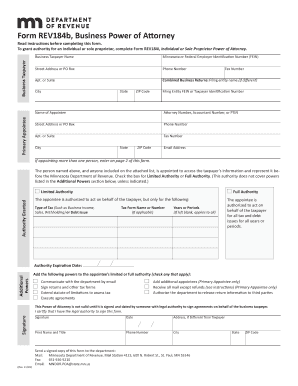
- Enter the business taxpayer's full name and primary contact information, including the street address, city, state, ZIP code, and phone number.
- Input the Minnesota or Federal Employer Identification Number (FEIN) or the relevant Tax ID number for your business.
- If your business files combined business returns, specify the name and ID number of the entity responsible for those filings.
- Fill out the primary appointee's details, including the name, contact information, and eligibility based on department guidelines.
- Indicate whether the appointee will have full authority or limited authority by checking the appropriate box and specifying any tax types or periods as needed.
- Select any additional powers you wish to grant the appointee, such as communication by email or the ability to sign returns.
- Have someone with legal authority sign and date the form, ensuring to print their name and title along with contact details.
- Finally, send the completed form to the Minnesota Department of Revenue via mail, fax, or email, as specified in the instructions.
Start filling out the MN DoR Form REV184b online today for a smoother tax process.
Related links form
A general power of attorney authorizes your agent to conduct your entire business and affairs. A limited or special power of attorney authorizes your agent to conduct specified business, perform specified acts, or make certain decisions on your behalf.