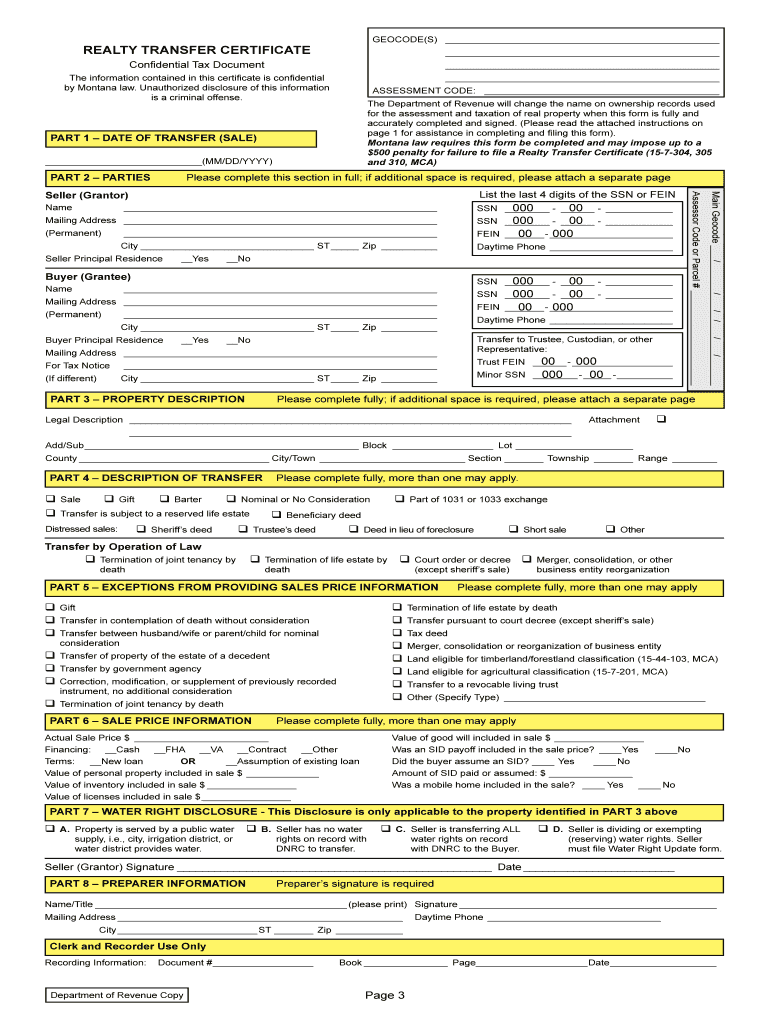
REALTY TRANSFER CERTIFICATEForm 488 (RTC) Revised 01/13Confidential Tax DocumentWHO MUST FILE Any party transferring real property regardless of whether the transfer is or is not evidenced by deed.

Open form follow the instructions

Easily sign the form with your finger

Send filled & signed form or save
How to fill out the MT DoR 488 (RTC) online
Filling out the MT DoR 488 (RTC) online can be a straightforward process if you follow the right steps. This guide provides a comprehensive overview of the form's components and offers detailed instructions to ensure accurate completion.
Follow the steps to accurately complete the Realty Transfer Certificate online.
- Click the ‘Get Form’ button to obtain the Realty Transfer Certificate and open it in your preferred online editor.
- In Part 1, enter the date of transfer (sale) using the format MM/DD/YYYY, which should match the executed date on the deed.
- For Part 2, provide the names of the seller (grantor) and buyer (grantee) as they appear in the transferring document. Include the current mailing addresses for both parties.
- In Part 3, give a legal description of the property being transferred. You may attach additional documentation if needed.
- In Part 4, check applicable descriptions that characterize the type of transfer being recorded, indicating any legal operations.
- If applicable, in Part 5, check any exceptions from providing sales price information that may apply to your transfer.
- In Part 6, if no exceptions were checked, provide detailed sale information including the actual sale price and financing method.
- Complete Part 7 by disclosing any water rights associated with the property. Check the appropriate boxes based on the situation.
- In Part 8, ensure the preparer's information is accurately filled out, including signature, date, and contact details.
- Review all entered information for accuracy. You can then save changes, download, print, or share the completed form.
Start filling out your Realty Transfer Certificate online today!
Experience a faster way to fill out and sign forms on the web. Access the most extensive library of templates available.
Related content
Jan 25, 2018 — The department recently updated the Realty Transfer Certificate (Form...
by KE Powell · Cited by 4 — Jeff Martin, A Brief History of Cyclical Reappraisal of...
dor. They assume no responsibility or liability for any errors or inaccuracies that may...
Use professional pre-built templates to fill in and sign documents online faster. Get access to thousands of forms.
If you believe that this page should be taken down, please follow our DMCA take down process here.
This form is available in several versions. Select the version you need from the drop-down list below.