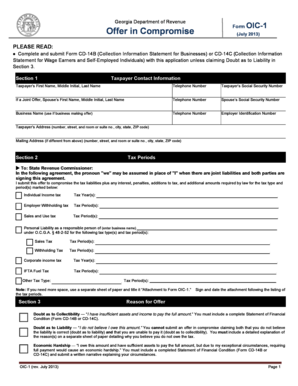
Get Ga Oic-1 2013
How it works
-

Open form follow the instructions
-

Easily sign the form with your finger
-

Send filled & signed form or save
How to fill out the GA OIC-1 online
The GA OIC-1 form, known as the Offer in Compromise, is an important document for individuals seeking to settle their tax liabilities with the Georgia Department of Revenue. This guide provides clear, step-by-step instructions to assist you in completing the form online effectively.
Follow the steps to successfully complete the GA OIC-1.
- Press the ‘Get Form’ button to access the GA OIC-1 form and open it in your chosen editor.
- Complete the taxpayer contact information in Section 1. Enter the taxpayer's first name, middle initial, last name, telephone number, and social security number. If it is a joint offer, provide the spouse's information as well, including their social security number, business name (if applicable), and contact details.
- In Section 2, specify the tax periods for which you are submitting the offer. Mark the appropriate tax types, such as individual income tax, employer withholding tax, or sales and use tax, and provide the respective years or periods.
- Proceed to Section 3 to indicate the reason for your offer. Choose from options such as 'doubt as to collectibility', 'doubt as to liability', or 'economic hardship', and include a detailed explanation of your circumstances.
- In Section 4, if applicable, check the box for low-income certification and ensure your gross monthly household income aligns with the provided guidelines.
- Section 5 requires you to enter the amount of your offer and select a payment option. Indicate whether you will pay within 60 days or via monthly installments, and provide all necessary financial details.
- Complete Section 6 by outlining the source of funds where you will obtain the payment for your offer. Avoid sending cash and ensure checks are separate from any application fees.
- Read and agree to the terms outlined in Section 7, and ensure to understand the implications of accepting your offer and the conditions that need to be met.
- Obtain mandatory signatures in Section 9, including the taxpayer and spouse, if applicable. Ensure all signatures are dated appropriately.
- If someone else prepared the application, provide their information in Section 10. If you wish to allow a third party to discuss your offer, complete Section 11.
- Finally, review all information for accuracy and completeness. Save changes, download, print, or share the completed form as needed.
Complete the GA OIC-1 form online today and take the first step toward settling your tax liabilities.
Get form
Related links form
Withholding on a paycheck refers to the portion of your earnings that an employer deducts for tax purposes. This amount is sent directly to the state and federal tax authorities to cover your tax obligation. Understanding how withholding affects your finances helps you plan your budget effectively. Familiarizing yourself with GA OIC-1 can aid you in making informed decisions about your paycheck.