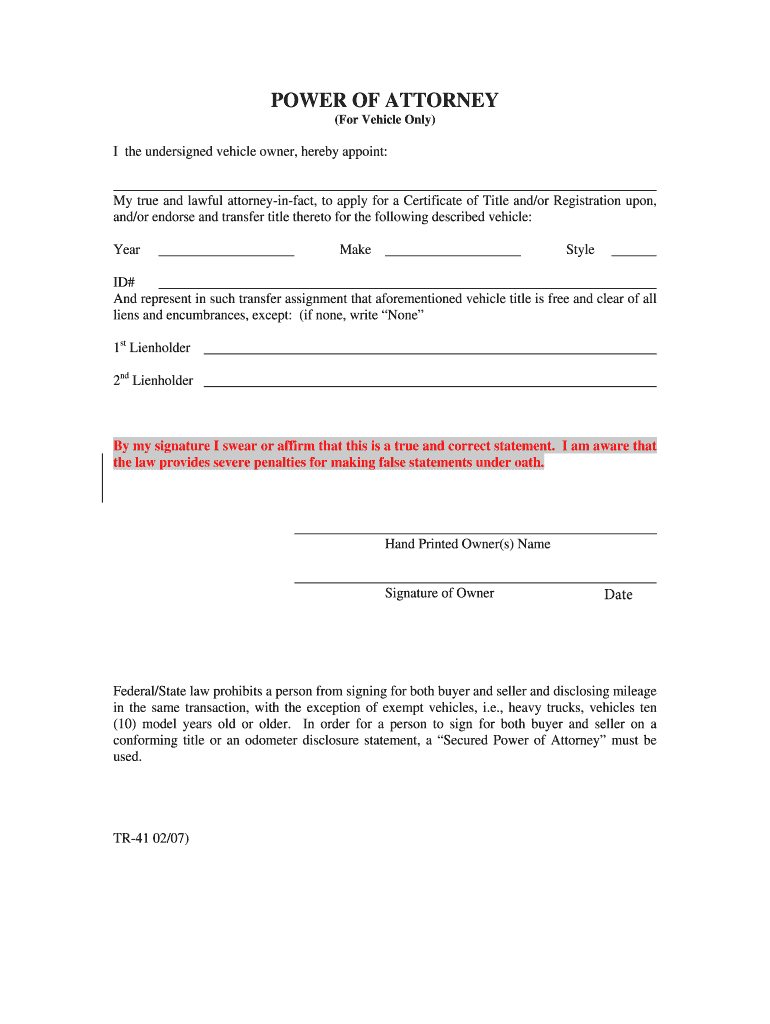
POWER OF ATTORNEY (For Vehicle Only)I the undersigned vehicle owner, hereby appoint:My true and lawful attorneyinfact, to apply for a Certificate of Title and/or Registration upon, and/or endorse.
Loading

Open form follow the instructions

Easily sign the form with your finger

Send filled & signed form or save
How to fill out the KS TR-41 online
Filling out the KS TR-41 form is essential for vehicle ownership transfers and title applications. This guide provides user-friendly, step-by-step instructions to help you complete the form accurately and efficiently.
Follow the steps to complete the KS TR-41 online form.
- Click ‘Get Form’ button to retrieve the KS TR-41 form and open it in your preferred online format.
- Begin by entering the year of the vehicle in the designated field. Ensure that the information is accurate to avoid any issues with the title transfer.
- Next, input the make of the vehicle in the corresponding section. This typically refers to the manufacturer of the vehicle.
- Fill in the style of the vehicle. This could indicate the body type, such as sedan, coupe, or hatchback.
- Provide the vehicle identification number (ID#). This unique code is crucial for identifying the specific vehicle and must be entered precisely.
- List any lienholders if applicable. If there are no liens, please write 'None' in the field provided to indicate that the title is clear.
- Sign your name as the owner. This signature verifies that the information provided is correct and must be legible.
- Date the form when you are completing it. The date is important for the validation of the document.
- Review the entire form for accuracy. Ensure that there are no errors in the fields completed.
- Once everything is filled out correctly, save your changes. You can then download, print, or share the completed form as required.
Complete your documents efficiently by filing the KS TR-41 online today!
Experience a faster way to fill out and sign forms on the web. Access the most extensive library of templates available.
Related content
Affidavit of Correction (pdf) · Affidavit of Relationship (TR-215) (pdf); Affidavit to a...
Nov 10, 2017 — Tr. 100.08. 1. Laddo. 1925. 2. Sand and insoluble material. 3. Water...
F/A TR CRM. S. FAILURE TO APPEAR IN COURT ... B41. Possess or provide counterfeit or...
Use professional pre-built templates to fill in and sign documents online faster. Get access to thousands of forms.
If you believe that this page should be taken down, please follow our DMCA take down process here.
This form is available in several versions. Select the version you need from the drop-down list below.