Loading
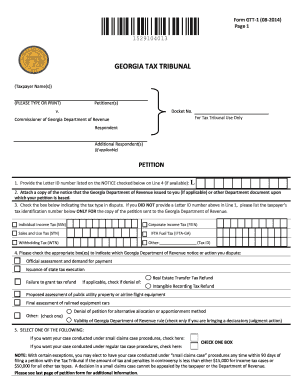
Get Ga Gtt-1 2014
How it works
-

Open form follow the instructions
-

Easily sign the form with your finger
-

Send filled & signed form or save
How to fill out the GA GTT-1 online
Filling out the GA GTT-1 form online is a crucial step in addressing disputes with the Georgia Department of Revenue. This guide provides clear, step-by-step instructions to help users navigate the form with ease and confidence.
Follow the steps to complete your GA GTT-1 form online.
- Click ‘Get Form’ button to access the GA GTT-1 form and open it in your chosen editor.
- In the 'Petitioner(s)' section, enter the name of the person or people filing the petition. Ensure that this is typed clearly.
- For the 'Docket No.' field, leave it blank as it is designated for Tax Tribunal use only.
- In Line 1, provide the Letter ID number from the notice you received, if available. If not, skip to Line 3.
- Attach a copy of the notice from the Georgia Department of Revenue or any relevant document that you are basing your petition on.
- Select the appropriate tax type in dispute by checking the corresponding box under Line 3. If no Letter ID was provided, add the taxpayer's identification number.
- In Line 4, indicate which Georgia Department of Revenue notice or action you dispute by checking the corresponding box(es).
- In Line 5, select whether you wish your case to be conducted under small claims case procedures or regular tax case procedures by checking one of the boxes.
- Line 6 requires you to explain your disagreement with the notice or action from the Georgia Department of Revenue. List your points clearly.
- In Line 7, state the facts that support your case. Use separate points for clarity.
- If needed, use additional pages for more detailed explanations or to list further facts. Do not include tax forms or evidence with your petition.
- In Line 8, remember to include the $60 filing fee, unless you are choosing small claims procedures. Make the payment to the Georgia Tax Tribunal.
- Complete the signature sections for the petitioner(s) and counsel, while ensuring all required contact information is filled out accurately.
- Finally, review your completed form for accuracy and clarity. Save your changes, then download, print, or share your form as desired.
Complete and file your GA GTT-1 form online for a seamless resolution to your tax dispute.
Get form
Experience a faster way to fill out and sign forms on the web. Access the most extensive library of templates available.
Collecting a glucose sample for the GA GTT-1 involves either a blood draw or using a fingerstick method. If you are doing a blood draw, ensure you fast beforehand as instructed. If using a fingerstick, clean the finger with alcohol, puncture the skin, and catch the drop of blood on the test strip.
Get This Form Now!
Use professional pre-built templates to fill in and sign documents online faster. Get access to thousands of forms.