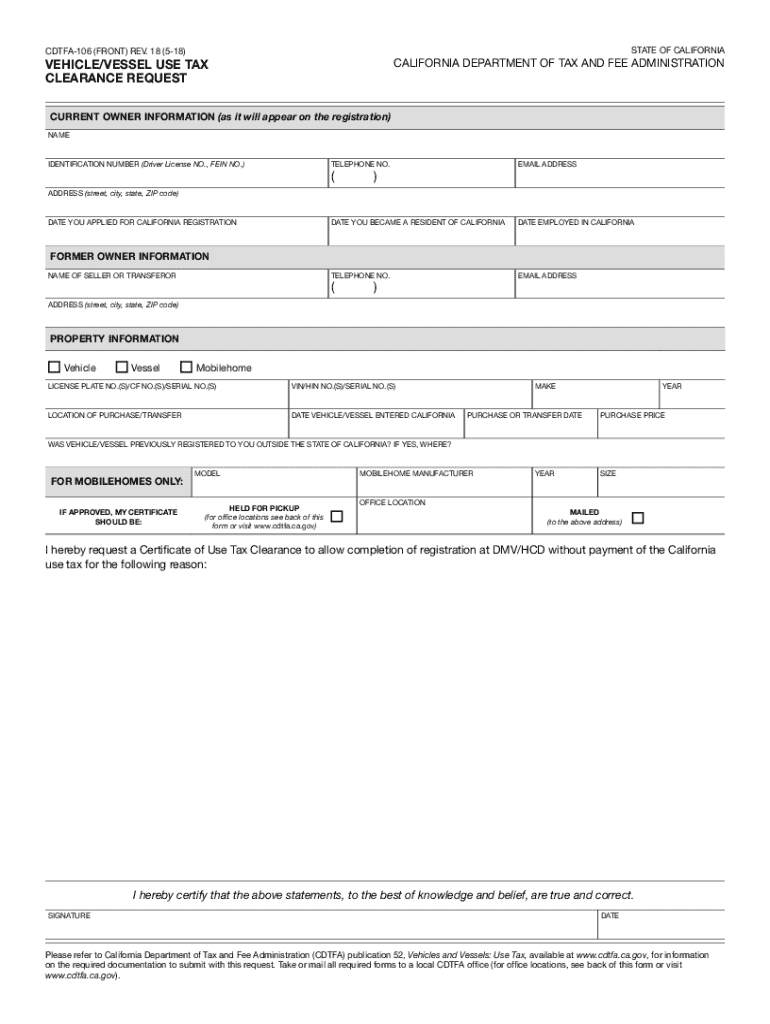
HCD under Limited Access Functions. STATE OF CALIFORNIA CDTFA-106 (FRONT) REV. 18 (5-18) VEHICLE/VESSEL USE TAX CLEARANCE REQUEST CALIFORNIA DEPARTMENT OF TAX AND FEE ADMINISTRATION CURRENT OWNER INFORMATION (as it will appear on the registration) NAME IDENTIFICATION NUMBER (Driver License NO., FEIN NO.) TELEPHONE NO. EMAIL ADDRESS DATE YOU BECAME A RESIDENT OF CALIFORNIA DATE EMPLOYED IN CALIFORNIA TELEPHONE NO. EMAIL ADDRESS ( ) ADDRESS (street, city, state, ZIP code) DATE YOU.
Loading

Open form follow the instructions

Easily sign the form with your finger

Send filled & signed form or save
How to fill out the CA CDTFA-106 (formerly BOE-106) online
The CA CDTFA-106 form is essential for individuals seeking a use tax clearance in order to register a vehicle or vessel in California without incurring use tax. This guide provides clear and supportive instructions to help you navigate the online filing process effectively.
Follow the steps to fill out the CA CDTFA-106 form online.
- Click the ‘Get Form’ button to access the CA CDTFA-106 form and open it in the online editor.
- Complete the current owner information section. Enter your name, identification number (such as driver license number or FEIN), telephone number, email address, date you became a resident of California, and your employment date in California. Ensure that the information matches your official documentation.
- Fill in the address field with your complete mailing address, including street, city, state, and ZIP code. This should reflect your current residence in California.
- Provide the date you applied for California registration along with the former owner information. List the name and address of the seller or transferor, ensuring accuracy.
- In the property information section, indicate the license plate number(s), VIN/HIN number(s), and the location of purchase or transfer. Include the date the vehicle or vessel entered California and its make, model, and year.
- State the purchase price of the vehicle or vessel and confirm whether it was previously registered to you outside of California by specifying the location.
- If you are applying for a mobile home, fill in the additional details required, including model, manufacturer, size, and intended certificate pickup option.
- Review all entered information for accuracy, then certify that the statements provided are true and correct by signing and dating the form.
- Once completed, you can save your changes, download the document, print it out, or share it, depending on your need.
Start completing your CA CDTFA-106 form online today for a smoother registration process.
Experience a faster way to fill out and sign forms on the web. Access the most extensive library of templates available.
Related content
You may now apply for a use tax clearance using CDTFA's online services at...
... CDTFA") as of July 1, 2017. The previous administrator was the State Board of...
Get answers to your most pressing questions about US Legal Forms API.
What triggers a CDTFA audit?
Several factors can trigger a CDTFA audit, including discrepancies in reported income, excessive refunds, or frequent amendments to your CA CDTFA-106 (formerly BOE-106) return. Additionally, large businesses or those with complex sales structures may be more likely to be audited. Staying organized and transparent in your reporting can help mitigate audit risks.
Who must file California sales tax return?
Any business engaged in selling tangible goods in California is required to file a sales tax return, including the CA CDTFA-106 (formerly BOE-106). This applies to businesses irrespective of size, so whether you are a large retailer or a small vendor, compliance is essential. Check with the CDTFA for specific guidelines related to your business.
Do I need to file a California state tax return?
Most individuals and businesses must file a California state tax return if they meet specific income thresholds. If you operate a business subject to sales tax, then filing the CA CDTFA-106 (formerly BOE-106) return is also required. Be sure to review your eligibility and consult a tax professional if needed to stay compliant with California state tax laws.
How to file a CDTFA return?
To file a CA CDTFA-106 (formerly BOE-106) return, you can either e-file through the CDTFA’s online portal or submit a paper form by mail. To ensure a smooth process, collect your sales records and tax documents before you start. After you complete your return, double-check your entries for accuracy to avoid any potential issues.
What is CDTFA 106?
The CA CDTFA-106 (formerly BOE-106) is a tax return form used by businesses to report their sales tax obligations in California. This form captures crucial information such as total sales, taxable sales, and the sales tax owed. Understanding how to fill out the CDTFA-106 correctly plays a significant role in compliance and remaining in good standing with California tax regulations.
How do I amend my CDTFA sales tax return?
To amend your CA CDTFA-106 (formerly BOE-106) sales tax return, you need to submit a corrected return form. Visit the CDTFA website to find the appropriate amendment form. Include the correct information and any supporting documentation that shows why the amendment is necessary. This process helps ensure your tax records remain accurate.
How to print a payment voucher from CDTFA?
To print a payment voucher from the CDTFA, visit their official website and navigate to the payment section. You will need to provide your account information to access your payment details. This service allows you to generate a voucher for upcoming payments, ensuring you stay compliant with your tax obligations. For assistance, the CA CDTFA-106 (formerly BOE-106) can guide you through the process.
What is the difference between BOE and CDTFA?
The primary difference between the BOE and the CDTFA lies in their structure and responsibilities. The BOE was dissolved, and its duties were transferred to the CDTFA, which now oversees a broader range of taxes, including sales tax and fees. This change was intended to create a more efficient tax administration. For current sales tax issues, use the CA CDTFA-106 (formerly BOE-106) as your reference point.
What is California use tax?
A: You are supposed to keep receipts of out-of-state purchases and apply your local tax rate -- in California that can be 7.25% to 8.75% -- to the purchase price.
What is California DMV use tax?
In California we have to pay a use tax that's the same as the sales tax which is .08%, at least $960.00 of that was use tax.
Use professional pre-built templates to fill in and sign documents online faster. Get access to thousands of forms.
If you believe that this page should be taken down, please follow our DMCA take down process here.
This form is available in several versions. Select the version you need from the drop-down list below.