Loading
Get Fl Dr-659 2018
How it works
-

Open form follow the instructions
-

Easily sign the form with your finger
-

Send filled & signed form or save
How to fill out the FL DR-659 online
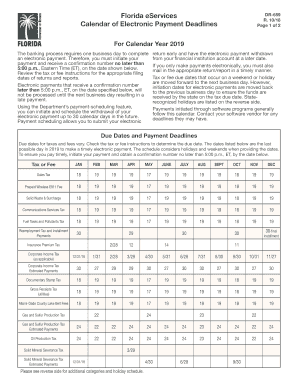
The FL DR-659 form is essential for managing electronic payment deadlines for various taxes and fees in Florida. This guide offers a step-by-step approach to help users navigate the online form efficiently and effectively.
Follow the steps to fill out the FL DR-659 online:
- Press the ‘Get Form’ button to obtain the FL DR-659 form and open it in the editor for your use.
- Review the form carefully to understand the different sections which may include tax/fee categories and their corresponding due dates.
- Fill in the required fields, including your contact information and details about the electronic payment if applicable.
- Check the due dates and ensure that the correct dates for your specific tax or fee are noted to avoid any late payment penalties.
- Utilize the payment scheduling feature if you wish to initiate a payment up to 30 days in advance, ensuring to note the confirmation number received.
- Once all fields are completed and checked, save your changes.
- Download, print, or share your FL DR-659 form as necessary, ensuring you keep a copy for your records.
Complete your FL DR-659 form online today to manage your electronic payments efficiently.
Get form
Experience a faster way to fill out and sign forms on the web. Access the most extensive library of templates available.
Related links form
Florida corporate tax returns are due on the first day of the fourth month following the end of the corporation's fiscal year. For those operating on a calendar year, this would be April 1. Filing the FL DR-659 can provide necessary extensions if you find you need more time. Ensure you stay proactive in understanding your tax obligations to avoid last-minute stress.
Get This Form Now!
Use professional pre-built templates to fill in and sign documents online faster. Get access to thousands of forms.