Loading
Form preview
  • US Legal Forms
  • Other Templates
  • Tax Forms
  • Florida Tax Forms
  • Fl Rts-6 2013

Get Fl Rts-6 2013-2026

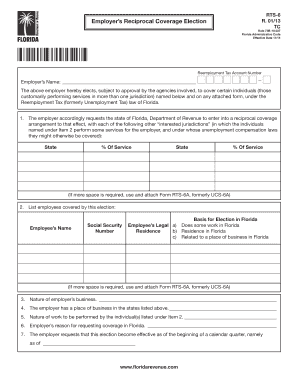
Enue.com RTS-6 R. 01/13 Page 2 ELECTION (continued) 8. This election, if approved, shall remain operative, as to the individuals listed herewith, until terminated in accordance with the currently applicable regulations of the Florida Department of Revenue. 9. The employer hereby agrees to give each individual covered by this election a notice thereof, promptly after its approval, on a form to be supplied by the Florida Department of Revenue, and to file copies thereof with said agency. 10.

How it works

  1. Open form

    Open form follow the instructions

  2. Easily sign form

    Easily sign the form with your finger

  3. Share form

    Send filled & signed form or save

How to fill out the FL RTS-6 online

The FL RTS-6 form is crucial for employers in Florida to elect reciprocal coverage under the Reemployment Tax law. This guide offers a step-by-step approach to help you complete the form accurately and efficiently online.

Follow the steps to complete the FL RTS-6 form online.

  1. Press the ‘Get Form’ button to access the FL RTS-6 form and open it in the online editor.
  2. Enter your reemployment tax account number in the designated field, ensuring accuracy as this number is vital for identification.
  3. Fill in the employer's name. This should be the official name of the business or organization submitting the form.
  4. In the section that requests a list of interested jurisdictions, indicate the states where employees perform services. For each state, specify the percentage of service provided.
  5. List the employees covered by this election, including their names and social security numbers, ensuring that all information is current and accurate.
  6. Indicate the basis for election in Florida by selecting the applicable options related to each employee's work or residence status.
  7. Describe the nature of your business and include information about your place of business in the states mentioned.
  8. Provide details regarding the nature of work performed by the listed individuals and state your reasons for requesting coverage in Florida.
  9. Specify the effective date for the election as it pertains to the beginning of a calendar quarter.
  10. Review the final instructions regarding notices required for individuals covered by the election and compliance responsibilities.
  11. After completing the form, save your changes and download or print the completed FL RTS-6 for submission.
  12. Submit the required signed copies to the Florida Department of Revenue and follow up as necessary.

Complete your FL RTS-6 form online today for streamlined processing and compliance.

Get form

Experience a faster way to fill out and sign forms on the web. Access the most extensive library of templates available.
Get form

Related content

Regional Transit System (RTS)
RTS is hiring transit operators. $15.91 an hour while in training, $16.97 an hour after...
Learn more
RTS Bus Service – TAPS
The GNV RideRTS app offers live bus tracking on all routes, accurate schedule information...
Learn more
RTS Automatic Transfer Switch
6. Set the generator's main circuit breaker (CB1) to its OFF or OPEN position. 7. Set the...
Learn more

Related links form

CA FL-100 2015 CA FL-100 S 2016 CA FL-103 2013 CA FL-105(A)/GC-120(A) 2009

Questions & Answers

Get answers to your most pressing questions about US Legal Forms API.

Contact support

A state unemployment report provides essential data regarding unemployment claims and the financial standing of your business concerning unemployment taxes. This report helps state officials monitor unemployment trends while also guiding employers in managing potential liabilities. Regularly reviewing your state unemployment reports aids in maintaining compliance with your FL RTS-6 obligations. UsLegalForms offers resources to keep you informed and organized.

The SUTA rate is determined by various factors including an employer's tax history and the overall state unemployment rate. New employers typically start at a standard rate, while seasoned employers may see adjustments based on their experience ratings. Keeping track of these rates and ensuring you file your FL RTS-6 on time can prevent unexpected liabilities. Our tools at UsLegalForms can help to clarify your rate.

Filing Florida sales tax involves registering your business with the state and collecting sales tax on taxable sales. You complete a sales tax return and submit it on a monthly, quarterly, or annual basis, depending on your sales volume. For ease, consider using the UsLegalForms suite, which can help streamline the entire filing process and ensure compliance.

An RT number in Florida refers to the reemployment tax account number assigned to employers. This unique identifier is necessary for reporting wages and taxes accurately. It's essential to keep this number handy when filing your FL RTS-6 or any related documents. Use our platform to ensure your information is always organized and accessible.

The full form of RT-6 is 'Reemployment Tax Report Form RT-6.' This document serves as a declaration of the taxes withheld for reemployment from employees' wages. Understanding the RT-6 is vital for proper tax management and compliance in Florida. At UsLegalForms, we provide templates and tools to assist you in navigating these forms.

The SUTA rate in Florida varies based on your business's experience rating and the state's current unemployment rates. The state provides a new employer rate and different rates depending on the number of claims filed against your business. Staying updated on the FL RTS-6 can help you manage costs effectively. You can easily check your rate through state resources.

An RT-6 report in Florida is a required document for employers detailing the reemployment taxes owed. This report summarizes employee wages and tax calculations for a specific period. Filing the RT-6 ensures compliance with state regulations while also keeping your business informed on its tax obligations. Consider using UsLegalForms to streamline the filing process.

Florida unemployment benefits are calculated based on your highest earning quarter within a defined base period. The state averages around 1/26 of your highest wages, subject to minimum and maximum limits. It's essential to stay informed about changes in the FL RTS-6, as this impacts calculation methods. For further assistance, you can explore our tools on the UsLegalForms platform.

To calculate the Florida reemployment tax, you need to determine your taxable payroll for the quarter. Multiply the taxable wages by the current state SUTA rate. Additionally, you must consider any exemptions or deductions that may apply. Utilizing the FL RTS-6 report simplifies this process by detailing your tax liabilities.

To file your Florida state tax return, first confirm you meet requirements for filing. Although Florida does not enforce a state income tax, if you need to report specific scenarios, consider using US Legal Forms for clear instructions and necessary forms. They can guide you in navigating your filing, ensuring compliance and accuracy.

Get This Form Now!

Use professional pre-built templates to fill in and sign documents online faster. Get access to thousands of forms.
Get form
If you believe that this page should be taken down, please follow our DMCA take down processhere.
Get FL RTS-6
Get form
  • Adoption
  • Bankruptcy
  • Contractors
  • Divorce
  • Home Sales
  • Employment
  • Identity Theft
  • Incorporation
  • Landlord Tenant
  • Living Trust
  • Name Change
  • Personal Planning
  • Small Business
  • Wills & Estates
  • Packages A-Z
  • Affidavits
  • Bankruptcy
  • Bill of Sale
  • Corporate - LLC
  • Divorce
  • Employment
  • Identity Theft
  • Internet Technology
  • Landlord Tenant
  • Living Wills
  • Name Change
  • Power of Attorney
  • Real Estate
  • Small Estates
  • Wills
  • All Forms
  • Forms A-Z
  • Other Templates
  • Legal Hub
  • About Us
  • Help Portal
  • Legal Resources
  • Blog
  • Affiliates
  • Contact Us
  • Delete My Account
  • Site Map
  • Industries
  • Forms in Spanish
  • Localized Forms
  • State-specific Forms
  • Forms Kit
  • Real Estate Handbook
  • All Guides
  • Notarize
  • Incorporation services
  • For Consumers
  • For Small Business
  • For Attorneys
  • USLegal
  • FormsPass
  • pdfFiller
  • signNow
  • altaFlow
  • DocHub
  • Instapage
Form Packages
  • Adoption
  • Bankruptcy
  • Contractors
  • Divorce
  • Home Sales
  • Employment
  • Identity Theft
  • Incorporation
  • Landlord Tenant
  • Living Trust
  • Name Change
  • Personal Planning
  • Small Business
  • Wills & Estates
  • Packages A-Z
Form Categories
  • Affidavits
  • Bankruptcy
  • Bill of Sale
  • Corporate - LLC
  • Divorce
  • Employment
  • Identity Theft
  • Internet Technology
  • Landlord Tenant
  • Living Wills
  • Name Change
  • Power of Attorney
  • Real Estate
  • Small Estates
  • Wills
  • All Forms
  • Forms A-Z
  • Other Templates
Customer Service
  • Legal Hub
  • About Us
  • Help Portal
  • Legal Resources
  • Blog
  • Affiliates
  • Contact Us
  • Delete My Account
  • Site Map
  • Industries
  • Forms in Spanish
  • Localized Forms
  • State-specific Forms
  • Forms Kit
Legal Guides
  • Real Estate Handbook
  • All Guides
Prepared for you
  • Notarize
  • Incorporation services
Our Customers
  • For Consumers
  • For Small Business
  • For Attorneys
Our Sites
  • USLegal
  • FormsPass
  • pdfFiller
  • signNow
  • altaFlow
  • DocHub
  • Instapage
Social Media
Call us now toll free:
+1 833 426 79 33
As seen in:
© Copyright 1999-2026 airSlate Legal Forms, Inc. 17 Station Street, Suite 303, Brookline, MA 02445
  • Your Privacy Choices
  • Terms of Service
  • Privacy Notice
  • Content Takedown Policy
  • Bug Bounty Program