Ww.ceb.com Change Document Font Size Check Spelling Email Form Save Form FL-103 CASE NUMBER: Petitioner: Respondent: + + 4. DECLARATION REGARDING SEPARATE PROPERTY AS CURRENTLY KNOWN a. There are no such assets or debts subject to disposition by the court in this proceeding. Attachment 4b All such assets and debts listed are listed in Property Declaration (form FL-160) b. and should be confirmed as petitioner's or respondent's separate property as indicated in form FL-160 or Attachmen.

Open form follow the instructions

Easily sign the form with your finger

Send filled & signed form or save
How to fill out the CA FL-103 online
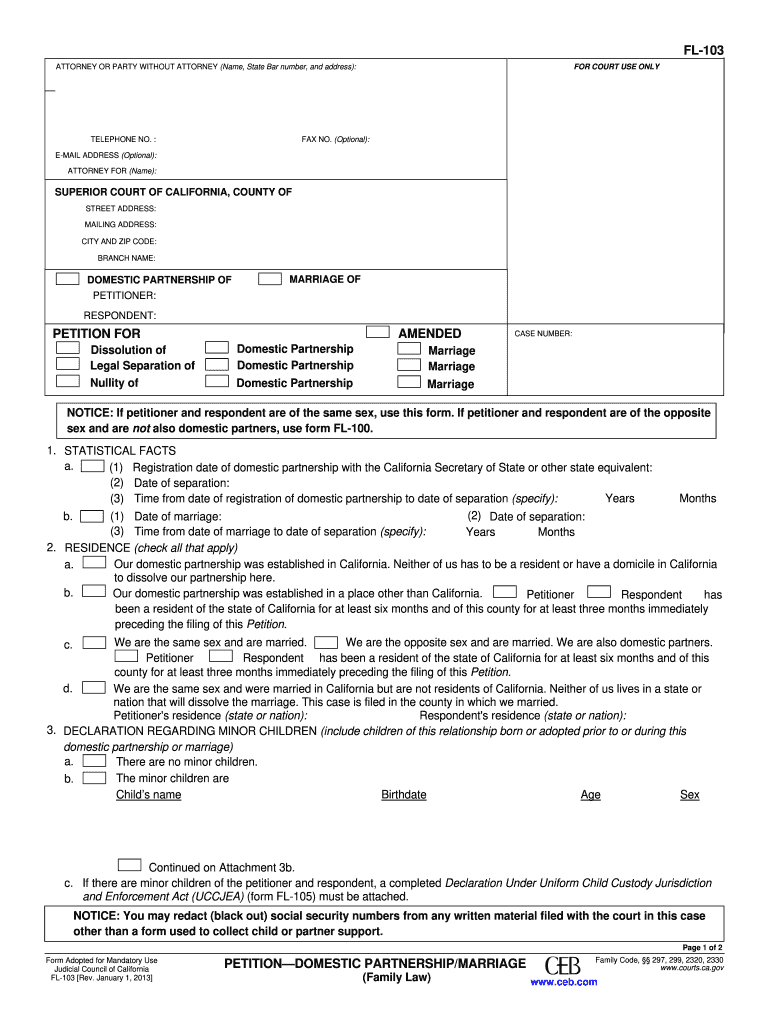
Filling out the CA FL-103 form is an essential step in the legal process of dissolving a domestic partnership or marriage. This guide provides clear instructions on how to navigate the form and complete it accurately to ensure a smooth filing process.
Follow the steps to successfully fill out the CA FL-103 online.
- Click ‘Get Form’ button to obtain the CA FL-103 and open it in your preferred online editor.
- Review the top section of the form, which requires you to enter the name, state bar number, and address of the attorney or party without an attorney. Make sure the information is accurate and up-to-date.
- Fill in the case number, if applicable, and the names of the petitioner and respondent, indicating whether it relates to a domestic partnership or marriage.
- Complete the ‘Statistical Facts’ section, providing registration dates, dates of separation, and the duration between these dates.
- In the ‘Residence’ section, check all boxes that apply to your situation, indicating your residency status and specifying the state of residency for both parties.
- If applicable, indicate whether there are any minor children involved in the relationship in the ‘Declaration Regarding Minor Children’ section. You must complete additional forms if there are children.
- Proceed to the ‘Declaration Regarding Separate Property’ and ‘Community and Quasi-Community Assets and Debts’ sections, documenting any relevant assets or debts.
- In the ‘Petitioner Requests’ section, check the appropriate boxes based on the type of relief you are seeking, such as dissolution or legal separation, and provide details if necessary.
- Fill out the ‘Child Support’ section, understanding that orders may be made for the support of the children if applicable.
- Finally, review the entire form for accuracy and completeness before saving your changes. You have the option to download, print, or share the completed form as needed.
Complete your CA FL-103 form online and take the next step towards resolving your legal matter.
Experience a faster way to fill out and sign forms on the web. Access the most extensive library of templates available.
Related content
Jun 20, 2011 — This proposal would amend Petition—Domestic Partnership (form FL-103)...
FL 103 - Elementary French III (4). Advanced grammatical patterns and pronunciation within...
Available via Private Prescription Throughout the UK & Channel Islands Subject to Medical...
Get answers to your most pressing questions about US Legal Forms API.
How long does it take to get a divorce in California if both parties agree?
If both parties agree on the terms, you can expect the divorce process in California to take around six months from the date of filing. This is the minimum waiting period required by state law, even with the simplified process involving the CA FL-103 form. However, the actual timeline may vary depending on your specific situation and court workload. For a smoother process, you might find it beneficial to explore resources offered by US Legal Forms.
What is the first step in the divorce process in California?
The first step in the divorce process in California is to file the petition with the court, which often includes the CA FL-103 form. This document outlines your marriage details and your requests regarding asset division, support, and other important matters. After filing, you will serve your spouse with the papers, initiating the legal process. Utilizing services like US Legal Forms can make this step easier by providing accurate and tailored legal forms.
Where to file for domestic partnership in California?
To file for domestic partnership in California, you should go to your local county clerk's office. You will need to complete appropriate forms, including the CA FL-103 if it's relevant to your situation. This process is generally straightforward, and the staff at the clerk's office can assist you. US Legal Forms offers convenient templates to help you with your filing documentation.
What is the first step in filing for divorce in California?
The first step in filing for divorce in California is to complete and file the necessary paperwork, including the CA FL-103 form. This form helps establish your intent to divorce and includes essential details about you and your spouse. Once submitted, you will receive a case number which you will need for further proceedings. To ensure you follow the correct procedures, consider using platforms like US Legal Forms for guidance.
What is the easiest divorce process in California?
The easiest divorce process in California often involves filing for a no-fault divorce, which can be done with the CA FL-103 form. This method allows couples to separate without assigning blame. By using this streamlined approach, you can save time and reduce emotional stress. Additionally, utilizing services like US Legal Forms can help simplify the documentation process for you.
What are the disadvantages of domestic partnership in California?
Some disadvantages of domestic partnership in California include limited federal benefits compared to marriage and potential complications in legal matters. While domestic partners have rights under state law, certain federal protections, such as tax benefits, may not apply. It's wise to evaluate your options carefully and consider if domestic partnership meets your long-term goals.
What qualifies for domestic partnership in California?
Qualifying for domestic partnership in California involves meeting essential criteria outlined in the CA FL-103. You and your partner must be at least 18 years old, share a primary residence, and have a committed relationship. Importantly, neither partner should be married or involved in another domestic partnership. Understanding these qualifications helps ensure a successful application process.
Can I add my girlfriend to my health insurance if we live together in California?
Yes, you can add your girlfriend to your health insurance if you live together in California, provided you meet the criteria for domestic partnership according to CA FL-103. Your insurance provider may require proof of your shared domestic life, but typically, domestic partners have similar rights as spouses in terms of health coverage. This step can support both your health and financial well-being.
How do you qualify for domestic partnership in California?
You qualify for domestic partnership in California by meeting requirements set forth in the CA FL-103. Both partners must be at least 18 years old, live together, and share a domestic life. Additionally, you cannot be currently married or in a registered domestic partnership with someone else. Following the California Secretary of State’s guidelines will ensure you meet all the necessary conditions.
Does my girlfriend qualify as a domestic partner?
To determine if your girlfriend qualifies as a domestic partner in California, consider the criteria outlined in the CA FL-103. You both must agree to share a domestic life, be at least 18 years old, and not be currently married to someone else. It is essential to establish a mutual commitment and demonstrate your relationship to meet these qualifications.
Use professional pre-built templates to fill in and sign documents online faster. Get access to thousands of forms.
If you believe that this page should be taken down, please follow our DMCA take down process here.