Loading
Get Or Or-stt-1 2021-2026
How it works
-

Open form follow the instructions
-

Easily sign the form with your finger
-

Send filled & signed form or save
How to use or fill out the OR OR-STT-1 online
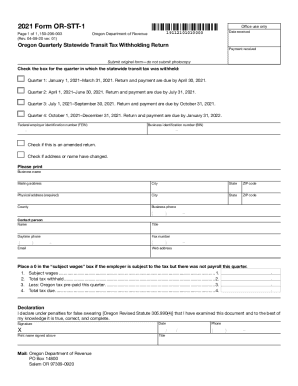
The OR OR-STT-1 form is essential for reporting the Oregon Quarterly Statewide Transit Tax withholding. This guide offers clear, step-by-step guidance to help users complete the form accurately and efficiently online.
Follow the steps to accurately complete your OR OR-STT-1 form.
- Click the ‘Get Form’ button to obtain the form and open it in the online editor.
- Select the appropriate quarter by checking the corresponding box for when the statewide transit tax was withheld. Make sure to check the deadlines for return and payment.
- Enter your Federal Employer Identification Number (FEIN) and Business Identification Number (BIN) in the designated fields.
- If applicable, mark the checkbox if this submission is an amended return or if there have been changes to the address or business name.
- Fill in the business name and mailing address, including city, state, and ZIP code. Ensure the information is accurate and up to date.
- Complete the physical address section, providing the same city, state, and ZIP code along with the county.
- Provide the business phone number, title, daytime phone number, fax number, email, and contact person's name.
- Indicate '0' in the subject wages box if there were no payrolls this quarter but the employer is subject to the tax.
- Enter the subject wages in the designated section and complete the calculations for total tax withheld and less Oregon tax prepaid.
- Calculate and fill in the total tax due.
- Complete the declaration by signing, dating, and printing your name. Ensure all information is truthful and accurate.
- Once you have filled out the form, save any changes you have made. You can download, print, or share the completed form online.
Complete your OR OR-STT-1 form online today to ensure timely submission.