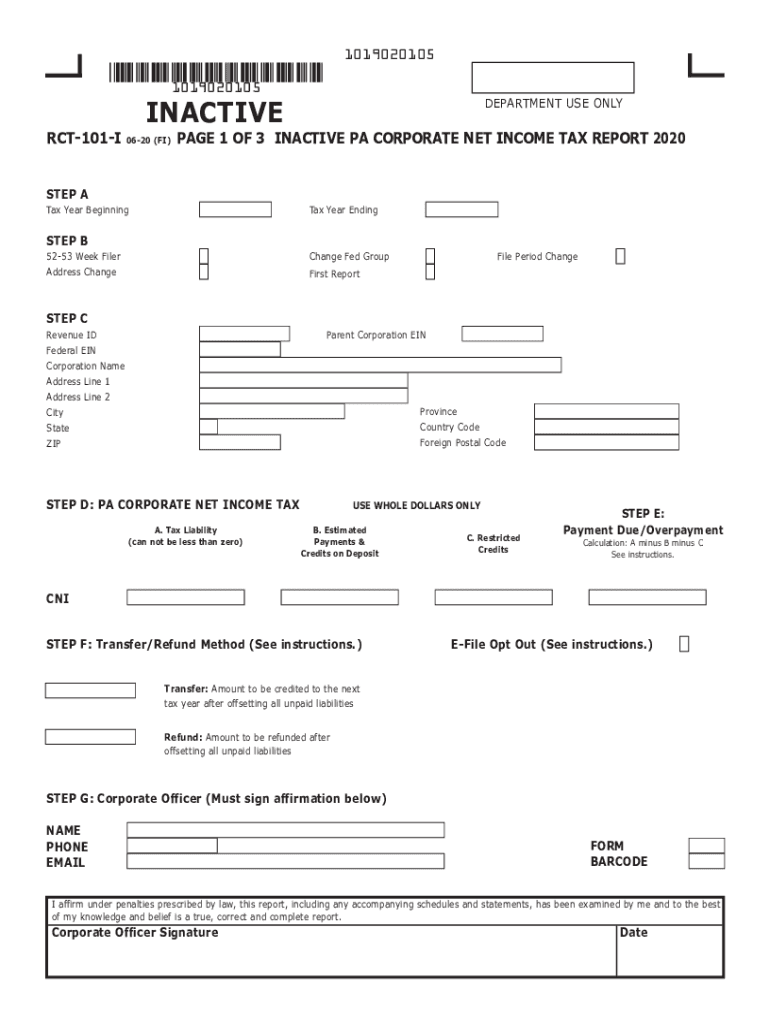
FILL IN FORM USING ALL CAPS.DO NOT USE DASHES () OR SLASHES (/) IN ANY FIELD. ENTER DATES AS MMDDYYYY. USE WHOLE DOLLARS ONLY. 1019020105 1019020105RCT101iSTARTinaCTive 0620 (Fi)DEPARTMENT USE ONLYpage.
Loading

Open form follow the instructions

Easily sign the form with your finger

Send filled & signed form or save
How to fill out the PA RCT-101-I online
The PA RCT-101-I form is used for reporting the corporate net income tax for inactive corporations in Pennsylvania. This guide will provide you with a clear step-by-step approach to filling out this form online, ensuring accuracy and compliance.
Follow the steps to successfully complete the PA RCT-101-I form.
- Click the ‘Get Form’ button to access the PA RCT-101-I form and open it in your preferred online editor.
- Enter the tax year beginning and ending dates. Ensure you use the MMDDYYYY format for all dates.
- In Step B, indicate any necessary changes regarding the federal grouping, address, or filing period by checking the appropriate boxes.
- Input the parent corporation's EIN, Revenue ID, corporation name, and address details in Step C. Make sure to enter all information in uppercase letters, as specified.
- For Step D, input the tax liability amount (this cannot be less than zero), followed by any estimated payments and credits on deposit, and restricted credits.
- In Step E, calculate the payment due or overpayment by subtracting the estimates and restricted credits from the tax liability.
- In Step F, choose the refund or transfer method for any credits found owing. Specify the amounts clearly after reviewing the instructions.
- Proceed to fill out the corporate officer details in Step G, including their name, phone number, and email address. Ensure the designated officer signs and dates the affirmation after printing.
- Complete Step H by checking the appropriate box to support your filing of the inactive report. Provide the required tax period information.
- For Step I, answer the general information questionnaire, providing details regarding the corporation’s records and any ownership information requested.
- Fill out Step J if there are any changes in corporate status. Provide the required details if applicable.
- Finally, ensure all necessary signatures are obtained for both the corporate officer and the tax preparer, if applicable. After reviewing all information, you can save changes, download, print, or share the completed form as needed.
Complete your PA RCT-101-I form online today to ensure timely compliance with Pennsylvania tax regulations.
Experience a faster way to fill out and sign forms on the web. Access the most extensive library of templates available.
Related content
Tax Year Ending. FoRm. BaRCoDe. 1019019105. 1019019105. RCT-101-i 08-19 (Fi) page 1 oF 3...
Inactive PA Corporate Tax Report (RCT-101-I). More about the Pennsylvania Form RCT-101-I...
Download Rct 106 Instructions Pennsylvania Form RCT-101 (PA Corporate Tax Report) - 2018...
Get answers to your most pressing questions about US Legal Forms API.
Does Kentucky accept federal extension for corporations?
Kentucky Tax Extension Form: If you have a valid Federal tax extension (IRS Form 7004), you will automatically be granted a Kentucky tax extension. Kentucky does not have its own state extension application. ... You can make a Kentucky extension payment with Form 41A720SL.
Where do I mail 1099 MISC in PA?
When filing state copies of forms 1099 with Pennsylvania department of revenue, the agency contact information is: PA Department of Revenue, P.O. Box 280412, Harrisburg, PA 17128-0412.
Where do I mail my amended PA tax return?
PA Dept Of Revenue, Payment Enclosed, 1 Revenue Place, Harrisburg PA 17129-0001 (payment), PA Dept Of Revenue, No Payment Or No Refund, 2 Revenue Place, Harrisburg PA 17129-0002 (no payment or refund), PA Dept Of Revenue, Refund Or Credit Requested, 3 Revenue Place, Harrisburg PA 17129-0003 (refund.
Where do I mail my Pennsylvania tax return?
Revenue Place. Harrisburg, PA 17129-0001. PA Department of Revenue. No Payment/No Refund. Revenue Place. Harrisburg, PA 17129-0002. PA Department of Revenue. Refund Requested. Revenue Place.
Does PA accept federal extension for corporations?
Extended Deadline with Pennsylvania Tax Extension: Pennsylvania offers a 60-day extension for corporations that don't have a valid Federal tax extension. If a corporation has a 6-month Federal extension and owes zero state tax, a Pennsylvania extension will automatically be granted for the same period of time.
Where do I mail my pa corporate tax return?
If the report is being sent by a means other than U.S. Mail the following address should be used: PA Dept of Revenue. ... Harrisburg, PA 17104-0400.
What is an RCT 101?
The PA Corporate Tax Report (RCT-101) is due annually on April 15 of the year following the year for which the report is submitted for a calendar year reporting corporation, or 30 days after the federal due date for corporations reporting to the federal government on a fiscal year basis.
How do I pay my PA state taxes?
Credit or Debit Card Payments: Use your American Express, Discover/NOVUS, MasterCard or Visa to pay Pennsylvania taxes over the Internet or by phone by visiting www.officialpayments.comOpens In A New Window or calling, toll-free, 1-800-2PAYTAX (1-800-272-9829). Note that Official Payments CorpOpens In A New Window.
Does PA accept federal extension for S corporations?
S Corporation and Partnership - S Corporations and Partnerships that have obtained a federal extension by filing Form 7004 with the Internal Revenue Service are also extended five months to file their Pennsylvania return as long as they do not owe any non-resident withholding tax on the PA-20S/PA-65 Information Return.
Does Hawaii accept federal extension for corporations?
Q: Does Hawaii accept the Federal Form 4868, Application for Automatic Extension of time to File U.S. Individual Income Tax Return, in lieu of the Hawaii extension form? A: No. Hawaii will not accept Federal extension forms. The Hawaii extension forms must be used.
Use professional pre-built templates to fill in and sign documents online faster. Get access to thousands of forms.
If you believe that this page should be taken down, please follow our DMCA take down process here.
This form is available in several versions. Select the version you need from the drop-down list below.