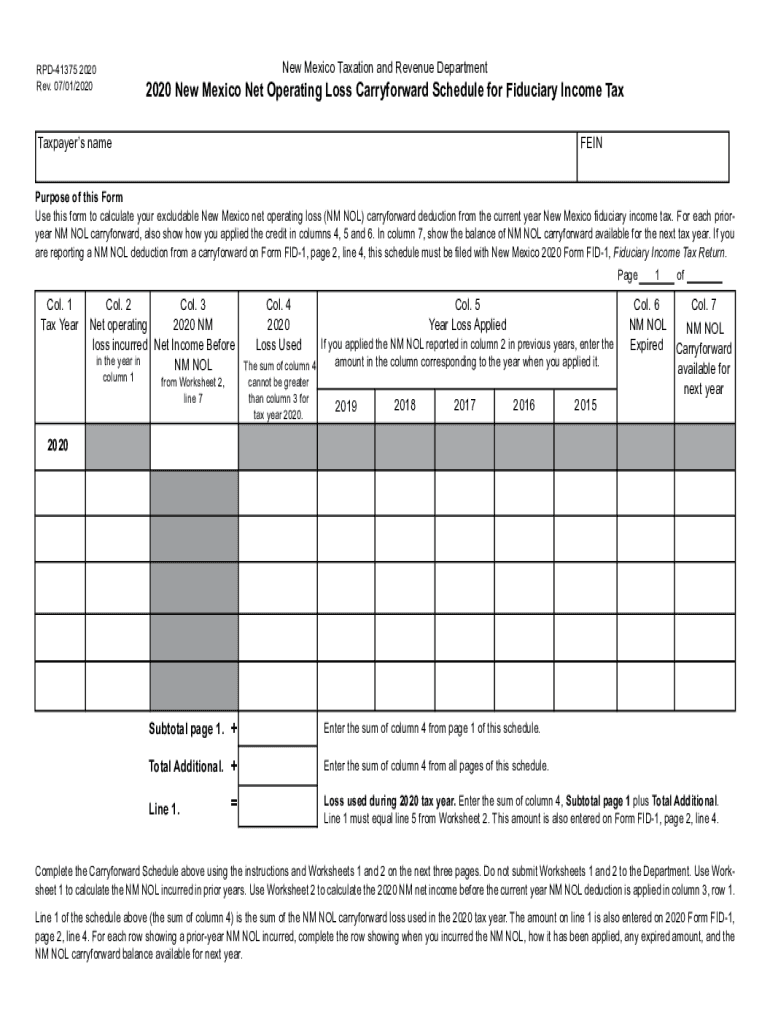
New Mexico Taxation and Revenue DepartmentRPD41375 2020 Rev. 07/01/20202020 New Mexico Net Operating Loss Carryforward Schedule for Fiduciary Income TaxTaxpayers nameFEINPurpose of this Form Use this.
Loading

Open form follow the instructions

Easily sign the form with your finger

Send filled & signed form or save
How to fill out the NM RPD-41375 online
The NM RPD-41375 form, also known as the New Mexico Net Operating Loss Carryforward Schedule for Fiduciary Income Tax, is essential for calculating your excludable New Mexico net operating loss (NM NOL) carryforward deduction. This guide provides clear, step-by-step instructions to assist you in completing the form accurately online.
Follow the steps to efficiently complete the NM RPD-41375 form.
- Click the ‘Get Form’ button to access the NM RPD-41375 form and open it in the online editor.
- Begin by entering the taxpayer’s name and Federal Employer Identification Number (FEIN) at the top of the form. This information is vital for identification purposes.
- In 'Column 1', indicate the tax year during which the net operating loss occurred. Use the specific rows for prior years if applicable.
- In 'Column 2', input the amount of the NM net operating loss incurred for the indicated tax year. Refer to Worksheet 1 for calculating this amount.
- In 'Column 3', enter the 2020 NM net income before any NM NOL is applied. Use Worksheet 2 to derive this figure based on your FID-1 tax return.
- Column 4 requires you to document the 2020 NM loss used. Ensure that the sum equals the total from Worksheet 2, and does not exceed the amount in Column 3.
- In Columns 5 and 6, record the year the loss was applied and any expired NOL amounts, respectively. Be careful to verify the amounts against your prior records.
- Finally, review the amounts in Column 7, which represent the NM NOL carryforward available for the next tax year. Make sure these calculations are accurate.
- After completing the form, you may have the option to save changes, download, print, or share the document. Ensure you keep a record of the completed form.
Start filing your NM RPD-41375 online today to ensure timely and accurate submission.
Experience a faster way to fill out and sign forms on the web. Access the most extensive library of templates available.
Related content
Taxation & Revenue New Mexico Logo. Close. Search Our Site. Type a word or phrase in the...
... Sandoval, Ranchos de Placitas, RDP-2B, 641, Water Well, 24-641, Cuttings, 2, F...
Afrika Bambaataa is an American disc jockey, singer, and songwriter from the South Bronx...
Use professional pre-built templates to fill in and sign documents online faster. Get access to thousands of forms.
If you believe that this page should be taken down, please follow our DMCA take down process here.