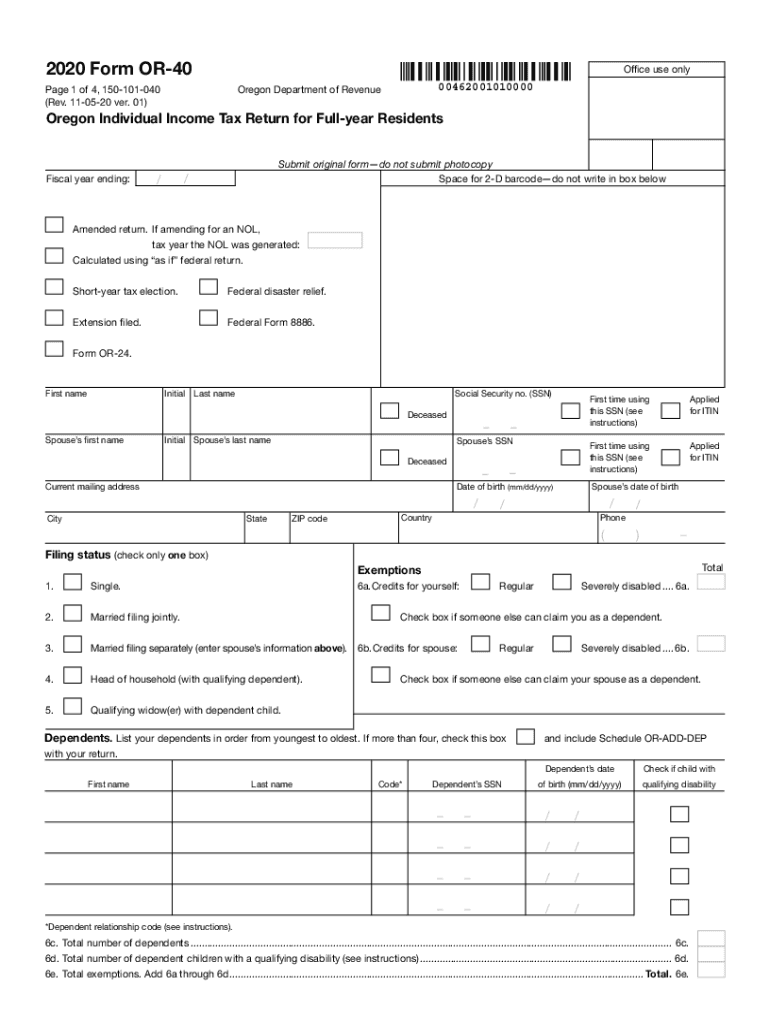
Clear formClear this page2020 Form OR40Office use only00462001010000Oregon Department of RevenuePage 1 of 4, 150101040 (Rev. 110520 ver. 01)Oregon Individual Income Tax Return for Fullyear ResidentsSubmit.
Loading

Open form follow the instructions

Easily sign the form with your finger

Send filled & signed form or save
How to use or fill out the OR DoR OR-40 online
Filling out the Oregon Individual Income Tax Return for full-year residents can be a straightforward process when you have the right guidance. This guide will provide you with step-by-step instructions on how to accurately complete the OR DoR OR-40 form online, ensuring you don't miss any important details.
Follow the steps to complete the OR DoR OR-40 online.
- Click ‘Get Form’ button to obtain the OR DoR OR-40 form and open it in your preferred online editor.
- Begin filling out your personal information in the appropriate fields, including your first name, last name, and Social Security number (SSN). Ensure that you accurately indicate whether this is your first time using the SSN.
- Provide your current mailing address, ensuring that all sections are filled out completely, including city, state, and ZIP code.
- Select your filing status by checking the appropriate box. Options include single, married filing jointly, married filing separately, head of household, and qualifying widow(er).
- List any dependents you have in the designated section. You will need to provide details such as their names, Social Security numbers, dates of birth, and whether they have a qualifying disability.
- Calculate your taxable income based on your federal adjusted gross income. Follow the prompts to include any necessary add-ons and subtractions as mentioned in the form.
- Input deductions for either Oregon itemized deductions or your standard deduction, depending on which is more beneficial for your tax situation.
- Complete the tax section by checking the appropriate boxes and adding any applicable credits before calculating your total tax liability.
- Enter your payments and refundable credits, including any withholdings, estimated payments, and any credits you qualify for.
- Determine if you have a tax obligation or are due a refund by completing the final sections concerning overpayments and any applicable penalties.
- Sign the form where indicated, ensuring both you and your spouse (if filing jointly) sign. Enter the date and any required information about the preparer if applicable.
- At the end, save your changes, and be sure to download or print a copy for your records. Follow any additional instructions for submitting your completed form.
Complete your Oregon Individual Income Tax Return online today to ensure accuracy and timeliness!
Experience a faster way to fill out and sign forms on the web. Access the most extensive library of templates available.
Related content
Apr 28, 2020 — Full-year Resident. Publication OR-40-FY www.oregon.gov/dor. • July 15...
You've had a recent personal or financial change that may affect your tax situation, such...
A play clock, also called a delay-of-game timer, is a countdown clock intended to speed up...
Get answers to your most pressing questions about US Legal Forms API.
What is a form or 40?
Oregon Department of Revenue. 2018 Form OR-40. Oregon Individual Income Tax Return for Full-year Residents.
Do you have to file a tax return for stimulus check?
Will I have to file a tax return to get my stimulus money? The amount of money you receive will be computed from your adjusted gross income on your 2019 tax return. ... The IRS and Treasury Department clarified this week that Social Security beneficiaries will not have to file a tax return in order to get their payments.
What is the Oregon standard deduction for 2019?
The standard deduction amount for Single filers claiming three (3) or more allowances will increase from $4,435 to $4,545. The standard deduction amount for Married filers will increase from $4,435 to $4,545. The annual tax credit amount, per exemption, will increase from $201 to $206.
Who Must File PA 40?
Every resident, part-year resident or nonresident individual must file a Pennsylvania Income Tax Return (PA-40) when he or she realizes income generating $1 or more in tax, even if no tax is due (e.g., when an employee receives compensation where tax is withheld).
Do I need to file an Oregon tax return?
You must file an Oregon income tax return if: * The larger of $1,100, or your earned income plus $350, up to the standard deduction amount for your filing status.
Do I need to file a state tax return in Oregon?
You must file an Oregon income tax return if: * The larger of $1,100, or your earned income plus $350, up to the standard deduction amount for your filing status.
At what income are you required to file a tax return?
For single dependents who are under the age of 65 and not blind, you generally must file a federal income tax return if your unearned income (such as from ordinary dividends or taxable interest) was more than $1,050 or if your earned income (such as from wages or salary) was more than $12,000.
Does Michigan require you to file a tax return?
If you are a resident of Michigan for all or part of the tax year and you file a federal income tax return, you must file a Michigan state income tax return even if you don't owe any state tax.
What does a 1040 form tell you?
The IRS Form 1040 is one of the official documents that U.S. taxpayers can use to file their annual income tax return. The form is divided into sections where you can report your income and deductions to determine the amount of tax you owe or the refund you can expect to receive.
Use professional pre-built templates to fill in and sign documents online faster. Get access to thousands of forms.
If you believe that this page should be taken down, please follow our DMCA take down process here.
This form is available in several versions. Select the version you need from the drop-down list below.