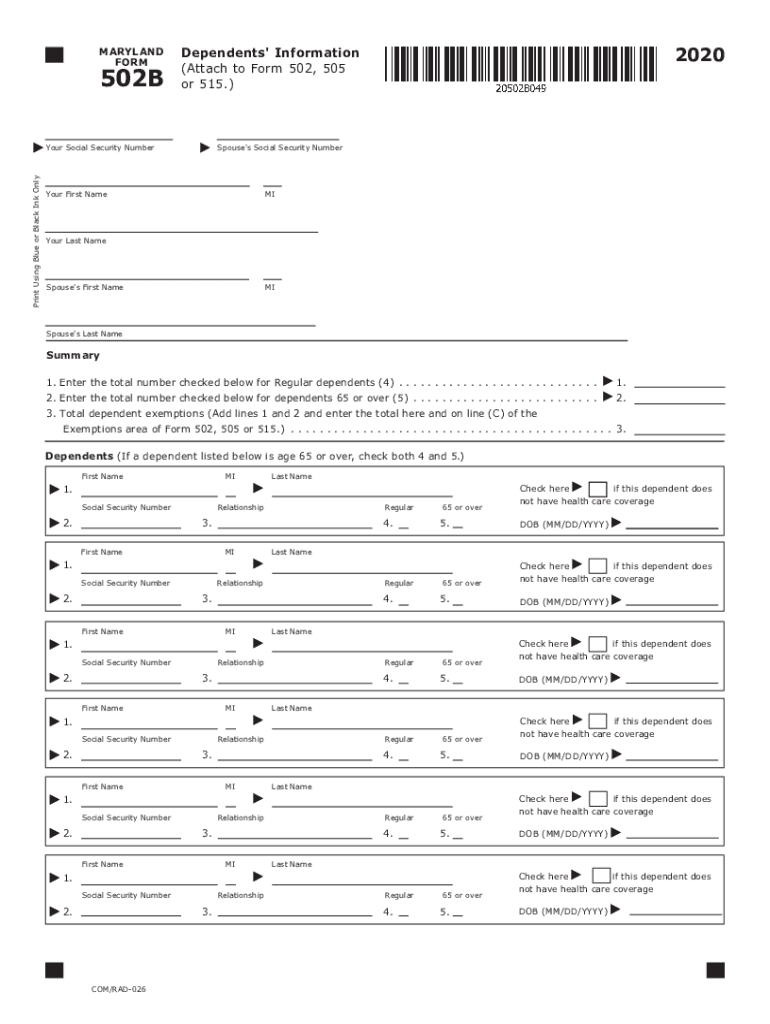
MARYLAND FORM502BYour Social Security NumberPrint Using Blue or Black Ink Only2020Dependents ' Information (Attach to Form 502, 505 or 515.)Spouse 's Social Security NumberYour First NameMIYour Last.
Loading

Open form follow the instructions

Easily sign the form with your finger

Send filled & signed form or save
How to fill out the MD Comptroller 502B online
Filling out the MD Comptroller 502B form is an essential step for reporting your dependents' information accurately. This guide will walk you through each section of the form to ensure that you provide all necessary details with ease.
Follow the steps to complete the MD Comptroller 502B online.
- Press the ‘Get Form’ button to obtain the MD Comptroller 502B form and open it in your online editor.
- Start by entering your Social Security Number in the designated field. Make sure to print using blue or black ink if you are completing the form manually.
- Provide your first name, middle initial, and last name in the respective fields.
- Enter your spouse's Social Security Number, followed by their first name, middle initial, and last name.
- Count the regular dependents you are claiming and enter this number in the first designated field.
- If you have dependents aged 65 or over, note this number in the second designated field.
- Add the numbers from steps 5 and 6 together and enter the total in line 3. This total should also be reported on line (C) of Form 502, 505, or 515.
- List each dependent's first name, last name, and Social Security Number in the provided fields, followed by their relationship to you.
- For any dependent aged 65 or over, check both the regular and 65 or over boxes.
- If any dependents lack health care coverage, check the corresponding box and provide their date of birth in the specified format (MM/DD/YYYY).
- Once all fields are filled out accurately, you can save your changes, download the document, print it out, or share it as needed.
Start filing your MD Comptroller 502B online today for a smooth experience.
Experience a faster way to fill out and sign forms on the web. Access the most extensive library of templates available.
Related content
502-502B, Maryland Resident Income Tax Return with Form 502B, Maryland long .... for the...
Apr 15, 2019 - If you are sending a Form 502 or Form 505 (with a payment) through the US...
675, § 502, 52 Stat. 1050; June 23, 1939, ch. 242, § 3, 53 Stat. 854; Dec. ... 14, 2018...
Get answers to your most pressing questions about US Legal Forms API.
Can you pay MD state taxes online?
Online Bill Pay is an easy, convenient and secure way to pay your Maryland tax liabilities online for free. This system may be used to make bill payments on business taxes using electronic funds withdrawal (direct debit) from a U.S. bank or financial institution. Foreign facilities will not be accepted.
Can you make tax payments online?
Official Payments - Pay 1040 & IRS Taxes Online - Federal Tax Payment Home. We provide technology systems that give you fast, easy and secure payment options for your taxes and bills, such as by internet, telephone and mobile app. ... Enjoy the convenience and flexibility of paying federal taxes by debit or credit card.
How do I pay my Maryland taxes with a credit card?
You can pay your Maryland tax with a credit card, using VISA, MasterCard, American Express or Discover. This service applies to taxes owed for the current year or any back year (if you have a bill). You can make your payment online or over the phone by calling 1-800-2PAYTAX (1-800-272-9829).
Can I pay my Maryland taxes online?
Online Bill Pay is an easy, convenient and secure way to pay your Maryland tax liabilities online for free. This system may be used to make bill payments on business taxes using electronic funds withdrawal (direct debit) from a U.S. bank or financial institution.
How do I pay Maryland taxes?
Payment Information. You can pay your Maryland taxes with a personal check, money order or credit card. You may also choose to pay by direct debit if you file electronically. If you file and pay electronically by April 15, you have until April 30 to make the electronic payment, using direct debit or a credit card.
How do I calculate estimated tax payments?
To calculate your estimated taxes, you will add up your total tax liability for the year including self-employment tax, income tax, and any other taxes and divide that number by four.
How do I pay quarterly taxes with 1099?
If you expect to owe more than $1,000 in tax on your self-employed income at the end of the year, The Internal Revenue Service requires you to make quarterly payments toward the debt. To estimate your quarterly tax payments, you must complete and file Form 1040-ES.
Do I have to make estimated tax payments for 2019?
If at least two-thirds of your gross income is from farming or fishing, you can make just one estimated tax payment for the 2019 tax year by January 15, 2020. If you file your 2019 tax return by March 2, 2020, and pay all the tax you owe at that time, you don't need to make any estimated tax payments.
Do I need to pay quarterly taxes?
The rule is that you must pay your taxes as you go. If at filing time, you have not paid enough income taxes through withholding or quarterly estimated payments, you may have to pay a penalty for underpayment. ... If so, then you're in the clear, and you don't need to make estimated tax payments.
How do you pay your taxes quarterly?
Sign up for the Electronic Federal Tax Payment System, or EFTPS. The system allows anyone to pay taxes they owe. ... Pay online via the IRS at www.irs.gov/payments. Pay using debit or credit card. Remit a check or money order using estimated tax payment voucher.
Use professional pre-built templates to fill in and sign documents online faster. Get access to thousands of forms.
If you believe that this page should be taken down, please follow our DMCA take down process here.