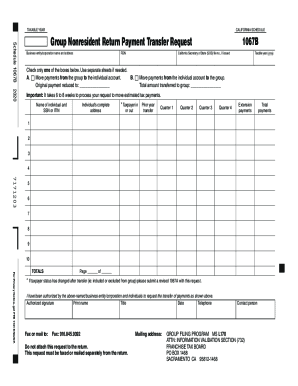
TAXABLE YEARCALIFORNIA SCHEDULESchedule 1067BGroup Nonresident Return Payment Transfer Request Business entity/corporation name and addressFEIN1067BCalifornia Secretary of State (SOS) file no., if.
Open form follow the instructions
Easily sign the form with your finger
Send filled & signed form or save
How to fill out the CA FTB Schedule 1067B online
Filling out the CA FTB Schedule 1067B is a crucial step for managing nonresident return payment transfers. This guide will provide you with clear, step-by-step instructions to complete the form accurately and efficiently online.
Follow the steps to complete the CA FTB Schedule 1067B
- Click the 'Get Form' button to access the CA FTB Schedule 1067B and open it in your preferred online editor.
- Fill in the business entity or corporation name and address at the top of the form. Ensure that this information is accurate and complete.
- Provide the Federal Employer Identification Number (FEIN) in the designated field to identify your entity.
- If issued, enter the California Secretary of State (SOS) file number in the corresponding section.
- Indicate the taxable year by entering the four-digit year (e.g., 2020).
- Check one of the provided boxes to indicate whether you want to move payments from the group to the individual account or vice versa. If necessary, use separate sheets for additional details.
- Input the original payment amount reduced to the appropriate field for clarity.
- Specify the total amount you wish to transfer to the group account.
- Enter the name and Social Security Number (SSN) or Individual Taxpayer Identification Number (ITIN) of the individual associated with the transfer.
- Complete the individual's full address in the corresponding field.
- Select whether the taxpayer is classified as in or out of the group.
- Complete the section regarding prior year transfers, filling in the payments for each quarter and extension payments if applicable.
- Add total payments in the designated section to summarize your entries.
- Authorize the request by signing in the 'Authorized signature' field. Print your name, title, date, and contact telephone number beneath your signature.
- Once completed, save your changes, download or print the form for your records, and fax or mail it to the address provided.
Complete your CA FTB Schedule 1067B online today for a smooth filing experience.
Experience a faster way to fill out and sign forms on the web. Access the most extensive library of templates available.
Related content
Aug 28, 2019 - California group nonresident tax return Composite tax return ... Visit...
Find a specific institution's A-G course list. View associated schools within a school...
Get answers to your most pressing questions about US Legal Forms API.
What is Schedule OSC?
Schedule OSC is supplemental schedule that should be filed with Form 760. Schedule OSC allows residents that work in other states to claim a credit for taxes they paid to other states.
Do Virginia residents pay state taxes?
Live in Virginia, Work Out of State All Virginia residents must file a Form 760 Virginia resident tax return. Any income you earn out of state will be taxed by Virginia and must be filed with Virginia, regardless of the source of income.
What is credit for taxes paid to another state?
When more than one state taxes the same income, you can claim a credit for taxes paid to the other state. The 'other state' is usually the nonresident state. When you create a Resident state return and a Non-Resident state return, the program will calculate the credit for taxes paid to another state, if applicable.
What is a reverse credit state?
States that provide a credit to California residents are referred to as reverse credit states. Currently, Arizona, Indiana, Oregon, Virginia, and Guam are reverse credit states. ... Currently, none of the reverse credit states allow a credit for taxes paid to California on the group nonresident tax return.
What is the California tax rate for 2019?
The statewide tax rate is 7.25%. In most areas of California, local jurisdictions have added district taxes that increase the tax owed by a seller. Those district tax rates range from 0.10% to 1.00%.
What is the state income tax in California 2019?
California state Income Tax California's state income tax rates have a large range from 1% to 12.3%.
Do I have to pay state income tax if I live in another state?
In general, you'll pay state taxes on all the personal income you earn in your home state (unless you live in a state without personal income taxation). If you work in a state but don't live there, you are considered a non-resident of that state.
Does California tax non resident income?
Residents of California are taxed on ALL income, including income from sources outside California . Nonresidents of California are taxed only on income from California sources . Nonresidents of California are not taxed on pensions received after December 31, 1995 .
Does California tax income in other states?
Yes, California taxes income earned from ALL state sources. If you're a California resident, you're no stranger to high tax rates. ... Here's another fact: if you earned income working in another state, you'll still be forced to pay the same, high California tax rate, even if that other state has a lower tax rate.
What is the California standard deduction for 2019?
California Standard Deductions Standard deductions as of 2018 are $4,236 for single filers and married/registered domestic partner filers of separate returns. This increases to $8,472 for married/registered domestic partner filers of joint returns, qualifying widow(er)s, and heads of household.
Use professional pre-built templates to fill in and sign documents online faster. Get access to thousands of forms.
If you believe that this page should be taken down, please follow our DMCA take down process here.