I Yes No For Privacy Notice get form FTB 1131. 3661113 Form 565 C1 2011 Side Schedule A Cost of Goods Sold 1 Inventory at beginning of year. Get 565 Booklet to see the instructions for the 565 Form TAXABLE YEAR CALIFORNIA FORM Partnership Return of Income For calendar year 2011 or fiscal year beginning month day year and ending month day year. Penalties May Apply Side Form 565 C1 2011 Schedule K Partners Shares of Income Deductions Credits etc.
Loading

Open form follow the instructions

Easily sign the form with your finger

Send filled & signed form or save
How to fill out the CA FTB 565 online
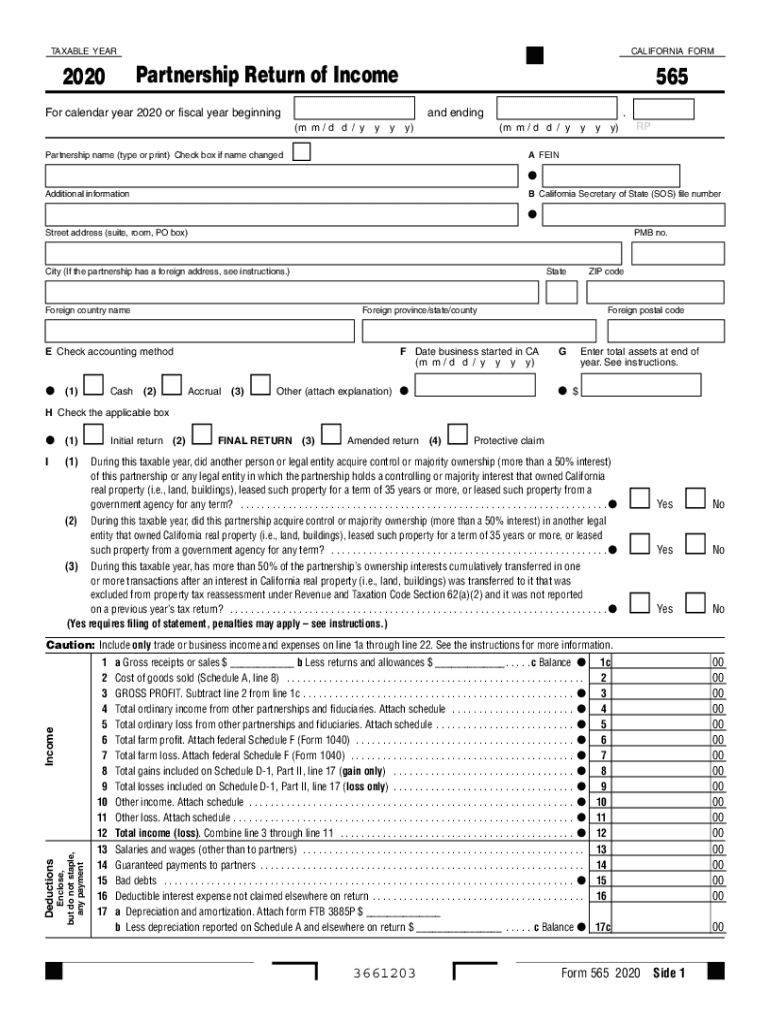
The CA FTB 565 form is essential for partnerships in California to report their income and deductions. This guide provides comprehensive, step-by-step instructions to help users successfully complete the form online, ensuring clarity and accuracy in their submissions.
Follow the steps to fill out the CA FTB 565 online.
- Click the ‘Get Form’ button to obtain the CA FTB 565 form and launch it in the editor.
- Complete the partnership name field by entering the full legal name of the partnership. Check the box if the name has changed.
- Enter the partnership's Federal Employer Identification Number (FEIN) in the designated field.
- Fill in the California Secretary of State (SOS) file number if applicable.
- Provide the partnership's street address, city, state, ZIP code, and any foreign address details required.
- Select the accounting method used by marking the appropriate box for cash, accrual, or other, along with initial return status.
- Indicate the date the business started in California using the specified format.
- Respond to questions regarding the acquisition of control or ownership of real property by marking 'Yes' or 'No'.
- Enter total assets at the end of the taxable year in the designated field.
- Detail your income and deductions by filling in the necessary lines accurately according to trade or business income and expenses.
- Aggregate your income and deductions to find the total taxable amount, then provide payment details if applicable.
- Finally, review all entered information for accuracy before proceeding to save changes, download, print, or share the completed form as needed.
Complete your CA FTB 565 form online today to ensure timely and accurate tax reporting for your partnership.
Experience a faster way to fill out and sign forms on the web. Access the most extensive library of templates available.
Related content
Caution: Include only trade or business income and expenses on line 1a through line 22...
Sep 1, 2001 — 565, California Partnership Return of Income, this ... the FTB. @ The...
switches are available factory-installed or in kit form for ... STR53UP-FTb ... CA to H or...
Use professional pre-built templates to fill in and sign documents online faster. Get access to thousands of forms.
If you believe that this page should be taken down, please follow our DMCA take down process here.
This form is available in several versions. Select the version you need from the drop-down list below.