Loading
Get Oh Kr-1040 - Kettering City 2020
How it works
-

Open form follow the instructions
-

Easily sign the form with your finger
-

Send filled & signed form or save
How to fill out the OH KR-1040 - Kettering City online
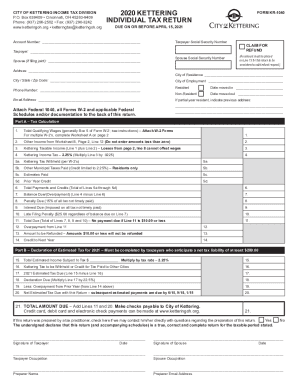
Filing your Kettering City income tax return using the OH KR-1040 form can be a straightforward process when you understand each section. This guide will walk you through the components of the form and provide detailed instructions to assist you in completing it accurately.
Follow the steps to complete your OH KR-1040 - Kettering City form.
- Press the ‘Get Form’ button to access the OH KR-1040 - Kettering City form and open it in your preferred editing tool.
- Enter your Taxpayer Social Security Number and Account Number at the top of the form. Then, fill in your name and your spouse's name if you are filing jointly.
- Complete your residential information, including your address and the city, state, and zip code of your residence. Indicate your city of employment as well.
- If applicable, specify whether you are a resident or non-resident. Include the dates of your move if you are a partial-year resident, and provide your previous address.
- Proceed to Part A – Tax Calculation. Input your total qualifying wages, referring to Box 5 of your W-2 form. If you have multiple W-2 forms, complete Worksheet A included with the form.
- Report any other income in Line 2, utilizing Worksheet B for additional non-wage income if you have it.
- Calculate your Kettering taxable income by adding your qualifying wages and other income; enter this total in Line 3.
- Determine your Kettering income tax amount by multiplying your Kettering taxable income by the tax rate of 2.25%. Enter the result in Line 4.
- List the Kettering tax withheld and any other applicable credits in Lines 5a through 5d. Then, sum these figures and enter the total in Line 6.
- Calculate your balance due or potential overpayment in Line 7 by subtracting the total payments and credits (Line 6) from the Kettering income tax (Line 4).
- Complete the penalties and interest if applicable in Lines 8 and 9, and any potential late filing penalty in Line 10.
- Total everything in Line 11 to determine the total amount due, or if there's an overpayment to be refunded (Line 12).
- If you are estimating your taxes for the next year, complete Part B, including Line 15 for total estimated income subject to tax and follow through to Line 20.
- After checking for accuracy, save your changes, and choose to download, print, or share your completed form as appropriate.
Complete your OH KR-1040 - Kettering City form online today to ensure accurate and timely filing.
Get form
Experience a faster way to fill out and sign forms on the web. Access the most extensive library of templates available.
Get This Form Now!
Use professional pre-built templates to fill in and sign documents online faster. Get access to thousands of forms.