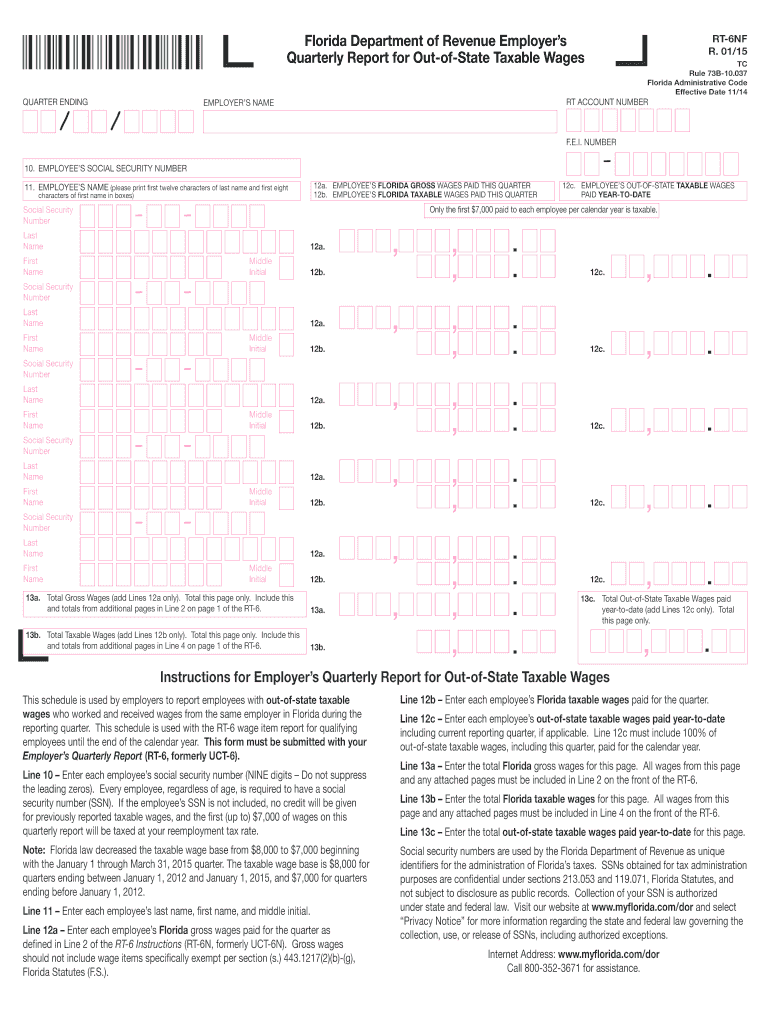
Florida Department of Revenue Employer s Quarterly Report for Out-of-State Taxable Wages QUARTER ENDING / F.E.I. NUMBER - 10. EMPLOYEE S SOCIAL SECURITY NUMBER 12a. EMPLOYEE S FLORIDA GROSS WAGES.
Loading

Open form follow the instructions

Easily sign the form with your finger

Send filled & signed form or save
How to fill out the FL RT-6NF online
The FL RT-6NF is a vital document used by employers to report employees with out-of-state taxable wages in Florida. This guide provides a step-by-step approach to accurately filling out the form online, ensuring compliance with state tax regulations.
Follow the steps to complete the FL RT-6NF.
- Click ‘Get Form’ button to obtain the form and open it in the editor.
- Enter the quarter ending date in the appropriate field to specify the reporting period.
- Input your F.E.I. number in the designated space to identify your business.
- For each employee listed, provide their social security number in Line 10. Use nine digits, including leading zeros.
- In Line 11, enter each employee's name by printing the first twelve characters of their last name and the first eight characters of their first name in the designated boxes.
- For Line 12a, record each employee’s Florida gross wages paid during the quarter according to the definitions provided in the RT-6 instructions.
- In Line 12b, fill in each employee’s Florida taxable wages paid during the quarter.
- In Line 12c, indicate each employee's out-of-state taxable wages paid year-to-date, ensuring all wages for the year are included.
- Complete Line 13a by adding the total Florida gross wages for this page only and incorporating totals from any additional pages in Line 2 on page 1 of the RT-6.
- For Line 13b, sum the total Florida taxable wages for this page only, ensuring it aligns with Line 4 on page 1 of the RT-6.
- Enter the total out-of-state taxable wages paid year-to-date on Line 13c for this page only.
- Once all fields are completed, save your changes, and you may choose to download, print, or share the form as needed.
Complete your FL RT-6NF form online to ensure accurate reporting and compliance.
Experience a faster way to fill out and sign forms on the web. Access the most extensive library of templates available.
Related content
by N Santanielo · 2020 · Cited by 73 — RT-F and RT-NF are similarly effective in...
File an Employer's Quarterly Report (Form RT-6) by the end of each month following the end...
Todas as tomadas de áudio digital são compatíveis com as frequências de amostragem de...
Get answers to your most pressing questions about US Legal Forms API.
How do I file for payroll?
Filing for payroll requires collecting employee information, calculating wages and withholdings, and submitting the necessary forms. You can use payroll software or services to streamline this process. As you prepare your payroll reports, make sure to comply with the specific needs of the FL RT-6NF for accurate filings.
How do I file an amended Florida sales tax return?
To file an amended Florida sales tax return, complete the appropriate amendment form provided by the Florida Department of Revenue. Review your original sales tax return, and make necessary adjustments based on the changes you need. This amendment process ensures that your records are accurate and compliant with your FL RT-6NF reporting.
How to get a Florida tax ID number?
To obtain a Florida tax ID number, you must apply via the Florida Department of Revenue's online portal. The application process typically requires details about your business, such as its legal structure. Once you complete the application, the Florida Department of Revenue will issue your tax ID number, essential for fulfilling your FL RT-6NF obligations.
How to file Florida state tax?
Filing Florida state tax involves determining the correct forms and submitting them to the state. You can file online through the Florida Department of Revenue’s website or use a tax software that supports state filings. Ensure that you include all required information related to your income and payroll taxes, including the FL RT-6NF.
How do I register for payroll taxes in Florida?
To register for payroll taxes in Florida, you need to complete the Florida Department of Revenue's online registration. This process requires basic business information and can be done easily through their platform. Once registered, you will receive your Employer Identification Number, which is necessary for fulfilling your FL RT-6NF obligations.
How to file Florida RT-6 online?
To file Florida RT-6 online, visit the Florida Department of Revenue's website. You'll need to log in or create an account to access their e-filing system. By following the prompts, you can easily submit your FL RT-6NF form and ensure timely compliance.
Are employers liable for payroll taxes?
Yes, employers are responsible for payroll taxes. This includes federal and state taxes that contribute to social security, Medicare, and unemployment insurance. It is essential to understand these liabilities to comply properly with the FL RT-6NF requirements for filing and payments.
How do I get a Florida sales tax ID?
To acquire a Florida sales tax ID, you must register your business with the Florida Department of Revenue. You can complete the registration online through their website, providing necessary business information and details about your sales activities. Having your sales tax ID is crucial for compliance, especially when processing transactions that relate to FL RT-6NF.
What is RT-6 Florida?
RT-6 Florida refers to the state’s unemployment tax report, which employers must file quarterly. This report details employee wages and the corresponding unemployment tax owed. Staying compliant with RT-6 is critical for all businesses operating in Florida, and using FL RT-6NF can aid in maintaining accurate records.
What is an RT number in Florida?
An RT number in Florida is a unique identifier assigned to employers for tax reporting purposes. This number is essential for properly submitting payroll taxes and other related filings. When engaging with FL RT-6NF, ensure that you have your RT number readily available to simplify the filing process.
Use professional pre-built templates to fill in and sign documents online faster. Get access to thousands of forms.
If you believe that this page should be taken down, please follow our DMCA take down process here.
This form is available in several versions. Select the version you need from the drop-down list below.