Of a competent member of the household or a person apparently in charge of the office or place of business, at least 18 years of age, who was informed of the general nature of the papers, and thereafter mailing (by first-class mail, postage prepaid) copies to the person served at the place where the copies were left. (CCP 415.20(b)) (Attach separate declaration or affidavit stating acts relied on to establish reasonable diligence in first attempting personal service.) d. Mail and acknowledgment.
Loading

Open form follow the instructions

Easily sign the form with your finger

Send filled & signed form or save
How to fill out the CA EJ-110 online
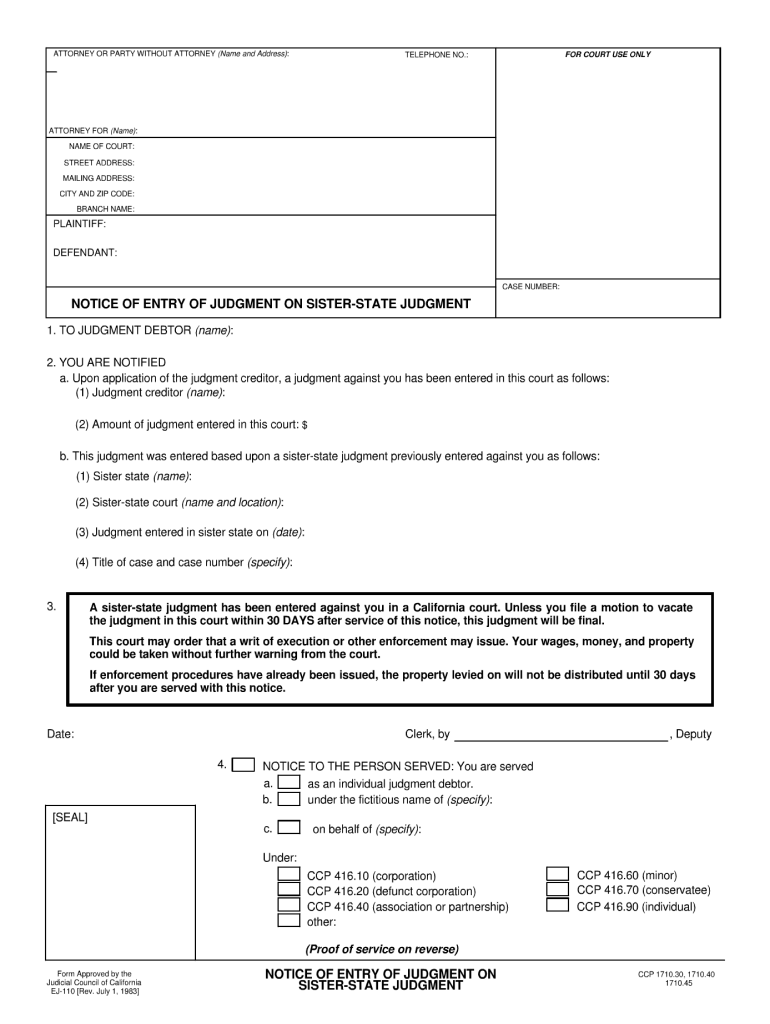
Filling out the CA EJ-110 form online can streamline the process of notifying a judgment debtor of a judgment entry. This guide provides a clear, step-by-step approach to effectively complete the form, ensuring all required information is accurately provided.
Follow the steps to successfully complete the CA EJ-110 form online.
- Click the ‘Get Form’ button to access the CA EJ-110 form. This will open the form for you in an online format, ready for completion.
- In the section labeled ATTORNEY OR PARTY WITHOUT ATTORNEY, enter the name and address of the individual or entity filing the form. This should include the attorney's name if applicable.
- Provide the telephone number in the designated field to ensure easy communication if necessary.
- Fill in the NAME OF COURT and its STREET ADDRESS, along with the MAILING ADDRESS, CITY, and ZIP CODE of the court handling the case.
- Specify the BRANCH NAME of the court if applicable. This helps to direct the notice appropriately.
- Complete the PLAINTIFF and DEFENDANT fields with the names of the relevant parties in the case.
- Enter the CASE NUMBER assigned to this case as it is essential for proper record-keeping.
- Proceed to the NOTICE OF ENTRY OF JUDGMENT sections, where you will fill out details regarding the judgment debtor, specifically their name and the judgment creditor's name.
- List the amount of the judgment that has been entered by the court, noted in the appropriate field.
- Fill in the details regarding the sister-state judgment, including the sister state name, court name and location, judgment date, and the case title and number.
- Ensure to sign and date the form appropriately, and indicate who completed the form by filling the Clerk and Deputy fields if required.
- Review all entries for accuracy and completeness before proceeding. Once satisfied, you can choose to save changes, download, print, or share the completed form.
Complete your CA EJ-110 online today to ensure proper notification and compliance with court requirements.
Experience a faster way to fill out and sign forms on the web. Access the most extensive library of templates available.
Related content
This court may order that a writ of execution or other enforcement may issue. Your wages...
This calculator only provides 10-year risk estimates for individuals 40-79 years of age...
This manual describes the hardware configurations of the transmitters listed in below. For...
Get answers to your most pressing questions about US Legal Forms API.
How do I complete a Writ of Execution in California?
Completing a Writ of Execution in California involves filling out the required forms accurately, detailing the judgment, and submitting it to the court. Once the court issues the writ, you can take it to the appropriate sheriff's office for enforcement. Using CA EJ-110 can streamline this entire process, ensuring you have the right guidance every step of the way.
How to request a default judgment in California?
To request a default judgment in California, you must first file a request with the court after the defendant fails to respond. You will need to provide supporting documents and, often, evidence of your claim. Carefully completing this process using CA EJ-110 ensures that the judge has everything needed to grant the judgment in your favor.
How do you enforce sister state judgments in California?
To enforce a sister state judgment in California, you must file it with the local courts, which is done through a petition under the Uniform Enforcement of Foreign Judgments Act. This process allows judgments from other states to be recognized and enforced in California. Using CA EJ-110 can simplify this procedure, making it easier to collect what you are owed.
How long do you have to file a writ in California?
In California, you generally have up to 10 years from the date of your judgment to file a writ of execution. However, it is advisable to file as soon as possible to ensure you can collect the debt without delays. Utilizing CA EJ-110 helps simplify this process and secure your claim effectively.
What is a writ of execution for dummies?
A writ of execution is an official court order that allows a judgment creditor to collect what they are owed. Essentially, if a court has awarded you a judgment, this writ empowers you to take action to enforce it. It typically involves seizing property, garnishing wages, or taking some other action to ensure you can collect the debt, all of which can be processed using CA EJ-110.
How do I serve an out-of-state defendant in California?
To serve an out-of-state defendant in California, you must comply with specific legal procedures stipulated in California law. Typically, this involves using a registered process server or following methods outlined in the CA EJ-110 guidelines. Correct service ensures that the defendant receives proper notice, allowing your case to proceed effectively.
How to register an out-of-state judgment in California?
You can register an out-of-state judgment in California by filing the CA EJ-110 form along with a certified copy of the judgment. It's important to provide the original court's judgment details to ensure proper registration. After completing this process, the judgment can be enforced just like a California judgment.
How to enforce an out-of-state judgment in California?
To enforce an out-of-state judgment in California, you must first register it with the California courts. This requires completing the CA EJ-110 form and submitting it with your judgment. Once registered, you can take further legal steps to ensure the judgment is enforced in accordance with California laws.
Can a judgment be transferred to another state?
Yes, a judgment can be transferred to another state through a process known as domestication. You will typically need to file your judgment in the new state's court using the CA EJ-110 form or an equivalent. Each state has its own requirements, so reviewing those specific regulations is essential.
How do I register a foreign judgment in California?
To register a foreign judgment in California, start by obtaining a copy of the judgment from the originating court. Complete the CA EJ-110 form, and file it along with the judgment in the California court. Once filed, the foreign judgment will carry the same weight as a local judgment, allowing you to pursue enforcement.
Use professional pre-built templates to fill in and sign documents online faster. Get access to thousands of forms.
If you believe that this page should be taken down, please follow our DMCA take down process here.