Loading
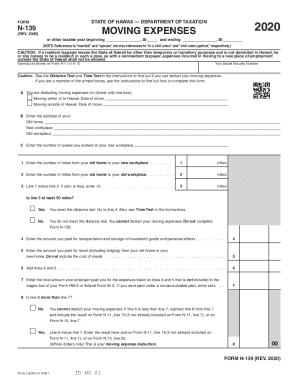
Get Hi Dot N-139 2020
How it works
-

Open form follow the instructions
-

Easily sign the form with your finger
-

Send filled & signed form or save
How to fill out the HI DoT N-139 online
The HI DoT N-139 form is used to determine moving expense deductions for individuals relocating due to a new job. Completing this form requires careful attention to detail in order to ensure that all necessary information is accurately provided, especially regarding moving expenses incurred during the relocation process.
Follow the steps to accurately fill out the HI DoT N-139 online
- Press the ‘Get Form’ button to obtain the HI DoT N-139 form and open it in your online editor.
- Enter the taxable year at the top of the form, specifying the start and end dates.
- Provide your name as it appears on Form N-11 or N-15 along with your Social Security number.
- Indicate whether you are deducting moving expenses for moving within or to Hawaii, or moving outside of Hawaii by checking the appropriate box. Include the date of move as specified.
- Fill in the addresses for your old home, new workplace, and old workplace in the designated fields.
- Enter the number of weeks you worked at your new workplace in the specified field.
- Calculate and input the number of miles from your old home to your new workplace in the designated field.
- Input the number of miles from your old home to your old workplace.
- Subtract the old workplace miles from the new workplace miles and enter the result.
- Check if the result from the previous step meets the distance test of at least 50 miles by selecting 'Yes' or 'No'.
- If you meet the distance test, enter the total amount paid for transportation and storage of household goods and personal effects.
- Next, enter the amount paid for travel from your old home to your new home, excluding meals.
- Add the amounts from lines 4 and 5 and enter the total.
- Record the total amount reimbursed by your employer for expenses from lines 4 and 5 that were not included in your wage statements.
- Determine whether your total expenses exceed your employer's reimbursements. If so, include that amount on the appropriate line for your tax return.
- Once all necessary fields are completed and reviewed, save your changes, and choose to download, print, or share the completed form as needed.
Begin the process of filling out your HI DoT N-139 form online today.
Get form
Experience a faster way to fill out and sign forms on the web. Access the most extensive library of templates available.
Related links form
Get This Form Now!
Use professional pre-built templates to fill in and sign documents online faster. Get access to thousands of forms.