Loading
Form preview
  • US Legal Forms
  • Other Templates
  • Tax Forms
  • Indiana Tax Forms
  • In Sf 11405 2017

Get In Sf 11405 2017

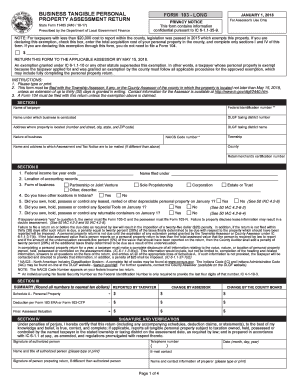
-35-9. State Form 11405 (R40 / 10-17) Prescribed by the Department of Local Government Finance NOTE: For taxpayers with less than $20,000 cost to report within the county, legislation was passed in 2015 which exempts this property. If you are declaring this exemption, check this box, enter the total acquisition cost of your personal property in the county, and complete only sections I and IV of this form. If you are declaring this exemption through this form, you do not need to file a Form 104.

How it works

  1. Open form

    Open form follow the instructions

  2. Easily sign form

    Easily sign the form with your finger

  3. Share form

    Send filled & signed form or save

How to fill out the IN SF 11405 online

Filling out the IN SF 11405 form is a vital step in reporting your business's tangible personal property for assessment. This guide provides users with clear instructions on how to complete the form accurately and submit it online.

Follow the steps to complete the IN SF 11405 online.

  1. Press the 'Get Form' button to obtain the form and open it in the editor.
  2. In Section I, enter the name of the taxpayer, their federal identification number, and the name under which the business is conducted. Be sure to fill in the DLGF taxing district number and the property address, including city, state, and ZIP code.
  3. Provide information regarding the nature of the business and include the Township and NAICS Code number, if applicable.
  4. Move to Section II. Fill in the federal income tax year end date, the name filed under, and the location of accounting records. Specify the form of business and indicate if there are other locations in Indiana.
  5. Answer questions 5, 6, and 7 concerning ownership of depreciable personal property, special tools, and returnable containers on January 1.
  6. In Section III, summarize reported values. Report the total costs in the appropriate fields, including deductions and any changes requested by the assessor or the county board.
  7. Proceed to Section IV. Sign the form under penalties of perjury, including the name and title of the authorized person. Include their contact information as well.
  8. Complete any additional schedules as necessary, such as Schedule A for personal property details. Ensure all amounts are rounded to the nearest dollar.
  9. Review the completed form for accuracy and completeness. Once satisfied, save your changes, and choose to download, print, or share the form as needed.

Complete and submit your IN SF 11405 form online to ensure accurate assessment of your tangible personal property.

Get form

Experience a faster way to fill out and sign forms on the web. Access the most extensive library of templates available.

Related content

Personal Property Forms - DLGF
11405 (Form 103-Long), Must be filed with Form 104. For use by manufacturers or...
Learn more
Class Schedule Search Details - Fall 2022
BUS 216 [04] - Foundations in Business Communications. Class number: 11405 | Units: 3...
Learn more
GrCEDuo Parts
9 014-11405-008 *De-electricity Brush; A3. 1. 014-91320-008 Guide Roller Ass'y ... 7...
Learn more

Related links form

FL 12.921 2011 FL 12.922(a) 2000 FL 12.922(c) 2015 FL 12.923 2015

Questions & Answers

Get answers to your most pressing questions about US Legal Forms API.

Contact support

S must be filed when a real estate transaction occurs and involves the sale or exchange of real estate. If you have received or made payments that meet the IRS requirements for reporting, filing is necessary to comply with tax regulations. Services like US Legal Forms can offer comprehensive support for filing your 1099S appropriately, ensuring you meet obligations under IN SF 11405.

To report a 1099-S on your tax return, include the information from the 1099-S form on Schedule D of your federal return if it pertains to sale proceeds. Ensure that you accurately reflect any gains or losses from the sale. If you're unsure about the process, leveraging assistance from resources like US Legal Forms can help you navigate reporting accurately under IN SF 11405.

Yes, you can file 1099-S forms online through the IRS e-file system or through various tax software that supports this functionality. Online filing enhances accuracy and speeds up the process. Moreover, using reliable services like US Legal Forms ensures compliance with current regulations, easing your obligation under IN SF 11405.

To file for an S Corporation in California, start by ensuring that your business meets all eligibility requirements. You can then complete Form 100S, the California S Corporation Franchise Tax Board form, and submit it along with the necessary fees. It is crucial to also file federal Form 2553 to elect S Corp status at the federal level. Consider using platforms like US Legal Forms for guidance through the filing process for savvy compliance under IN SF 11405.

The SF 85 is the correct form for the low risk, the SF 85 or SF 85P for the moderate risk, and the SF 86 is for security clearances and high risk public trust positions. Each SF provides a basis of information used for the appropriate investigation for suitability of public trust.

The SF-85 is used to request NACI investigations to support Low Risk positions. The SF-85P, Questionnaire for Public Trust Positions, is used to request a MBI investigation on Moderate Risk positions. It is the form most commonly required from law student interns.

- Veterans need to submit a SF-50? The job posting I'm looking at is available only to current and former Federal employees with reinstatement eligibility, and applicants eligible for appointment under special authorities such as VEOA. It specifically says that all status candidates must submit an SF-50.

To be entitled to preference, a veteran must meet the eligibility requirements in section 2108 of title 5, United States Code. This means that: They must have an honorable or general discharge. Retirees at the rank of O-5 or higher are not eligible for preference unless they are disabled veterans.

The SF-50 is the Notification of Personnel Action. It contains certain employment information useful to the applicant or if applying for another federal job. It is used by current and former federal employees.

A SF-15 form is used by various federal agencies and the Office of Personnel Management. It will verify whether a person is eligible for veteran's benefits. This form has been used since the Veterans' Preference Act was enacted in 1944. A veteran will be the one who fills out the form.

Get This Form Now!

Use professional pre-built templates to fill in and sign documents online faster. Get access to thousands of forms.
If you believe that this page should be taken down, please follow our DMCA take down processhere.
Get IN SF 11405
  • Adoption
  • Bankruptcy
  • Contractors
  • Divorce
  • Home Sales
  • Employment
  • Identity Theft
  • Incorporation
  • Landlord Tenant
  • Living Trust
  • Name Change
  • Personal Planning
  • Small Business
  • Wills & Estates
  • Packages A-Z
  • Affidavits
  • Bankruptcy
  • Bill of Sale
  • Corporate - LLC
  • Divorce
  • Employment
  • Identity Theft
  • Internet Technology
  • Landlord Tenant
  • Living Wills
  • Name Change
  • Power of Attorney
  • Real Estate
  • Small Estates
  • Wills
  • All Forms
  • Forms A-Z
  • Other Templates
  • Legal Hub
  • About Us
  • Help Portal
  • Legal Resources
  • Blog
  • Affiliates
  • Contact Us
  • Delete My Account
  • Site Map
  • Industries
  • Forms in Spanish
  • Localized Forms
  • State-specific Forms
  • Forms Kit
  • Real Estate Handbook
  • All Guides
  • Notarize
  • Incorporation services
  • For Consumers
  • For Small Business
  • For Attorneys
  • USLegal
  • FormsPass
  • pdfFiller
  • signNow
  • altaFlow
  • DocHub
  • Instapage
Form Packages
  • Adoption
  • Bankruptcy
  • Contractors
  • Divorce
  • Home Sales
  • Employment
  • Identity Theft
  • Incorporation
  • Landlord Tenant
  • Living Trust
  • Name Change
  • Personal Planning
  • Small Business
  • Wills & Estates
  • Packages A-Z
Form Categories
  • Affidavits
  • Bankruptcy
  • Bill of Sale
  • Corporate - LLC
  • Divorce
  • Employment
  • Identity Theft
  • Internet Technology
  • Landlord Tenant
  • Living Wills
  • Name Change
  • Power of Attorney
  • Real Estate
  • Small Estates
  • Wills
  • All Forms
  • Forms A-Z
  • Other Templates
Customer Service
  • Legal Hub
  • About Us
  • Help Portal
  • Legal Resources
  • Blog
  • Affiliates
  • Contact Us
  • Delete My Account
  • Site Map
  • Industries
  • Forms in Spanish
  • Localized Forms
  • State-specific Forms
  • Forms Kit
Legal Guides
  • Real Estate Handbook
  • All Guides
Prepared for you
  • Notarize
  • Incorporation services
Our Customers
  • For Consumers
  • For Small Business
  • For Attorneys
Our Sites
  • USLegal
  • FormsPass
  • pdfFiller
  • signNow
  • altaFlow
  • DocHub
  • Instapage
Social Media
Call us now toll free:
+1 833 426 79 33
As seen in:
© Copyright 1999-2026 airSlate Legal Forms, Inc. 17 Station Street, Ste. 203, Brookline, MA 02445
  • Your Privacy Choices
  • Terms of Service
  • Privacy Notice
  • Content Takedown Policy
  • Bug Bounty Program
IN SF 11405
This form is available in several versions.
Select the version you need from the drop-down list below.
2024 IN SF 11405
Select form
  • 2024 IN SF 11405
  • 2022 IN SF 11405
  • 2021 IN SF 11405
  • 2020 IN SF 11405
  • 2019 IN SF 11405
  • 2018 IN SF 11405
  • 2017 IN SF 11405
  • 2015 IN SF 11405
  • 2014 IN SF 11405
  • 2007 IN SF 11405
Select form