Loading
Form preview
  • US Legal Forms
  • Other Templates
  • Tax Forms
  • New York Tax Forms
  • Ny Dtf St-140 2020

Get Ny Dtf St-140 2020-2026

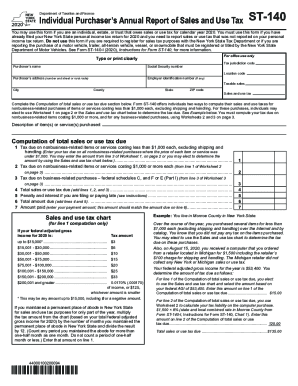
1 500 8 state and local combined rate in Monroe County from Form ST-140-I Instructions for Form ST-140 Chart 1. See Form ST-140-I 2017 Instructions for Form ST-140 for more information. For office use only Type or print clearly Tax jurisdiction code Purchaser s name Social security number Federal identification number if any Location code Taxable sales City County State ZIP code Sales and use tax Complete the Computation of total sales or use tax due section below. Form ST-140 offers individuals two ways to compute their sales and use taxes for nonbusiness-related purchases of items or services costing less than 1 000 each excluding shipping and handling. Department of Taxation and Finance Individual Purchaser s Annual Report of Sales and Use Tax ST-140 You may use this form if you are an individual estate or trust that owes sales or use tax for calendar year 2017. Form ST-140 offers individuals two ways to compute their sales and use taxes for nonbusiness-related purchases of items or....

How it works

  1. Open form

    Open form follow the instructions

  2. Easily sign form

    Easily sign the form with your finger

  3. Share form

    Send filled & signed form or save

How to fill out the NY DTF ST-140 online

The NY DTF ST-140 form is essential for individuals, estates, or trusts reporting sales or use tax for purchases made in 2020. Filling it out online can simplify the process and ensure accuracy in your tax submissions.

Follow the steps to complete the NY DTF ST-140 online effectively.

  1. Click ‘Get Form’ button to obtain the form and open it for editing.
  2. Start by entering your tax jurisdiction code in the specified field to identify your location for tax purposes.
  3. Provide your name, social security number, and address, ensuring all information is typed or printed clearly.
  4. If applicable, enter your employer identification number and location code.
  5. For taxable sales, list all relevant purchases made during the year, detailing the description of items or services.
  6. Proceed to the 'Computation of total sales or use tax due' section. You can choose between using Worksheet 1 or the sales and use tax chart for items costing less than $1,000.
  7. Complete the calculations for tax due on nonbusiness-related items or services, entering amounts in the provided fields.
  8. If you have other taxable purchases costing $1,000 or more, use Worksheet 2 for these calculations.
  9. For business-related purchases, utilize Worksheet 3 and ensure proper documentation and calculations.
  10. Verify the total amounts for each category and ensure that the total sales or use tax due is accurate by adding relevant lines together.
  11. Finally, save your changes, download, print, or share the completed form as necessary to submit it for processing.

Complete your documents online confidently and accurately to ensure compliance with tax regulations.

Get form

Experience a faster way to fill out and sign forms on the web. Access the most extensive library of templates available.
Get form

Related content

Use tax and casual sales - Department of Taxation...
Learn more
[PDF] IT-201-I:2013:Instructions for Form IT-201...
Dec 31, 2012 · DTF-624. New York was issued a certificate of eligibility by New York...
Learn more
Form IT 203 I PBF203B It203i - UserManual.wiki
Learn more

Related links form

IN State Form 55434 2019 IN State Form 9284 2015 IN State Form 9284 2010 IN State Form 9284 2002

Questions & Answers

Get answers to your most pressing questions about US Legal Forms API.

Contact support

The reporting periods covered by quarterly returns are March 1 through May 31, June 1 through August 31, September 1 through November 30, and December 1 through February 28/29.

New York State Department of Tax & Finance (NY DTF) is the tax agency that manages and collects tax revenues to support New York State services and programs. To set up your state tax, here's how: Add your New York employee's information. Set up New York State Tax Information.

The City Sales Tax rate is 4.5%, NY State Sales and Use Tax is 4% and the Metropolitan Commuter Transportation District surcharge of 0.375% for a total Sales and Use Tax of 8.875 percent.

The City Sales Tax rate is 4.5%, NY State Sales and Use Tax is 4% and the Metropolitan Commuter Transportation District surcharge of 0.375% for a total Sales and Use Tax of 8.875 percent.

Log in or create an Online Services account. Select Payments, bills and notices from the Services menu. Then select Make a payment.

Your pension income is not taxable in New York State when it is paid by: New York State or local government. the federal government, including Social Security benefits. certain public authorities.

The state of New York requires you to do all sales tax filing and payment remittance online. You can do one of two things: File online at the New York Department of Taxation and Finance. You must also remit your payment through their online system.

A casual sale is a sale of tangible personal property by a person who is not engaged in the business of selling the type of property involved.

Multiply the taxable sales by the applicable tax rate to calculate the quarterly sales tax. Calculate credits provided by your state. For example, New York State provides a vendor credit of up to $200 per quarter if the business files the sales tax return on time and remits payment with the return.

You may not have had enough withholding from your paycheck or your deductions may have changed, resulting in a lower refund or the need to pay additional taxes with your return. If you claim too many allowances, you won't have enough withheld to cover your tax obligation.

Get This Form Now!

Use professional pre-built templates to fill in and sign documents online faster. Get access to thousands of forms.
Get form
If you believe that this page should be taken down, please follow our DMCA take down processhere.
Get NY DTF ST-140
Get form
  • Adoption
  • Bankruptcy
  • Contractors
  • Divorce
  • Home Sales
  • Employment
  • Identity Theft
  • Incorporation
  • Landlord Tenant
  • Living Trust
  • Name Change
  • Personal Planning
  • Small Business
  • Wills & Estates
  • Packages A-Z
  • Affidavits
  • Bankruptcy
  • Bill of Sale
  • Corporate - LLC
  • Divorce
  • Employment
  • Identity Theft
  • Internet Technology
  • Landlord Tenant
  • Living Wills
  • Name Change
  • Power of Attorney
  • Real Estate
  • Small Estates
  • Wills
  • All Forms
  • Forms A-Z
  • Other Templates
  • Legal Hub
  • About Us
  • Help Portal
  • Legal Resources
  • Blog
  • Affiliates
  • Contact Us
  • Delete My Account
  • Site Map
  • Industries
  • Forms in Spanish
  • Localized Forms
  • State-specific Forms
  • Forms Kit
  • Real Estate Handbook
  • All Guides
  • Notarize
  • Incorporation services
  • For Consumers
  • For Small Business
  • For Attorneys
  • USLegal
  • FormsPass
  • pdfFiller
  • signNow
  • altaFlow
  • DocHub
  • Instapage
Form Packages
  • Adoption
  • Bankruptcy
  • Contractors
  • Divorce
  • Home Sales
  • Employment
  • Identity Theft
  • Incorporation
  • Landlord Tenant
  • Living Trust
  • Name Change
  • Personal Planning
  • Small Business
  • Wills & Estates
  • Packages A-Z
Form Categories
  • Affidavits
  • Bankruptcy
  • Bill of Sale
  • Corporate - LLC
  • Divorce
  • Employment
  • Identity Theft
  • Internet Technology
  • Landlord Tenant
  • Living Wills
  • Name Change
  • Power of Attorney
  • Real Estate
  • Small Estates
  • Wills
  • All Forms
  • Forms A-Z
  • Other Templates
Customer Service
  • Legal Hub
  • About Us
  • Help Portal
  • Legal Resources
  • Blog
  • Affiliates
  • Contact Us
  • Delete My Account
  • Site Map
  • Industries
  • Forms in Spanish
  • Localized Forms
  • State-specific Forms
  • Forms Kit
Legal Guides
  • Real Estate Handbook
  • All Guides
Prepared for you
  • Notarize
  • Incorporation services
Our Customers
  • For Consumers
  • For Small Business
  • For Attorneys
Our Sites
  • USLegal
  • FormsPass
  • pdfFiller
  • signNow
  • altaFlow
  • DocHub
  • Instapage
Social Media
Call us now toll free:
+1 833 426 79 33
As seen in:
© Copyright 1999-2026 airSlate Legal Forms, Inc. 17 Station Street, Ste. 203, Brookline, MA 02445
  • Your Privacy Choices
  • Terms of Service
  • Privacy Notice
  • Content Takedown Policy
  • Bug Bounty Program