Loading
Form preview
  • US Legal Forms
  • Other Templates
  • Tax Forms
  • Executive Department Treasury IRS Forms
  • Irs 2106 2020

Get Irs 2106 2020

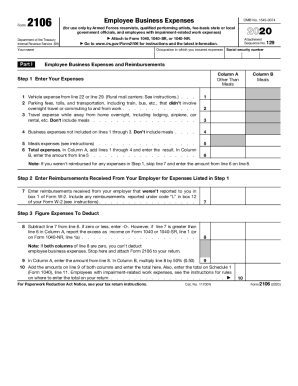
Government officials, and employees with impairment-related work expenses) Attach to Form 1040, 1040-SR, or 1040-NR. Go to www.irs.gov/Form2106 for instructions and the latest information. Your name Part I OMB No. 1545-0074 Occupation in which you incurred expenses Attachment Sequence No. 129 Social security number Employee Business Expenses and Reimbursements Column A Other Than Meals Step 1 Enter Your Expenses 1 Vehicle expense from line 22 or line 29. (Rural mail carriers: Se.

This website is not affiliated with IRS

How it works

  1. Open form

    Open form follow the instructions

  2. Easily sign form

    Easily sign the form with your finger

  3. Share form

    Send filled & signed form or save

How to fill out the IRS 2106 online

The IRS 2106 form, also known as Employee Business Expenses, is essential for users who wish to claim deductions for unreimbursed business expenses. This guide provides clear, step-by-step instructions on how to fill out this form online, ensuring you maximize your potential deductions effectively.

Follow the steps to complete the IRS 2106 form online.

  1. Click ‘Get Form’ button to obtain the form and open it in the editor.
  2. Begin by filling in your name and social security number at the top of the form. Next, indicate the occupation in which you incurred expenses, as this pertains to the deductions you are claiming.
  3. In Part I, list your business expenses under Column A for expenses other than meals. Enter the amounts for vehicle expenses, parking fees, and any travel expenses while away from home. Ensure you do not include meal expenses in these calculations.
  4. Continue in Part I by reporting any meal expenses in Column B. After entering all expenses in both columns, compute the total expenses in line 6.
  5. Next, in Step 2, enter any reimbursements received from your employer for expenses listed in Step 1. This includes reimbursements not reported on your Form W-2.
  6. Proceed to Step 3 to calculate the expenses you are eligible to deduct. Subtract the reimbursements from your total expenses. If the result is zero or less, you cannot deduct employee business expenses.
  7. In Step 3, continue by entering the allowable deductions as instructed. Add up amounts from both columns and ensure you attach the completed form to your tax return.
  8. Finally, review all entries for accuracy. Once completed, you can save your changes, download the form, print it, or share it as needed.

Start filling out your IRS 2106 form online today to ensure you claim all your eligible business expenses.

Get form

Experience a faster way to fill out and sign forms on the web. Access the most extensive library of templates available.

Related content

Instructions for Form 2106 (2018) | Internal...
Who must file Form 2106. The form will be used by Armed Forces reservists, qualified...
Learn more
Top Tax Tips for Nurses - Ameritech College
However, it will likely affect what you can deduct for 2018, so keep an eye on changes for...
Learn more
2017 Publication 907 P907 - UserManual.wiki
2018 ABLE account changes on IRS.gov. ... Instead, you would get a deduction on one of the...
Learn more

Related links form

Glass Breakage Record Sheet D3 Celebratory Signing Form Pdf Start Stop Continue Template Excel Brigada Eskwela Monitoring Tool 2020

Questions & Answers

Get answers to your most pressing questions about US Legal Forms API.

Contact support

The rule requires that you have no more than $16,000 in adjusted gross income; at least two W-2s, each paying at least $200, from entertainment-related companies; and performing-related deductions equal to at least 10 percent of your adjusted gross income.

Employees file this form to deduct ordinary and necessary expenses for their job. An ordinary expense is one that is common and accepted in your field of trade, business, or profession. A necessary expense is one that is helpful and appropriate for your business.

What Was Form 2106: Employee Business Expenses? Form 2106: Employee Business Expenses was a tax form distributed by the Internal Revenue Service (IRS) used by employees to deduct ordinary and necessary expenses related to their jobs.

What Was Form 2106: Employee Business Expenses? Form 2106: Employee Business Expenses was a tax form distributed by the Internal Revenue Service (IRS) used by employees to deduct ordinary and necessary expenses related to their jobs.

About Form 2106, Employee Business Expenses Employees file this form to deduct ordinary and necessary expenses for their job. An ordinary expense is one that is common and accepted in your field of trade, business, or profession. A necessary expense is one that is helpful and appropriate for your business.

Deductions for unreimbursed employee expenses. Workers who made unreimbursed purchases related to their job were able to deduct any amount that exceeded 2 percent of their adjusted gross income in 2017. However, taxpayers won't see that deduction available on their 2018 tax return.

For tax years through 2017, if you itemize deductions and they include some work-related expenses for travel, meals, entertainment or transportation, including use of your own car, and you don't receive reimbursement, then you may need to submit IRS Form 2106 with your tax return.

IRS Releases 2018 Versions of Form 2106 and Publication 463. ... Form 2106 and Instructions. For 2018, this form can be used only by Armed Forces reservists, qualified performing artists, fee-basis state or local government officials, and employees with disabilities who have impairment-related work expenses.

As of the tax year 2018, unreimbursed employee business expenses can no longer be claimed for a tax deduction. That means both Form 2106 and 2106-EZ can no longer be used.

IRS Releases 2018 Versions of Form 2106 and Publication 463. ... Form 2106 and Instructions. For 2018, this form can be used only by Armed Forces reservists, qualified performing artists, fee-basis state or local government officials, and employees with disabilities who have impairment-related work expenses.

Get This Form Now!

Use professional pre-built templates to fill in and sign documents online faster. Get access to thousands of forms.
If you believe that this page should be taken down, please follow our DMCA take down processhere.
Get IRS 2106
  • Adoption
  • Bankruptcy
  • Contractors
  • Divorce
  • Home Sales
  • Employment
  • Identity Theft
  • Incorporation
  • Landlord Tenant
  • Living Trust
  • Name Change
  • Personal Planning
  • Small Business
  • Wills & Estates
  • Packages A-Z
  • Affidavits
  • Bankruptcy
  • Bill of Sale
  • Corporate - LLC
  • Divorce
  • Employment
  • Identity Theft
  • Internet Technology
  • Landlord Tenant
  • Living Wills
  • Name Change
  • Power of Attorney
  • Real Estate
  • Small Estates
  • Wills
  • All Forms
  • Forms A-Z
  • Other Templates
  • Legal Hub
  • About Us
  • Help Portal
  • Legal Resources
  • Blog
  • Affiliates
  • Contact Us
  • Delete My Account
  • Site Map
  • Industries
  • Forms in Spanish
  • Localized Forms
  • State-specific Forms
  • Forms Kit
  • Real Estate Handbook
  • All Guides
  • Notarize
  • Incorporation services
  • For Consumers
  • For Small Business
  • For Attorneys
  • USLegal
  • FormsPass
  • pdfFiller
  • signNow
  • altaFlow
  • DocHub
  • Instapage
Form Packages
  • Adoption
  • Bankruptcy
  • Contractors
  • Divorce
  • Home Sales
  • Employment
  • Identity Theft
  • Incorporation
  • Landlord Tenant
  • Living Trust
  • Name Change
  • Personal Planning
  • Small Business
  • Wills & Estates
  • Packages A-Z
Form Categories
  • Affidavits
  • Bankruptcy
  • Bill of Sale
  • Corporate - LLC
  • Divorce
  • Employment
  • Identity Theft
  • Internet Technology
  • Landlord Tenant
  • Living Wills
  • Name Change
  • Power of Attorney
  • Real Estate
  • Small Estates
  • Wills
  • All Forms
  • Forms A-Z
  • Other Templates
Customer Service
  • Legal Hub
  • About Us
  • Help Portal
  • Legal Resources
  • Blog
  • Affiliates
  • Contact Us
  • Delete My Account
  • Site Map
  • Industries
  • Forms in Spanish
  • Localized Forms
  • State-specific Forms
  • Forms Kit
Legal Guides
  • Real Estate Handbook
  • All Guides
Prepared for you
  • Notarize
  • Incorporation services
Our Customers
  • For Consumers
  • For Small Business
  • For Attorneys
Our Sites
  • USLegal
  • FormsPass
  • pdfFiller
  • signNow
  • altaFlow
  • DocHub
  • Instapage
Social Media
Call us now toll free:
+1 833 426 79 33
As seen in:
© Copyright 1999-2026 airSlate Legal Forms, Inc. 17 Station Street, Suite 303, Brookline, MA 02445
  • Your Privacy Choices
  • Terms of Service
  • Privacy Notice
  • Content Takedown Policy
  • Bug Bounty Program
IRS 2106
This form is available in several versions.
Select the version you need from the drop-down list below.
2024 IRS 2106
Select form
  • 2024 IRS 2106
  • 2022 IRS 2106
  • 2020 IRS 2106
  • 2019 IRS 2106
  • 2018 IRS 2106
  • 2017 IRS 2106
  • 2016 IRS 2106
  • 2013 IRS 2106
  • IRS 2106_DSA
Select form