Loading
Get Irs W-4p 2020-2026
This website is not affiliated with IRS
How it works
-

Open form follow the instructions
-

Easily sign the form with your finger
-

Send filled & signed form or save
How to fill out the IRS W-4P online
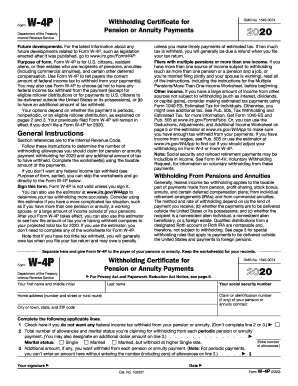
Filling out the IRS W-4P form is essential for managing federal income tax withholding on your pension or annuity payments. This guide provides clear steps to complete the form effectively online, ensuring you make informed choices specific to your financial situation.
Follow the steps to fill out the IRS W-4P correctly.
- Press the ‘Get Form’ button to obtain the IRS W-4P form and open it for editing.
- Enter your personal information in the designated fields, including your first name, middle initial, last name, and social security number.
- Provide your claim or identification number for your pension or annuity contract, as well as your home address, city, state, and ZIP code.
- Decide whether or not you want federal income tax withheld from your payments. If you do not wish to have any taxes withheld, check the box on line 1.
- If you want federal income tax withheld, complete line 2 by indicating the total number of allowances you are claiming based on your financial situation.
- If you wish to have an additional amount withheld from each payment, enter that amount on line 3. Note that you must have entered the number of allowances on line 2 before entering an amount on line 3.
- Ensure you sign and date the form to validate it. The form is not considered valid without your signature.
- Once all sections are complete, save your changes to the form, then you can print or share it as needed.
Complete your IRS W-4P form online today to stay on top of your federal income tax management.
Key Point: The due date for your 2018 Form 1040 is April 15, 2019, unless you live in Maine or Massachusetts, in which case your deadline is April 17, 2019. You can automatically extend your return to Oct. 15, 2019 by filing Form 4868 with the IRS on or before the applicable deadline.