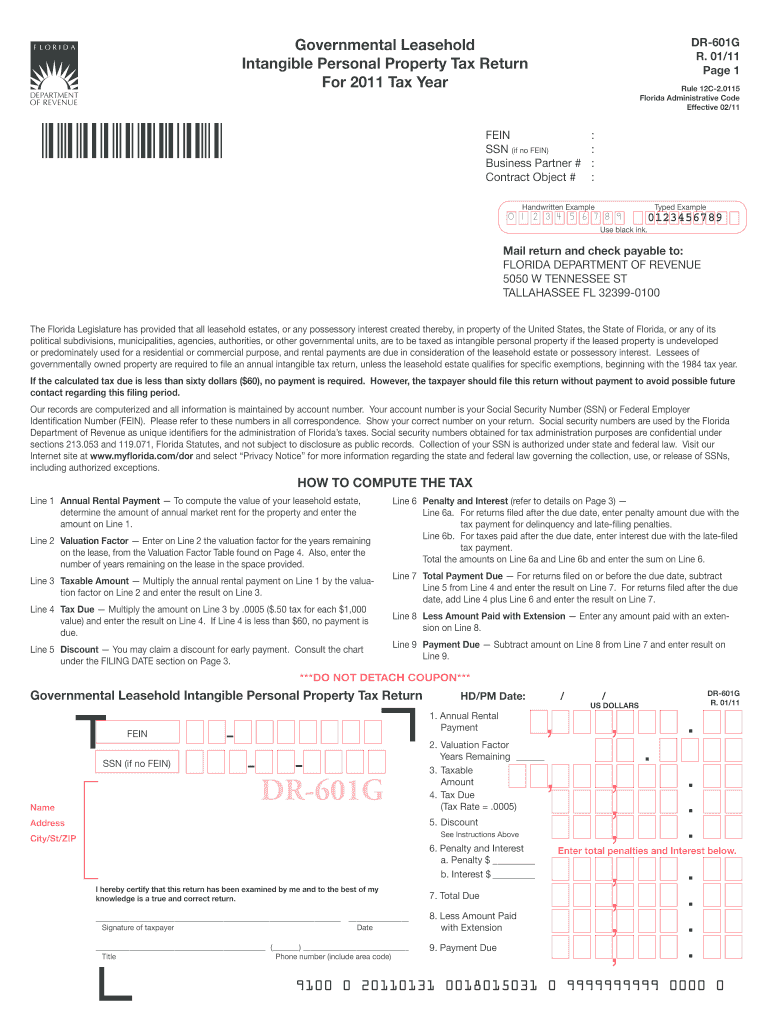
Unt You may claim a discount for early payment. Consult the chart under the FILING DATE section on Page 3. Line 6 Penalty and Interest (refer to details on Page 3) Line 6a. For returns filed after the due date, enter penalty amount due with the tax payment for delinquency and late-filing penalties. Line 6b. For taxes paid after the due date, enter interest due with the late-filed tax payment. Total the amounts on Line 6a and Line 6b and enter the sum on Line 6. Line 7 Total Paymen.
Loading

Open form follow the instructions

Easily sign the form with your finger

Send filled & signed form or save
How to fill out the FL DoR DR-601G online
This guide provides a comprehensive overview of how to accurately fill out the FL DoR DR-601G form online. Whether you are familiar with tax returns or new to the process, this guide offers step-by-step instructions to help you successfully complete your submission.
Follow the steps to complete your FL DoR DR-601G online.
- Use the ‘Get Form’ button to access the FL DoR DR-601G. Open the form in your preferred online editor.
- Enter your Federal Employer Identification Number (FEIN) or Social Security Number (SSN) where indicated. If you do not have a FEIN, provide your SSN.
- Complete the section for your business partner number and contract object number if applicable. Make sure all numbers are accurate.
- In line 1, determine and enter the annual rental payment for the property. This figure represents the market rent for your leasehold estate.
- Refer to the Valuation Factor Table to fill in line 2. Enter the valuation factor corresponding to the number of years remaining on your lease and specify the number of remaining years.
- For line 3, calculate the taxable amount by multiplying the annual rental payment (line 1) by the valuation factor (line 2). Enter the result.
- In line 4, calculate the tax due by multiplying the taxable amount (line 3) by 0.0005 ($0.50 for each $1,000 value). If the result is less than $60, no payment is necessary.
- If applicable, calculate any discount on line 5 for early payment, following the guidelines provided on the form.
- Complete line 6 by entering any penalties and interest incurred for late payments, separating out penalty amounts and interest amounts as necessary.
- Sum up any applicable fees for line 7, based on whether you filed on time or late, and enter the total payment due.
- If you had any pre-payments or extensions, indicate this on line 8 to reduce your payment amount on line 9.
- Finally, review all entries for accuracy. Save your changes, and use the options available to download, print, or share your completed FL DoR DR-601G form as needed.
Complete your FL DoR DR-601G form online today to ensure timely and accurate submission.
Experience a faster way to fill out and sign forms on the web. Access the most extensive library of templates available.
Related content
... FL EL 778'-0". FL EL 778'-0". 3/4 -151G. FL EL 778'-0". 1. FOR MECHANICAL ... DR'S...
At most of the sessions listed above, I prepared, and often distributed, notes of the...
Get answers to your most pressing questions about US Legal Forms API.
What is the tax rate for tangible personal property?
The tax rate for tangible personal property in Florida varies by county, but it generally falls within a set range determined by local governments. It is crucial for business owners to check their county’s specific rates. For accurate calculations, the FL DoR DR-601G form is an essential tool to guide you through the tax filing process.
Do I have to file a tangible property tax return in Florida?
Yes, if you own tangible personal property used for business, you are required to file a tangible property tax return in Florida. Not filing can lead to penalties and complications with the state. Make sure to understand the FL DoR DR-601G process to fulfill your obligations effectively.
Do I have to file an estate tax return in Florida?
In Florida, you are typically only required to file an estate tax return if the estate exceeds certain thresholds set by the IRS. However, submitting an estate tax return can help streamline the estate settlement process. Consider reviewing your situation with the FL DoR DR-601G guidelines to ensure compliance.
What is a Florida Department of Revenue Notice of Final Assessment?
The Florida Department of Revenue Notice of Final Assessment is a document that communicates the tax due on the assessed property. This notice is crucial because it informs taxpayers of their responsibilities and any adjustments made in valuation. Knowing how to respond is important, and utilizing FL DoR DR-601G can assist you with your next steps.
Does tangible personal property go through probate in Florida?
In Florida, tangible personal property is generally considered probate property and does go through probate. This means that any assets like furniture, equipment, or collectibles must be included in the probate process. It’s essential to handle this correctly, and the FL DoR DR-601G can guide you in understanding related tax implications.
Who needs to file a Florida tangible property tax return?
Businesses and individuals who own tangible personal property with a total value exceeding a certain amount need to submit a Florida tangible property tax return. This applies to those operating in various industries and sectors. Utilizing the FL DoR DR-601G form ensures you meet the necessary local and state regulations.
Who is required to file a tangible personal property tax return?
In Florida, any individual or business that owns tangible personal property used for business must file a tangible personal property tax return. This includes commercial equipment, furniture, tools, and machinery. Filing is essential to stay compliant with the FL DoR DR-601G requirements and can help you avoid penalties.
What is the personal income tax form for Florida?
Florida does not impose a personal income tax, which is one of the state's appealing features for residents. Therefore, there’s no specific personal income tax form to file, unlike in many other states. Businesses and property owners should focus on other forms, such as tangible tax returns, including references to FL DoR DR-601G for compliance.
How are doc stamps and intangible taxes calculated in Florida?
Documentary stamp taxes and intangible taxes in Florida are calculated based on the value of the transactions involved. For instance, document stamps are typically levied on documents that transfer interests in property, while intangible taxes are based on the value of certain assets. Knowing how these calculations align with FL DoR DR-601G can ensure you accurately meet your tax obligations.
Who pays tangible property tax in Florida?
Tangible property tax in Florida is owed by both individuals and businesses that own tangible personal property. This can include office equipment, machinery, and inventory. To understand your liability and streamline your tax processes, utilize resources like uslegalforms, aligned with the FL DoR DR-601G.
Use professional pre-built templates to fill in and sign documents online faster. Get access to thousands of forms.
If you believe that this page should be taken down, please follow our DMCA take down process here.
This form is available in several versions. Select the version you need from the drop-down list below.