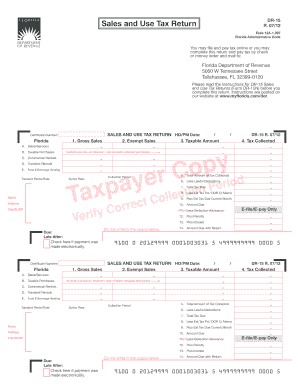
Get Fl Dor Dr-15 2012
How it works
-

Open form follow the instructions
-

Easily sign the form with your finger
-

Send filled & signed form or save
How to fill out the FL DoR DR-15 online
Filling out the FL DoR DR-15 form online can appear daunting, but with a clear understanding of its components, you can easily navigate the process. This guide provides step-by-step instructions to ensure that you complete your Sales and Use Tax Return accurately and efficiently.
Follow the steps to complete your Sales and Use Tax Return online.
- Click ‘Get Form’ button to obtain the form and open it in your preferred editor.
- Enter your certificate number in the specified field. This identifies your business and is essential for your tax return.
- Complete the sections regarding Gross Sales, Exempt Sales, and Taxable Amount. Ensure that all sales are reported accurately for proper tax calculation.
- For taxable purchases and commercial rentals, fill in the corresponding fields with the correct amounts. This helps in determining the rightful tax amounts owed.
- Include any use tax on internet or out-of-state untaxed purchases in the relevant section to comply with tax obligations.
- Fill out the surtax rate applicable to your location. Most counties have a discretionary sales surtax that must be accounted for.
- Calculate and input the total amount of tax collected during the specified collection period. This is crucial for understanding your tax liability.
- Make lawful deductions by providing the necessary documentation and information in the fields meant for lawful deductions.
- Determine the total tax due, factoring in estimated taxes paid and any credit memos from the Department of Revenue.
- Review all included amounts for accuracy and comply with the requirement to declare your true and correct information under penalties of perjury.
- When you are ready, save your changes and utilize the options available to download, print, or share your completed form as necessary.
Compete your documents online today to ensure compliance and ease in your tax reporting.
Get form
Related links form
Calculating the Florida collection allowance for sales tax involves understanding the state's guidelines for permitted deductions. You can refer to information provided by the Florida Department of Revenue, where they explain how the collection allowance works. Utilizing the FL DoR DR-15 can simplify this process, helping you ensure compliance while maximizing your allowable calculations.