Loading
Form preview
  • US Legal Forms
  • Other Templates
  • Tax Forms
  • Florida Tax Forms
  • Fl Dor Dr-15 2018

Get Fl Dor Dr-15 2018

Siness day following the 20th. Penalty. If you file your return or pay tax late, a late penalty of 10% of the amount of tax owed, but not less than $50, may be charged. The $50 minimum penalty applies even if no tax is due. A floating rate of interest also applies to late payments and underpayments of tax. Under penalties of perjury, I declare that I have read this return and the facts stated in it are true. Signature of Taxpayer Date Signature of Preparer ( ).

How it works

  1. Open form

    Open form follow the instructions

  2. Easily sign form

    Easily sign the form with your finger

  3. Share form

    Send filled & signed form or save

How to fill out the FL DoR DR-15 online

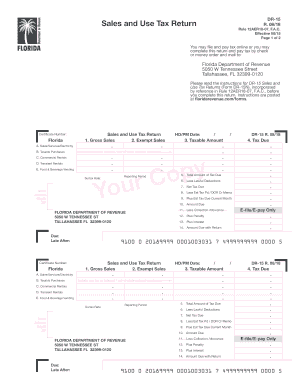
The FL DoR DR-15 is a Sales and Use Tax Return form used by individuals and businesses in Florida to report sales and use taxes. This guide provides a clear, step-by-step process for completing the form online, ensuring you meet all requirements for accurate and timely filing.

Follow the steps to effectively fill out the FL DoR DR-15 online.

  1. Press the ‘Get Form’ button to access the FL DoR DR-15 form and open it in your online editor.
  2. Begin by entering your certificate number in the designated field at the top of the form to identify your business.
  3. Fill out the sections regarding sales, services, and electricity. Input your gross sales and any exempt sales in the appropriate fields.
  4. Include use tax for any Internet or out-of-state purchases that were not taxed and enter this information under the taxable purchases section.
  5. Complete the selections for transient rentals and food and beverage vending if applicable, indicating any relevant amounts.
  6. Calculate the total tax due by entering lawful deductions and any estimated tax payments made or due for the current month in their respective fields.
  7. Finalize the amount due by applying any collection allowances, penalties, or interest as specified in the form.
  8. Make sure to sign the form, providing your signature as the taxpayer or preparer along with the date and telephone number.
  9. Once all fields are completed and reviewed for accuracy, save your changes, and choose the option to download, print, or share the completed form.

Complete and file your FL DoR DR-15 online today for a smooth tax reporting experience.

Get form

Experience a faster way to fill out and sign forms on the web. Access the most extensive library of templates available.

Related content

Discretionary Sales Surtax Information for...
Jan 1, 2021 — See TIP 24A01-15 about surtax suspension. ... 5% local government...
Learn more
Discretionary Sales Surtax Information for...
Jan 1, 2021 — 5% local government infrastructure surtax remains in effect and expires...
Learn more
PSR-S550 Manual do Proprietário
'ипы 15–26 основаны на ритме; при их применении...
Learn more

Related links form

UT USTC TC-20 2012 UT USTC TC-20 2011 UT USTC TC-569A 2013 UT USTC TC-569A 2011

Questions & Answers

Get answers to your most pressing questions about US Legal Forms API.

Contact support

To claim your Florida sales tax back, you can often apply for a refund through the Florida Department of Revenue. First, collect your evidence and complete the appropriate forms, including the FL DoR DR-15. This process allows you to formally request any overpaid taxes, so keep track of your paperwork.

When filing sales tax on your personal tax return, you typically include the amounts collected for state and local taxes in your income reports. Use the FL DoR DR-15 to document the sales tax you collected. Accurate reporting ensures compliance and helps you avoid potential issues with the IRS.

To amend a DR-15 in Florida, you should complete a new FL DoR DR-15 form indicating the correct amounts. Clearly mark the form as an amendment to avoid confusion. You can submit this amended form online or by mail, depending on your original filing method.

Filing your Florida sales tax involves filling out the FL DoR DR-15 form, which you can submit online or via mail. Prepare your sales figures and calculate the tax due based on your total sales. Paying a bit of attention to the details will help avoid mistakes and potential audits.

In Florida, if your taxable sales exceed $5000, you may be subject to a local surtax. This surtax varies by county and is added on top of the state sales tax rate. Always check the current local rates to determine the total you should collect. For assistance, consider using the FL DoR DR-15 form to ensure you accurately report these figures.

To file Florida sales tax, you need to complete the FL DoR DR-15 form. First, gather your sales data for the reporting period. You can file the form online through the Florida Department of Revenue's website or by submitting a paper form. Ensure your calculations are accurate to avoid penalties.

There are several red flags that may lead to a tax audit, such as significantly high earnings reported for your industry or large, unexplained deductions. Additionally, filing an amended return or showing a history of late payments can draw attention. To avoid these issues, keep meticulous records and ensure accuracy when completing your FL DoR DR-15 and other tax forms.

Tax audits are commonly triggered by inconsistencies in a taxpayer’s financial records, especially when reported income doesn’t match third-party information. Another common trigger includes high levels of deductions relative to income, which can raise suspicions. To minimize your risk of an audit, always ensure accurate and thorough reporting, particularly on forms like the FL DoR DR-15.

A tax audit can be triggered by various criteria, such as substantial discrepancies in reported income or expenses, repeated losses, or red flags from previous audits. Factors like large deductions or credits that seem out of place can also attract attention. It's essential to understand these criteria to avoid issues during tax filing or while using forms like the FL DoR DR-15.

Sales and use tax audits may be initiated due to various reasons, including significant discrepancies in reported sales and industry averages. Additionally, frequent changes in inventory, or the failure to remit tax on certain purchases can raise red flags. If your business receives a notice for a potential audit, consider consulting professionals for guidance on managing your FL DoR DR-15 obligations.

Get This Form Now!

Use professional pre-built templates to fill in and sign documents online faster. Get access to thousands of forms.
If you believe that this page should be taken down, please follow our DMCA take down processhere.
Get FL DoR DR-15
  • Adoption
  • Bankruptcy
  • Contractors
  • Divorce
  • Home Sales
  • Employment
  • Identity Theft
  • Incorporation
  • Landlord Tenant
  • Living Trust
  • Name Change
  • Personal Planning
  • Small Business
  • Wills & Estates
  • Packages A-Z
  • Affidavits
  • Bankruptcy
  • Bill of Sale
  • Corporate - LLC
  • Divorce
  • Employment
  • Identity Theft
  • Internet Technology
  • Landlord Tenant
  • Living Wills
  • Name Change
  • Power of Attorney
  • Real Estate
  • Small Estates
  • Wills
  • All Forms
  • Forms A-Z
  • Other Templates
  • Legal Hub
  • About Us
  • Help Portal
  • Legal Resources
  • Blog
  • Affiliates
  • Contact Us
  • Delete My Account
  • Site Map
  • Industries
  • Forms in Spanish
  • Localized Forms
  • State-specific Forms
  • Forms Kit
  • Real Estate Handbook
  • All Guides
  • Notarize
  • Incorporation services
  • For Consumers
  • For Small Business
  • For Attorneys
  • USLegal
  • FormsPass
  • pdfFiller
  • signNow
  • altaFlow
  • DocHub
  • Instapage
Form Packages
  • Adoption
  • Bankruptcy
  • Contractors
  • Divorce
  • Home Sales
  • Employment
  • Identity Theft
  • Incorporation
  • Landlord Tenant
  • Living Trust
  • Name Change
  • Personal Planning
  • Small Business
  • Wills & Estates
  • Packages A-Z
Form Categories
  • Affidavits
  • Bankruptcy
  • Bill of Sale
  • Corporate - LLC
  • Divorce
  • Employment
  • Identity Theft
  • Internet Technology
  • Landlord Tenant
  • Living Wills
  • Name Change
  • Power of Attorney
  • Real Estate
  • Small Estates
  • Wills
  • All Forms
  • Forms A-Z
  • Other Templates
Customer Service
  • Legal Hub
  • About Us
  • Help Portal
  • Legal Resources
  • Blog
  • Affiliates
  • Contact Us
  • Delete My Account
  • Site Map
  • Industries
  • Forms in Spanish
  • Localized Forms
  • State-specific Forms
  • Forms Kit
Legal Guides
  • Real Estate Handbook
  • All Guides
Prepared for you
  • Notarize
  • Incorporation services
Our Customers
  • For Consumers
  • For Small Business
  • For Attorneys
Our Sites
  • USLegal
  • FormsPass
  • pdfFiller
  • signNow
  • altaFlow
  • DocHub
  • Instapage
Social Media
Call us now toll free:
+1 833 426 79 33
As seen in:
© Copyright 1999-2026 airSlate Legal Forms, Inc. 17 Station Street, Suite 303, Brookline, MA 02445
  • Your Privacy Choices
  • Terms of Service
  • Privacy Notice
  • Content Takedown Policy
  • Bug Bounty Program
FL DoR DR-15
This form is available in several versions.
Select the version you need from the drop-down list below.
2020 FL DoR DR-15
Select form
  • 2020 FL DoR DR-15
  • 2019 FL DoR DR-15
  • 2018 FL DoR DR-15
  • 2015 FL DoR DR-15
  • 2013 FL DoR DR-15
  • 2012 FL DoR DR-15
Select form