Loading
Form preview
  • US Legal Forms
  • Form Library
  • Tax Forms
  • Executive Department Treasury IRS Forms
  • Treasury Fs 1522 2012

Get Treasury Fs 1522 2012

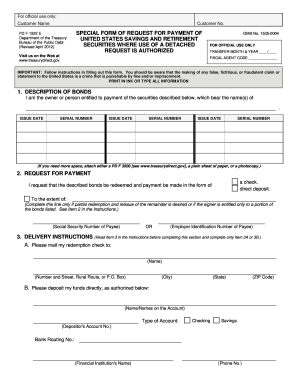
Form 1522 Department of the Treasury Bureau of the Fiscal Service (Revised July 2015) Visit us on the Web at www.treasurydirect.gov OMB No. 1530-0028 FOR OFFICIAL USE ONLY TRANSFER MONTH & YEAR / FISCAL AGENT CODE IMPORTANT: Follow instructions in filling out this form. You should be aware that the making of any false, fictitious, or fraudulent claim or statement to the United States is a crime that is punishable by fine and/or imprisonment. PRINT IN INK OR TYPE ALL INFO.

How it works

  1. Open form

    Open form follow the instructions

  2. Easily sign form

    Easily sign the form with your finger

  3. Share form

    Send filled & signed form or save

How to fill out the Treasury FS 1522 online

Filling out the Treasury FS 1522 form is essential for individuals seeking redemption of United States Savings and Retirement Securities. This guide provides clear instructions on how to efficiently complete the form online, ensuring that all necessary information is accurately provided.

Follow the steps to complete the Treasury FS 1522 online.

  1. Click ‘Get Form’ button to obtain the form and open it in the editor.
  2. In the first section, 'Description of Bonds', provide the names of the individuals listed on the securities that you are looking to redeem. Enter the issue dates and serial numbers corresponding to each bond. If additional space is required, attach a supplemental document as indicated.
  3. Move to 'Request for Payment'. Indicate your desired payment option by marking the appropriate box — either in full or the extent of the bonds. If requesting a partial payment, specify the amount. Ensure you also include the required Taxpayer Identification Number, providing either the Social Security Number or Employer Identification Number.
  4. In the 'Delivery Instructions' section, fill in the names on the account, type of account (checking or savings), your bank account number, and the nine-digit bank routing number. It is advisable to verify this information with your financial institution.
  5. Complete the 'Signature' section. Sign the form in ink and print your name. Provide your current address, daytime telephone number, and, if applicable, an email address. If applicable, mention any name changes clearly.
  6. After filling in all required sections, remember to review your entries for accuracy before submission. Save any changes, and you may choose to download, print, or share the completed form as necessary.

Complete your Treasury FS 1522 form online now for a smooth redemption process.

Get form

Experience a faster way to fill out and sign forms on the web. Access the most extensive library of templates available.

Related content

Special Form of Request for Payment of United...
This form is a special request for payment of US savings and retirement securities, where...
Learn more
31 CFR § 360.24 - Payment pursuant to judicial or...
Fiscal Service Form 1522 must specify: the contact point; the issue date of each bond; the...
Learn more
Annual Financial Statements 2019 Daimler AG
Dec 31, 2019 — The 2019 Daimler AG financial statements include a Balance Sheet, Income...
Learn more

Related links form

TN DoR FAE 183 2018 TN DoR INC 250 2018 TN DoR INC 250 2015 TN DoR INC 250 2013

Questions & Answers

Get answers to your most pressing questions about US Legal Forms API.

Contact support

FS Form 1522 should be mailed to the address indicated on the form's instructions. This address helps ensure that your submission reaches the correct processing department at the Treasury. Double-checking the mailing address can prevent potential delays. For more structured help with this process, consider leveraging services from U.S. Legal Forms.

To mail in savings bonds, you typically need to complete FS form 1522. This form provides the necessary information for processing. Ensure you follow all instructions included with the form for a smooth submission. Utilizing U.S. Legal Forms can help in obtaining the correct documents and guidance through the process.

Filling out FS form 1522 involves entering your personal information, including details about the bonds in question. Follow each section carefully to ensure completeness. If you encounter challenges, consider referencing the guidance available from the Treasury or use U.S. Legal Forms for assistance. Accurate completion helps prevent issues later on.

You should send your FS form 1522 to the address specified in the form's instructions, usually to a Treasury processing center. This helps ensure that your forms are processed without delays. For specific situations, checking the latest guidelines on the Treasury website can be beneficial. Using U.S. Legal Forms can streamline this process for you.

Sending bonds via certified mail is often a good idea, especially for security purposes. This method provides proof of mailing and delivery which can be crucial for sensitive documents, such as those related to the Treasury FS 1522. Use certified mail for peace of mind when returning any financial documents.

To report a cashed bond on your taxes, include the interest as income on your tax return. You'll often use Schedule B if necessary. Tracking your cashing of bonds using the Treasury FS 1522 makes reporting simpler. It's advisable to consult with a tax professional for any complex situations.

The mailing address for TreasuryDirect is P.O. Box 426, Parkersburg, WV 26106-0426. Be sure to confirm this address before sending any documents, especially if you are working with the Treasury FS 1522. Always use the correct address to ensure timely processing of your requests.

Retrieving a bond usually starts by logging into your TreasuryDirect account or contacting customer support if you encounter difficulties. If you own a physical bond, you may need to complete specific forms to request a replacement or redemption. Always keep your Treasury FS 1522 handy to confirm your identity and expedite the retrieval process.

To obtain a TreasuryDirect tax form, you can log into your TreasuryDirect account and navigate to the tax forms section. The forms available will include interest statements and IRS documents you may need. For specific inquiries, your Treasury FS 1522 will be helpful.

Retrieving Treasury Bonds from your account involves accessing your TreasuryDirect profile. For paper bonds, you will have to fill out the appropriate forms and send them to the appropriate address. Keep an eye on your Treasury FS 1522 for any updates regarding retrieval processes.

Get This Form Now!

Use professional pre-built templates to fill in and sign documents online faster. Get access to thousands of forms.
If you believe that this page should be taken down, please follow our DMCA take down processhere.
Get Treasury FS 1522
  • Adoption
  • Bankruptcy
  • Contractors
  • Divorce
  • Home Sales
  • Employment
  • Identity Theft
  • Incorporation
  • Landlord Tenant
  • Living Trust
  • Name Change
  • Personal Planning
  • Small Business
  • Wills & Estates
  • Packages A-Z
  • Affidavits
  • Bankruptcy
  • Bill of Sale
  • Corporate - LLC
  • Divorce
  • Employment
  • Identity Theft
  • Internet Technology
  • Landlord Tenant
  • Living Wills
  • Name Change
  • Power of Attorney
  • Real Estate
  • Small Estates
  • Wills
  • All Forms
  • Forms A-Z
  • Form Library
  • Legal Hub
  • About Us
  • Help Portal
  • Legal Resources
  • Blog
  • Affiliates
  • Contact Us
  • Delete My Account
  • Site Map
  • Industries
  • Forms in Spanish
  • Localized Forms
  • State-specific Forms
  • Forms Kit
  • Real Estate Handbook
  • All Guides
  • Notarize
  • Incorporation services
  • For Consumers
  • For Small Business
  • For Attorneys
  • USLegal
  • FormsPass
  • pdfFiller
  • signNow
  • altaFlow
  • DocHub
  • Instapage
Form Packages
  • Adoption
  • Bankruptcy
  • Contractors
  • Divorce
  • Home Sales
  • Employment
  • Identity Theft
  • Incorporation
  • Landlord Tenant
  • Living Trust
  • Name Change
  • Personal Planning
  • Small Business
  • Wills & Estates
  • Packages A-Z
Form Categories
  • Affidavits
  • Bankruptcy
  • Bill of Sale
  • Corporate - LLC
  • Divorce
  • Employment
  • Identity Theft
  • Internet Technology
  • Landlord Tenant
  • Living Wills
  • Name Change
  • Power of Attorney
  • Real Estate
  • Small Estates
  • Wills
  • All Forms
  • Forms A-Z
  • Form Library
Customer Service
  • Legal Hub
  • About Us
  • Help Portal
  • Legal Resources
  • Blog
  • Affiliates
  • Contact Us
  • Delete My Account
  • Site Map
  • Industries
  • Forms in Spanish
  • Localized Forms
  • State-specific Forms
  • Forms Kit
Legal Guides
  • Real Estate Handbook
  • All Guides
Prepared for you
  • Notarize
  • Incorporation services
Our Customers
  • For Consumers
  • For Small Business
  • For Attorneys
Our Sites
  • USLegal
  • FormsPass
  • pdfFiller
  • signNow
  • altaFlow
  • DocHub
  • Instapage
Social Media
Call us now toll free:
+1 833 426 79 33
As seen in:
© Copyright 1999-2026 airSlate Legal Forms, Inc. 17 Station Street, Suite 303, Brookline, MA 02445
  • Your Privacy Choices
  • Terms of Service
  • Privacy Notice
  • Content Takedown Policy
  • Bug Bounty Program
Treasury FS 1522
This form is available in several versions.
Select the version you need from the drop-down list below.
2019 Treasury FS 1522
Select form
  • 2019 Treasury FS 1522
  • 2016 Treasury FS 1522
  • 2015 Treasury FS 1522
  • 2014 Treasury FS 1522
  • 2012 Treasury FS 1522
Select form