Bonds, notes, mortgages, and other taxable interest. (See instructions.) Description Income Type Enter I for interest or D for dividends. Amount Round to the nearest dollar. Total taxable dividends and interest. Enter on Line 1 ................................................................................... Schedule B - Non-Taxable Dividends and Interest List dividends from national and Tennessee chartered bank stock, credit unions, building or savings and loan companies, and Tennessee lice.

How it works
  • Open form

    Open form follow the instructions

  • Easily sign form

    Easily sign the form with your finger

  • Share form

    Send filled & signed form or save

How to fill out the TN DoR INC 250 online

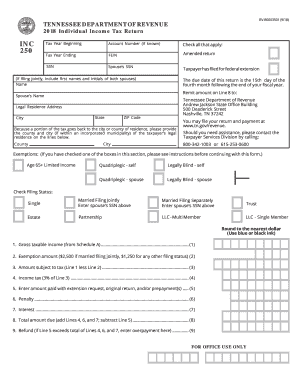
This guide provides comprehensive instructions for completing the Tennessee Department of Revenue's Individual Income Tax Return, known as the TN DoR INC 250, online. By following these steps, users can effectively navigate the form, ensuring accurate and timely submission.

Follow the steps to complete the TN DoR INC 250 online successfully.

  1. Press the ‘Get Form’ button to obtain the TN DoR INC 250 and open it in the online editor.
  2. Fill in the Tax Year Beginning and Tax Year Ending fields with the appropriate dates for your tax return.
  3. Provide your Account Number if you know it; otherwise, you may leave this blank.
  4. Indicate whether you are filing an Amended Return by checking the appropriate box if applicable.
  5. Input your Social Security Number (SSN) and, if applicable, your spouse’s SSN in the respective fields.
  6. Enter both your names as well as your spouse’s name, if filing jointly, including initials.
  7. Fill in your Legal Residence Address, including State, City, and ZIP Code.
  8. Provide the name of the County and City of your legal residence as requested.
  9. Check the applicable exemptions based on your age or disability status.
  10. Select your Filing Status by checking the appropriate box: Single, Married Filing Jointly (include spouse's SSN), Married Filing Separately (include spouse's SSN), Trust, Estate, Partnership, LLC - Multi Member, or LLC - Single Member.
  11. Transfer your Gross Taxable Income from Schedule A on Line 1.
  12. Enter the Exemption Amount on Line 2 based on your filing status.
  13. Calculate Amount Subject to Tax by subtracting Line 2 from Line 1 and enter this on Line 3.
  14. Calculate your Income Tax by multiplying the amount on Line 3 by the tax rate of 3% and enter the figure on Line 4.
  15. Enter any amount previously paid with an extension request or other payments on Line 5.
  16. Calculate the Penalty for late filing based on the guidelines and enter it on Line 6.
  17. Calculate Interest due on any unpaid tax amount as of the due date, according to state regulations, and enter it on Line 7.
  18. Sum Lines 4, 6, and 7, and subtract Line 5 to determine the Total Amount Due on Line 8.
  19. If applicable, enter the Refund amount on Line 9, indicating any overpayment.
  20. Review your completed form for accuracy, then save your changes, download it, or print it for submission.

Complete your TN DoR INC 250 online to ensure a smooth filing process.

Get form

Experience a faster way to fill out and sign forms on the web. Access the most extensive library of templates available.

Related content

State Tobacco Sales

... tn.gov & AGTobPact@ag.tn.gov, Year / Month. 9 ... D.O. R. showing each and every...

Learn more
Tofoli_LF_2004_Doutorado.pdf

by LFF Tófoli · Cited by 6 — ACL. ANALISE DE CLASSES LATENTES. AACL ANÁLISE DE...

Learn more
KOMPLETE KONTROL S-Series Manual French

▫ Inc : ce mode permet de configurer une liste de valeurs envoyées successivement à...

Learn more
Questions & Answers

Get answers to your most pressing questions about US Legal Forms API.

Contact support

Why am I getting a letter from TN Department of Revenue?

Receiving a letter from the TN Department of Revenue often indicates that there are updates or actions required regarding your business taxes. This could include notices about outstanding taxes or compliance reminders related to the TN DoR INC 250. It’s wise to respond promptly to avoid further issues.

TN Inc 250 refers to the Tennessee Department of Revenue's business tax requirements for corporations. This specific filing is crucial for compliance and avoiding penalties. If you are unsure how to proceed, platforms like uslegalforms can guide you through this process.

Receiving a $250 check from the Georgia Department of Revenue typically means you qualify for a refund or rebate related to state taxes. It's important to confirm your eligibility for the TN DoR INC 250 during your records review to avoid confusion.

Tennessee's sales tax rate can seem high due to a combination of state and local taxes that contribute to overall costs. This funding is vital for various public services. As a business owner, understanding the implications of the TN DoR INC 250 can help you budget accordingly.

The TN excise tax applies to corporations and other business entities earning income in the state. This tax is calculated based on the net income from their business operations. Businesses should always consider the TN DoR INC 250 while ensuring compliance for their excise tax obligations.

In Tennessee, you may notice two separate taxes on your receipt: sales tax and local tax. The state sales tax applies statewide, while local tax varies by city and county. For clarity on your obligations related to the TN DoR INC 250, checking with your local tax office can prove helpful.

The TN business tax is a tax that applies to most businesses operating in Tennessee. It is based on the gross sales of the business, not on its net income. Understanding the TN DoR INC 250 can help you navigate these tax requirements effectively.

Tennessee does not have a state income tax on wages, but it does tax interest and dividends. For handling your taxes accurately, using services like TurboTax in conjunction with the TN DoR INC 250 can help clarify your obligations. Utilize these resources for a streamlined tax filing experience.

Yes, LLCs operating in Tennessee must file a tax return, even if they do not owe state income tax. The TN DoR INC 250 is useful for LLCs to understand their filing requirements. Proper compliance will help maintain your business's good standing with state authorities.

To file Tennessee state taxes, you will need to collect your income information and prepare the necessary documents. Most individuals can file through the TN DoR INC 250, which provides a clear process to complete your filing online. With the right tools, you can easily manage your tax obligations.

Get This Form Now!

Use professional pre-built templates to fill in and sign documents online faster. Get access to thousands of forms.

If you believe that this page should be taken down, please follow our DMCA take down process here.

TN DoR INC 250 Form

This form is available in several versions. Select the version you need from the drop-down list below.

Get TN DoR INC 250