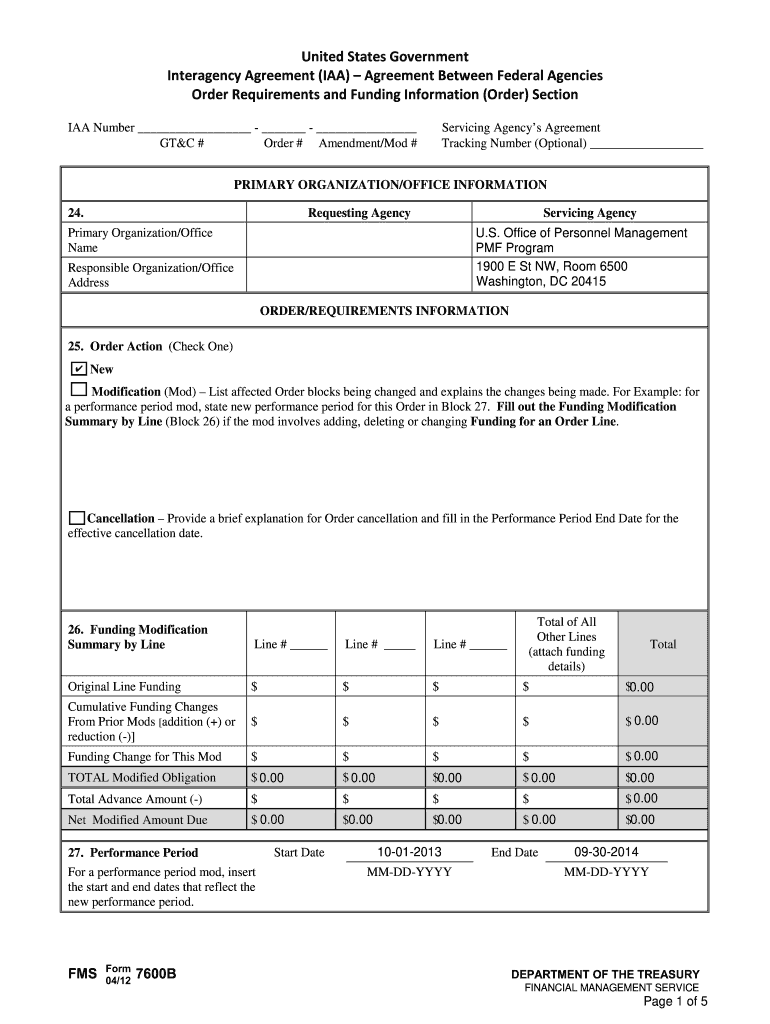
GT&C # Order # Amendment/Mod # Servicing Agency s Agreement Tracking Number (Optional) PRIMARY ORGANIZATION/OFFICE INFORMATION 24. Requesting Agency Servicing Agency U.S. Office of Personnel Management PMF Program 1900 E St NW, Room 6500 Washington, DC 20415 Primary Organization/Office Name Responsible Organization/Office Address ORDER/REQUIREMENTS INFORMATION 25. Order Action (Check One) New Modification (Mod) List affected Order blocks bein.

Open form follow the instructions

Easily sign the form with your finger

Send filled & signed form or save
How to fill out the Treasury FMS 7600B online
The Treasury FMS 7600B is an essential form used for interagency agreements among federal agencies. This guide provides clear, step-by-step instructions on how to accurately complete the form online, ensuring a smooth submission process.
Follow the steps to successfully complete the Treasury FMS 7600B online.
- Click the ‘Get Form’ button to access the Treasury FMS 7600B online for editing.
- Fill in the IAA Number, GT&C Number, Order Number, and Amendment/Mod Number at the top of the form. Ensure all identifiers are correct to avoid processing delays.
- In the Primary Organization/Office Information section, enter the details for the Requesting Agency and the Servicing Agency, including the organization name and the physical address.
- In the Order/Requirements Information section, select the appropriate Order Action: New, Modification, or Cancellation. Provide any needed details for each chosen action.
- Complete the Funding Modification Summary by Line, detailing original line funding and cumulative funding changes as necessary. Ensure that total modified obligations reflect any changes.
- Specify the Performance Period Start and End Dates if applicable. This is particularly crucial for modification orders.
- For the Order Line/Funding Information, fill in the line number and both the Requesting Agency and Servicing Agency Funding Information, including ALC and object class codes.
- Complete the Advance Information section only if the advance payment for products/services is indicated. Specify the total advance amount and the revenue recognition methodology.
- List any relevant attachments that support the order, such as project milestones or additional documentation.
- Select the Payment Method, Billing Frequency, and Payment Terms based on your agreement's stipulations.
- Fill out the Deliver/Shipping Information if products are being shipped. Include the Point of Contact's details and the delivery address.
- Complete the Approval and Contact Information sections, ensuring that program officials and funding officials' details are filled out accurately.
- Review all the information for accuracy. Once everything is complete, you can save changes, download, print, or share the form as needed.
Start filling out your Treasury FMS 7600B online today to facilitate your interagency agreements.
Experience a faster way to fill out and sign forms on the web. Access the most extensive library of templates available.
Related content
Formerly known as FMS Case Identifier, the Security Cooperation Case. Designator is used...
LEAD. TRANSFORM. DELIVER. FS Form 7600A (06-10). Department of the Treasury | Bureau of...
Get answers to your most pressing questions about US Legal Forms API.
What is the priority order indicator?
The priority order indicator is a crucial element in the Treasury FMS 7600B process, determining the sequence in which funds should be released among various requests. It helps agencies prioritize their financial commitments, allowing for optimal resource allocation in critical scenarios. Understanding this indicator can enhance financial planning and management within federal agencies.
What is the 7600B funding document?
The 7600B funding document serves as a vital record for documenting the allocation of funds between federal agencies. It outlines the specifics of the financial transaction, ensuring transparency and accountability in the use of taxpayer dollars. By utilizing the Treasury FMS 7600B, agencies can manage their financial responsibilities more effectively.
What is the purpose of the 7600B?
The primary purpose of the Treasury FMS 7600B is to facilitate the transfer of funds between federal accounts. This document ensures that resources are allocated properly, enhancing financial accountability within federal agencies. Users benefit from a streamlined process when initiating transfers, promoting efficient government operations.
What is Treasury payment system?
The Treasury payment system refers to the overarching framework through which the U.S. Department of the Treasury processes payments to federal agencies. This system ensures that funds are distributed accurately and efficiently, facilitating financial transactions across various government programs. The integration of the Treasury FMS 7600B within this system optimizes the transfer of funds, ensuring smooth operational flows.
What is the difference between 7600A and 7600B?
The Treasury FMS 7600A and 7600B forms serve distinct purposes within the federal financial management system. While the 7600A form authorizes federal agencies to set up accounts, the 7600B form is specifically designed for transferring funds between accounts. Understanding this difference is essential for anyone involved in federal financial processes or transactions.
How secure is the TreasuryDirect website?
The TreasuryDirect website employs robust security measures to protect user data and transactions. Utilizing encryption and regular security updates, the platform ensures that information remains safe and secure. As a user, you can confidently engage with Treasury FMS 7600B transactions knowing that your financial information is well-protected.
Is the TreasuryDirect website working?
Generally, the TreasuryDirect website is functional and allows users to access their accounts and complete transactions. However, occasional maintenance may cause temporary disruptions. If you encounter issues, you might want to check for updates on their official social media channels or customer service for assistance regarding the Treasury FMS 7600B.
What is the difference between the IRS and the Department of Treasury?
The IRS, or Internal Revenue Service, primarily focuses on tax collection and tax law enforcement, while the Department of Treasury manages federal finances, including currency issuance and government debt. Understanding this distinction can help you navigate financial matters better, including activities related to the Treasury FMS 7600B. Both entities work closely to ensure financial accountability and transparency.
What is the official Treasury website?
The official Treasury website is , where you can find comprehensive information about U.S. financial services. This includes details regarding the Treasury FMS 7600B form, along with other resources related to government finances and investments. Always refer to this site to ensure you're getting accurate and reliable information.
What is the priority order?
Priority order refers to the sequence in which tasks or agreements should be addressed, especially in a financial context. For the Treasury FMS 7600B, establishing a clear priority order can enhance workflow efficiency and compliance. This systematic approach assists organizations in managing their financial obligations effectively.
Use professional pre-built templates to fill in and sign documents online faster. Get access to thousands of forms.
If you believe that this page should be taken down, please follow our DMCA take down process here.