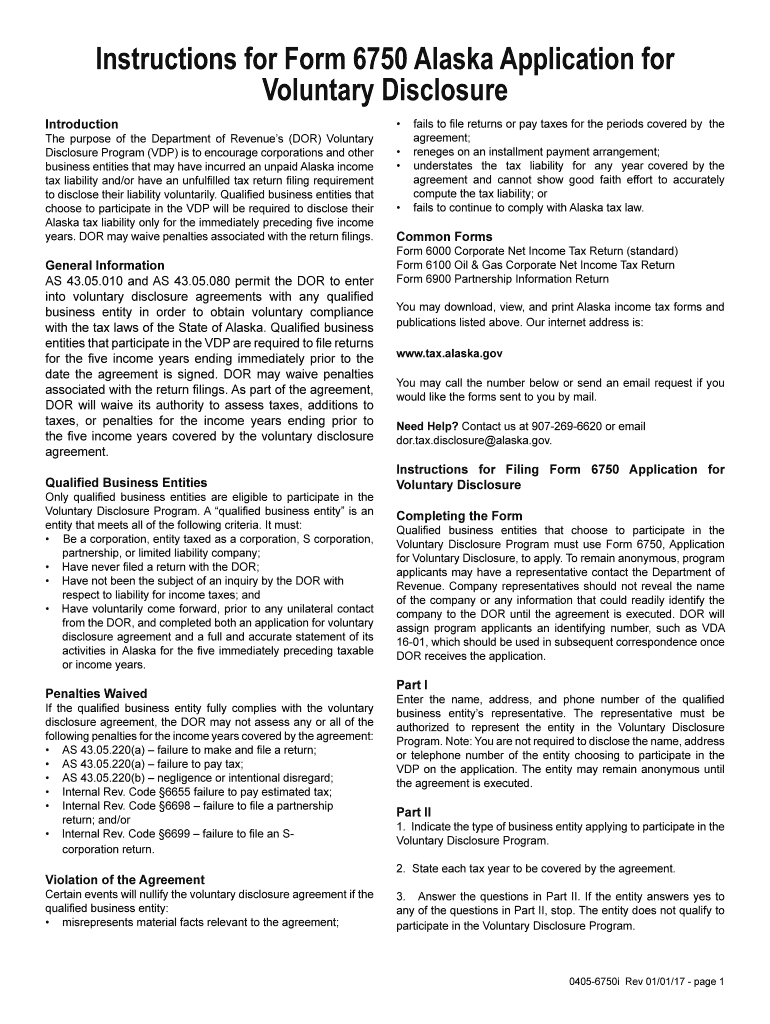
S and other business entities that may have incurred an unpaid Alaska income tax liability and/or have an unfulfilled tax return filing requirement to disclose their liability voluntarily. Qualified business entities that choose to participate in the VDP will be required to disclose their Alaska tax liability only for the immediately preceding five income years. DOR may waive penalties associated with the return filings. General Information AS 43.05.010 and AS 43.05.080 permit the DOR to enter.
Loading

Open form follow the instructions

Easily sign the form with your finger

Send filled & signed form or save
How to fill out the AK 0405-6750i online
Filling out the AK 0405-6750i form, Application for Voluntary Disclosure, is an essential step for qualified business entities seeking to address unpaid Alaska income tax liabilities. This guide provides clear and step-by-step instructions to help you complete the form accurately and efficiently.
Follow the steps to complete the AK 0405-6750i form online.
- Click the ‘Get Form’ button to access the AK 0405-6750i application and open it in the online editor.
- In Part I, enter the name, address, and phone number of the authorized representative for your business entity. Remember, you do not need to disclose the entity's information to remain anonymous until the agreement is executed.
- In Part II, specify the type of business entity applying for the Voluntary Disclosure Program, and clearly state each tax year that will be included in the agreement. Answer all questions honestly; if you answer yes to any of them, the entity does not qualify for the program.
- In Part III, on Exhibit 1, provide a detailed description of the business activities, the reasons for entering the Voluntary Disclosure Program, the proposed settlement terms, and the number of corporate partners or members if applicable. Ensure that partnerships or LLCs with only individual partners are aware they do not need to file in Alaska.
- Complete Part IV on Exhibit 2 by including your estimated taxes due, itemized by year along with the necessary computations to support your estimates.
- Finally, an authorized representative must sign the application in Part V. After submission, the Department of Revenue will reach out for any additional information if needed. Note that acceptance of the proposed settlement may vary based on the submitted information.
- Once you have filled out the form, save your changes, and consider downloading, printing, or sharing the completed application for your records.
Complete your AK 0405-6750i form online today to address your tax obligations.
Experience a faster way to fill out and sign forms on the web. Access the most extensive library of templates available.
Related content
Jul 26, 2018 — A.K. FICKEL. 402 S LINCOLN. CHANUTE KS 66720. Check. $50.00. 07/26/18...
Este libro contiene instrucciones para la instalación, operación y prueba de la Unidad...
Get answers to your most pressing questions about US Legal Forms API.
How do I file AK 1?
To file an AK 1, start by obtaining the necessary forms from the IRS or your state’s tax authority. Fill out the form with accurate information regarding your income and distribution. If you need additional support, tools available through AK 0405-6750i can provide guidance for a successful filing experience.
How to file k1 turbo tax?
To file a K-1 with TurboTax, first locate the 'Other Income' section. Enter the income and other relevant details directly from the K-1 form. Following the prompts in TurboTax allows for a smooth filing process. If you encounter any issues, AK 0405-6750i can help clarify your needs.
How to file form 1065 online?
To file Form 1065 online, use the IRS website or tax software that supports this form. Most online tax programs guide you through the necessary steps, ensuring your partnership income is reported correctly. For seamless filing, AK 0405-6750i can provide essential tools and information.
Which version of TurboTax handles K-1?
TurboTax Deluxe and higher versions handle K-1s effectively. These versions provide the necessary tools to report income received from partnerships or S corporations. If you are working with a K-1, using these TurboTax versions ensures comprehensive support, from input to filing. For extra help, consider referencing AK 0405-6750i.
Why is Schedule K1 not available on TurboTax?
There can be several reasons why Schedule K-1 is not available on TurboTax. It could be due to the version of TurboTax you are using or if the K-1 has not been input correctly. For best results, make sure to use a version of TurboTax that supports K-1 filings, or refer to AK 0405-6750i for alternative solutions.
How to file Alaska PFD on taxes?
To file your Alaska Permanent Fund Dividend (PFD) on your taxes, include the amount on your federal tax return as income. The IRS requires you to report any taxable income from PFDs. Using platforms like AK 0405-6750i can simplify the filing process and help ensure accuracy.
How do I report K-1 on my tax return?
Reporting a K-1 on your tax return involves including the income and losses shown on the form. You will typically enter the amounts from the K-1 into the corresponding sections of your Form 1040 and other necessary forms. If you're unsure about the process, consider consulting tools associated with AK 0405-6750i for guidance.
Are K-1 distributions considered income?
Yes, K-1 distributions are generally considered income. When you receive a K-1 form, it typically reflects your share of income, losses, and other tax items from a partnership or S corporation. Therefore, it's crucial to report these distributions when filing your taxes. If you need assistance, resources like AK 0405-6750i can help clarify your situation.
Where to put 0 or 1 on W4?
On the W-4 form for the AK 0405-6750i, you will find a section dedicated to allowances. Here, you can indicate 0 or 1 based on your situation. Simply write your chosen number in the appropriate box, and ensure the form is complete before submitting it to your employer, as it directly affects your paycheck withholding.
What should I put for withholding allowance?
When determining what to put for withholding allowances on the AK 0405-6750i, consider your tax situation. Factors such as your marital status, dependents, and additional deductions can influence the number of allowances you qualify for. Use available worksheets or calculators to guide your decision, as accuracy is crucial for effective tax withholding.
Use professional pre-built templates to fill in and sign documents online faster. Get access to thousands of forms.
If you believe that this page should be taken down, please follow our DMCA take down process here.
This form is available in several versions. Select the version you need from the drop-down list below.