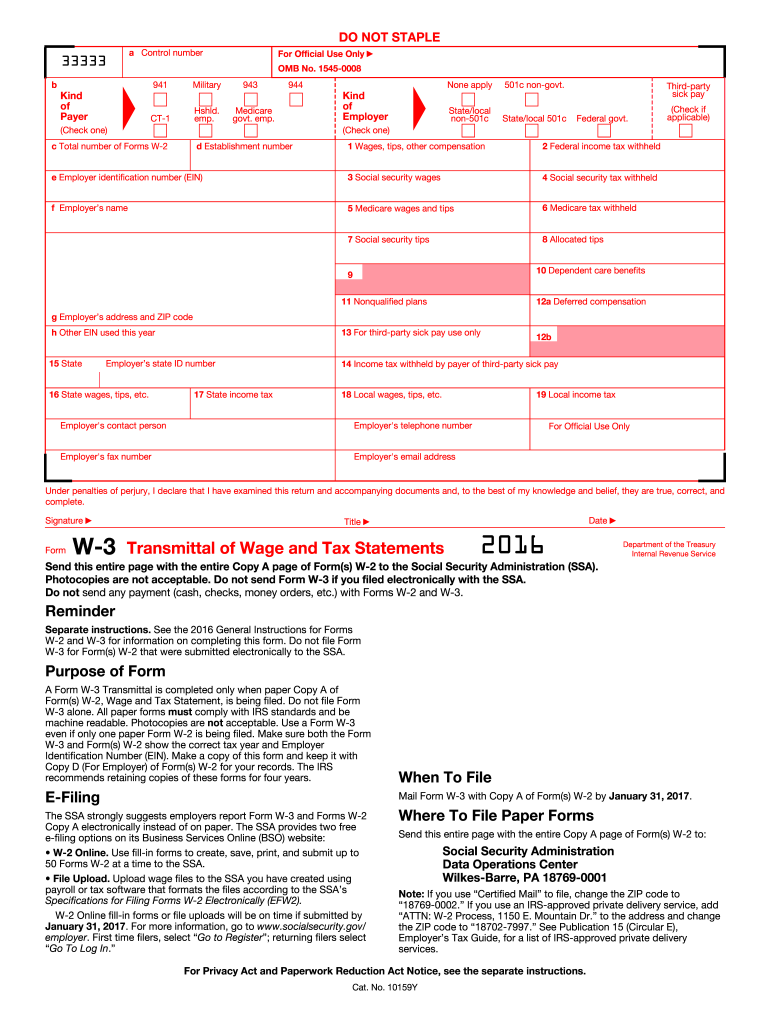
SA. Purpose of Form A Form W-3 Transmittal is completed only when paper Copy A of Form(s) W-2, Wage and Tax Statement, is being filed. Do not file Form W-3 alone. All paper forms must comply with IRS standards and be machine readable. Photocopies are not acceptable. Use a Form W-3 even if only one paper Form W-2 is being filed. Make sure both the Form W-3 and Form(s) W-2 show the correct tax year and Employer Identification Number (EIN). Make a copy of this form and keep it with Copy D (For Emp.

Open form follow the instructions

Easily sign the form with your finger

Send filled & signed form or save
How to fill out the IRS W-3 online
Filling out the IRS W-3 form online is a straightforward process that ensures you accurately report wages and tax information to the Social Security Administration. This guide will walk you through each section of the form, providing clear instructions to help you complete it correctly.
Follow the steps to complete the IRS W-3 form online.
- Click ‘Get Form’ button to obtain the W-3 form and open it in your preferred editor.
- Begin by filling in the control number, if applicable. This is often used for your internal tracking.
- Choose the kind of employer by checking the appropriate box. Options include 941, CT-1, 943, etc., based on your employment type.
- Enter your establishment number if applicable, or select 'None apply' if it does not pertain to you.
- Complete the employer identification number (EIN) field, ensuring it is accurate as this number links your business to the Social Security Administration.
- Fill in the employer’s name along with their address and ZIP code.
- Provide the total number of Forms W-2 being submitted with this W-3 form. This should match the corresponding W-2 forms.
- Input wages, tips, and other compensation amounts in the respective fields along with any federal income tax withheld.
- Complete the sections regarding Social Security and Medicare wages as well as related taxes, ensuring all totals reflect your payroll records.
- List any allocated tips, dependent care benefits, or nonqualified plans if applicable.
- In the final section, sign the form, providing your title, and date it to validate the information.
- After reviewing all entries for accuracy, you can save changes, download, print, or securely share the completed form.
Start filling out your IRS W-3 form online today to ensure timely and accurate reporting.
Experience a faster way to fill out and sign forms on the web. Access the most extensive library of templates available.
Related content
Jun 24, 2025 — Information about Form W-3, Transmittal of Wage and Tax Statements (Info...
Jan 26, 2024 — Do not use these forms to report wages subject to U.S. income tax...
May 2, 2017 — Be sure that the payer's name and EIN on Forms W-2 and. W-3 are the same...
Get answers to your most pressing questions about US Legal Forms API.
What is the easiest way to fill out a tax return?
The easiest way to fill out a tax return is by using online tax software that simplifies the process through guided questions and automated calculations. Such platforms usually integrate various IRS forms, including the W-3, making it more efficient. Additionally, consider consulting with a tax professional to ensure completeness and accuracy. Embracing tools like US Legal Forms can enhance this experience, offering clarity and support throughout the filing process.
How to complete W-3?
To complete the IRS W-3 form effectively, gather all necessary information, including total employee compensation and tax withheld as reported on W-2 forms. Carefully fill in each section of the form, verifying all figures against your payroll records. Double-check your EIN to ensure it matches IRS records, as inaccuracies can lead to processing delays. For assistance, consider using US Legal Forms, offering user-friendly resources and templates.
How to fill out a third party authorization form?
Filling out a third-party authorization form involves providing specific details about the taxpayer, the individual, or organization authorized to act on their behalf, and the powers granted. It’s crucial to include accurate identification details, such as name, address, and identification number. Additionally, be sure to review the IRS instructions for the third-party authorization form to ensure compliance. Resources on US Legal Forms can help you navigate this process effectively.
How to fill W-3?
To fill out the IRS W-3 form, start by gathering all relevant information from your W-2 forms. Input the total number of W-2 forms being submitted, along with the total wages and tax withheld. Make sure to verify your Employer Identification Number (EIN) and contact information to avoid delays. Using platforms like US Legal Forms can simplify the process, offering guidance and templates tailored to meet your needs.
What is k in box 14?
In box 14 of the W-2 form, 'K' typically indicates the amount of contributions made to a designated retirement plan. This reference on your IRS W-3 is crucial for reporting employee benefits accurately. To ensure you provide the correct data, review each W-2 thoroughly and consult resources if needed, such as those offered by US Legal Forms.
How to fill out a third-party authorization form?
To fill out a third-party authorization form, you need to provide essential details about your taxpayer information and the person or entity receiving authorization. Be clear and specific about the permissions granted, and ensure that the form is signed by the taxpayer. If you're unsure, platforms like US Legal Forms can guide you through the process to ensure compliance and accuracy.
What is the W-3 format?
The IRS W-3 is a transmittal form that summarizes the total earnings, tax withheld, and employee information submitted with W-2 forms. It is typically formatted as a simple one-page document requiring specific payroll information. When submitting your forms, ensure your W-3 is properly formatted according to IRS guidelines, which you can easily reference through platforms like US Legal Forms.
What is the difference between W2 and W3?
The IRS W-2 form is used to report individual employee earnings and tax information, while the W-3 form serves as a summary of all W-2 forms submitted by an employer for a tax year. Essentially, the W-2 details each employee's income and tax withheld, whereas the W-3 consolidates this information for IRS reporting. Understanding this distinction is crucial for accurate filings; tools like USLegalForms can help clarify these forms further.
What is the purpose of W3?
The primary purpose of the IRS W-3 is to summarize the data from W-2 forms and report it to the IRS. This form ensures that the total amounts of wages, tips, and taxes withheld are accurate and match the individual submissions from employees. The IRS W-3 plays a vital role in federal tax reporting, and using resources like USLegalForms can help you navigate its completion effectively.
What is the W3 format?
The IRS W-3 form is a transmittal document used to report the total earnings from all W-2 forms for a specific tax year. It is a summary that employers submit to the IRS alongside their W-2 forms. The format includes sections for employer information, tax data, and totals for wages and withheld taxes. Understanding this format is crucial for accurate reporting, and utilizing platforms like USLegalForms can help simplify this process.
Use professional pre-built templates to fill in and sign documents online faster. Get access to thousands of forms.
If you believe that this page should be taken down, please follow our DMCA take down process here.
This form is available in several versions. Select the version you need from the drop-down list below.