Loading
Get Az Des Uc-018/uc-020 2011
How it works
-

Open form follow the instructions
-

Easily sign the form with your finger
-

Send filled & signed form or save
How to fill out the AZ DES UC-018/UC-020 online
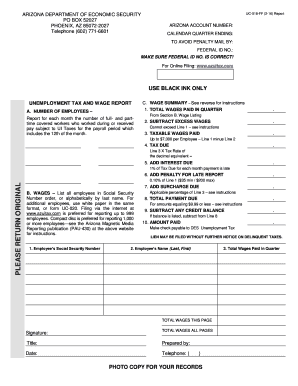
Filling out the AZ DES UC-018/UC-020 forms online is an essential process for accurately reporting unemployment tax and wages. This guide provides a clear, step-by-step approach to help users complete the forms efficiently and correctly.
Follow the steps to complete the unemployment tax and wage report.
- Click ‘Get Form’ button to access the unemployment tax and wage report, which you can fill out directly within the online interface.
- Enter the Arizona account number and federal ID number at the top of the form to ensure accurate identification of your business.
- In Section A, clearly print your full address of record and provide the name of the months for the calendar quarter you are reporting.
- Report the number of full and part-time covered workers in the designated fields for each month of the quarter.
- Complete Part B by listing each employee's Social Security number, name, and total wages paid during the quarter. Ensure this information is organized either numerically or alphabetically.
- In Part C, calculate the total wages paid for the quarter and enter them in Line 1. Proceed to subtract any excess wages on Line 2, ensuring you do not exceed the limits set in the instructions.
- Calculate the taxable wages by subtracting the excess wages on Line 2 from the total wages on Line 1. Enter the result on Line 3.
- Determine the amount of tax due by multiplying the taxable wages by your assigned tax rate and recording this figure on Line 4.
- Add any applicable interest due for late payments as detailed in the instructions and record it on Line 5.
- Include any penalties for late reports on Line 6, as applicable.
- If there is a surcharge applicable, add it to Line 7. Then, sum Lines 4 through 7 for the total payment due on Line 8.
- If applicable, subtract any credit balance on Line 9 and report the final amount of payment on Line 10.
- Sign and date the report, ensuring that the report preparer's name and phone number are provided.
- Once all information is complete and verified, save changes, download the document, and utilize the options to print or share it as needed.
Ready to submit your forms? Complete your AZ DES UC-018/UC-020 online today!
Get form
Experience a faster way to fill out and sign forms on the web. Access the most extensive library of templates available.
AZ UC 018 refers to the specific unemployment insurance application under the Arizona Department of Economic Security. This application is essential for individuals seeking unemployment benefits. By using AZ DES UC-018/UC-020, you can streamline the process and receive the financial support you need during challenging times.
Get This Form Now!
Use professional pre-built templates to fill in and sign documents online faster. Get access to thousands of forms.