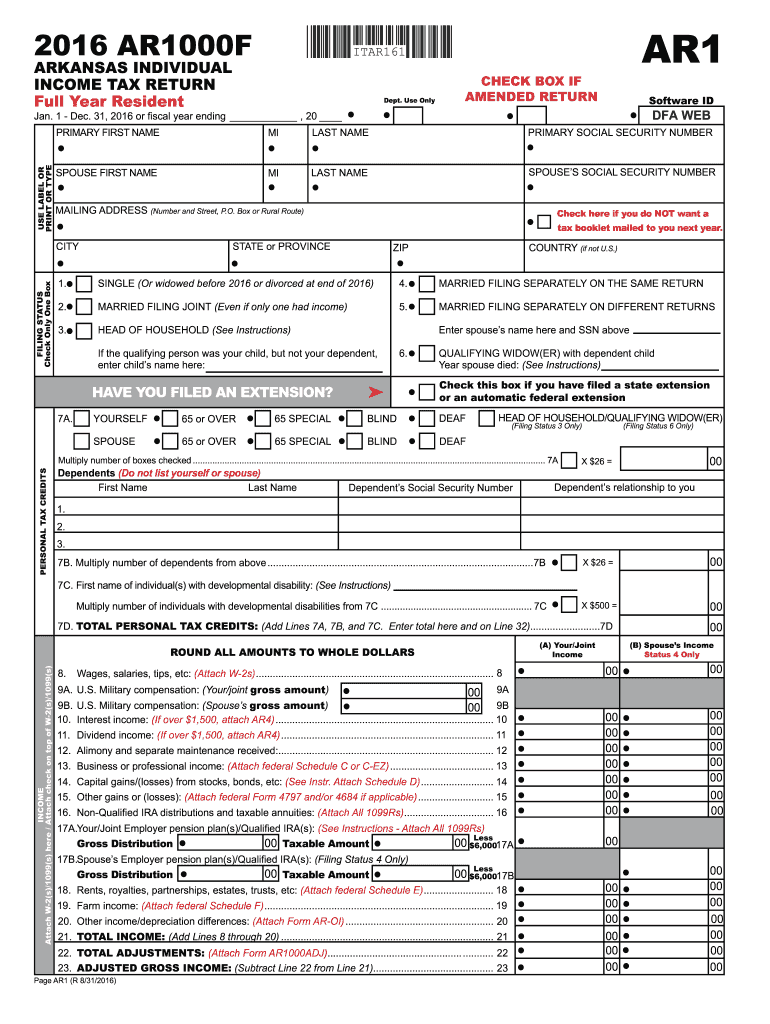
S. Military compensation: (Spouse s gross amount) 00 9B 10. Interest income: (If over $1,500, attach AR4) .............................................................................. 10 11. Dividend income: (If over $1,500, attach AR4) ............................................................................ 11 12. Alimony and separate maintenance received:............................................................................. 12 13. Business or professional income: (Attach federal.
Loading

Open form follow the instructions

Easily sign the form with your finger

Send filled & signed form or save
How to fill out the AR DFA AR1000F online
The AR DFA AR1000F is a crucial form for tax purposes in Arkansas. This guide provides step-by-step instructions to help users navigate the online filling process with confidence and clarity.
Follow the steps to successfully complete the AR DFA AR1000F online.
- Click ‘Get Form’ button to access the AR DFA AR1000F and open it in your browser.
- Complete the section for your primary personal information, including your first and last name, middle initial, and Social Security Number.
- Provide your spouse's information if applicable, including their name and Social Security Number.
- Fill in your mailing address, ensuring to include the state, city, and ZIP code accurately.
- Select your filing status from the options provided, ensuring you understand each category.
- Enter the appropriate details for any dependents, including their names and relationships to you.
- Report your income by entering amounts as indicated, attaching required documentation like W-2s or 1099s.
- Complete the payments and tax computation sections accurately, making sure to include any applicable credits.
- Review all entered information for accuracy before finalizing your form.
- Once satisfied with your form, save changes, download it, or print and share as needed.
Begin the process of completing your AR DFA AR1000F online today.
Experience a faster way to fill out and sign forms on the web. Access the most extensive library of templates available.
Related content
2024 Tax Year Forms ; AR1000DD Individuals With Developmental Disabilities Certificate...
Fra stolpehull til hushold. Utgravninger av hustomter på Kvenild, Trondheim.
Get answers to your most pressing questions about US Legal Forms API.
What are excise returns?
Excise returns are forms submitted to report the excise taxes owed on specific goods and services. These returns, including the AR1000F in Arkansas, provide detailed information about the products or services subject to excise taxation. Filing these returns accurately is essential for compliance with tax laws and avoiding penalties.
Where do I send my AR1000F?
You should send your completed AR1000F form to the Arkansas Department of Finance and Administration. Double-check their website for the correct mailing address, as it can change. Submitting it to the right location ensures that your excise tax return is processed without delays.
How do I file an excise tax return in Arkansas?
Filing an excise tax return in Arkansas typically involves completing the AR1000F form, which is specifically designed for this purpose. After filling out the required information, you can submit the form either by mail or electronically, depending on the state's requirements. For assistance, consider using uslegalforms to ensure you have the correct version of the form and follow the right submission process.
How to file Philadelphia BIRT online?
You can file the Philadelphia Business Income & Receipts Tax (BIRT) online through the city's Department of Revenue website. This process is convenient and saves time when using their online platform. Make sure to gather all necessary documents before starting your submission to ensure a smooth experience.
How do I file an excise tax return?
To file an excise tax return, you need to complete the appropriate forms, such as the AR1000F in Arkansas. Then, you must submit these forms to the appropriate state authority according to their guidelines. Using uslegalforms can simplify this process by providing accurate forms and step-by-step filing instructions.
Can you claim excise tax on your tax return?
Yes, you can sometimes claim excise tax on your tax return, depending on the circumstances. If you are eligible for a refund or credit for overpaid excise taxes, you may be able to include this in your tax filings. The AR DFA AR1000F can guide you on how to properly report these amounts.
Where can I get state and federal tax forms?
State and federal tax forms are available on the respective official websites. For Arkansas forms, visit the AR DFA site, and for federal forms, check the IRS website. Both platforms offer comprehensive resources, ensuring you find the exact forms you need for filing your taxes.
Where can I get Arkansas tax forms?
You can easily obtain Arkansas tax forms from the Arkansas Department of Finance and Administration (AR DFA) website. The site provides all the necessary forms, including the AR1000F, for easy downloading. If you prefer physical copies, some public libraries or post offices may offer these forms as well.
What is an AR1000F tax form?
The AR1000F tax form is a crucial document for Arkansas taxpayers, specifically used for filing individual income tax returns. It enables taxpayers to report their income accurately and calculate their owed taxes. Be sure to check the AR DFA website for the latest version and filing instructions related to the AR1000F.
What is the number for Arkansas withholding tax?
The number for Arkansas withholding tax varies based on your specific tax account. Generally, you can find this number on your tax account documentation or through your AR DFA online account. Keeping this number handy is crucial for accurate filing and payments.
Use professional pre-built templates to fill in and sign documents online faster. Get access to thousands of forms.
If you believe that this page should be taken down, please follow our DMCA take down process here.
This form is available in several versions. Select the version you need from the drop-down list below.