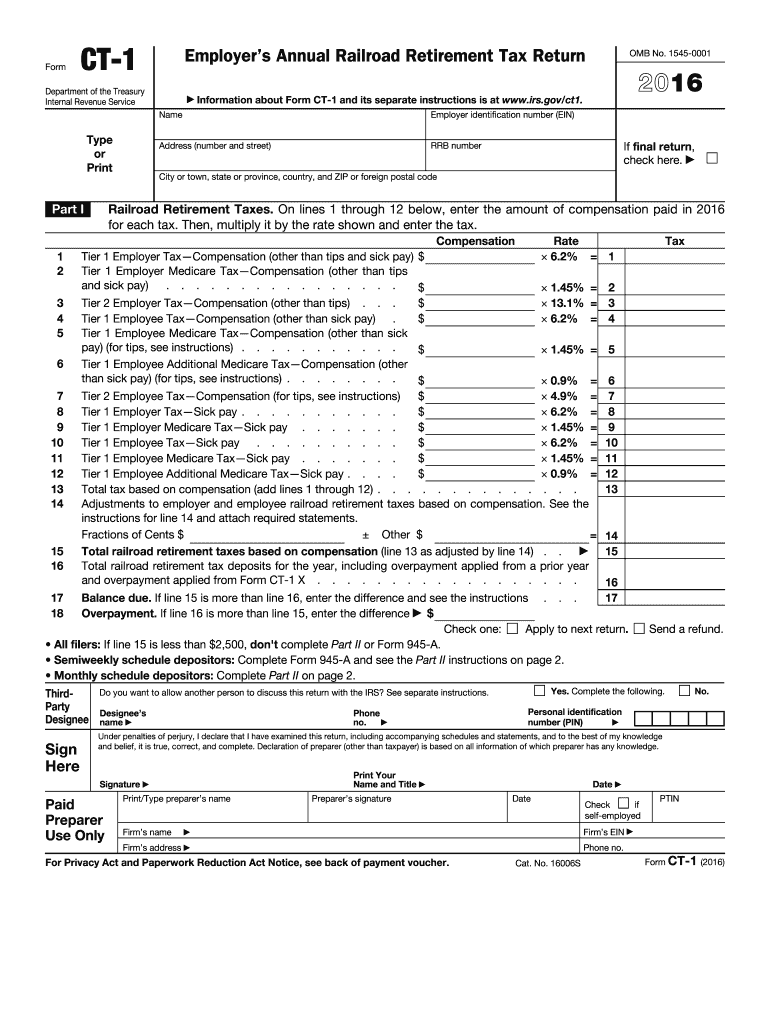
2016 Information about Form CT-1 and its separate instructions is at www.irs.gov/ct1. Name Employer identification number (EIN) Address (number and street) RRB number If final return, check here. City or town, state or province, country, and ZIP or foreign postal code Railroad Retirement Taxes. On lines 1 through 12 below, enter the amount of compensation paid in 2016 for each tax. Then, multiply it by the rate shown and enter the tax. Compensation Rate Tier 1 Employer Tax Compe.
Loading

Open form follow the instructions

Easily sign the form with your finger

Send filled & signed form or save
How to fill out the IRS CT-1 online
Filling out the IRS CT-1, Employer’s Annual Railroad Retirement Tax Return, can be a straightforward process if you follow the right steps. This guide provides clear, step-by-step instructions to help you complete the form accurately and efficiently online.
Follow the steps to fill out the IRS CT-1 online.
- Click ‘Get Form’ button to obtain the form and open it in the editor.
- Enter your name in the designated field.
- Provide your Employer Identification Number (EIN) in the corresponding box.
- Fill in your business address, including the number and street, city or town, state or province, country, and ZIP code.
- If this is your final return, check the appropriate box.
- For each compensation category listed (lines 1 through 12), enter the amount of compensation paid for the year and multiply by the appropriate rate to calculate the tax.
- In line 13, sum the total taxes based on compensation.
- If necessary, complete any adjustments to employer and employee railroad retirement taxes based on compensation.
- Enter the total railroad retirement tax deposits for the year in line 16.
- Determine any balance due or overpayment, entering the difference in the appropriate lines.
- If applicable, check the option for applying overpayment to next return.
- Complete the third-party designee section if you want to allow another person to discuss this return with the IRS.
- Sign and date the form, ensuring you have declared under penalties of perjury that the information is accurate.
- For users required to complete Part II, provide the monthly summary of railroad retirement tax liability.
- Review and finalize your entries, then save changes, download, print, or share the form as needed.
Start filling out your IRS CT-1 form online today.
Experience a faster way to fill out and sign forms on the web. Access the most extensive library of templates available.
Related content
Form CT-1 is used to report taxes imposed by the Railroad Retirement Tax Act (RRTA). Use...
Instructions for Form CT-1, employer's annual railroad retirement tax return. Instructions...
May 2, 2017 — Check the. “CT-1” checkbox on Form W-3, box b, “Kind of Payer,” to...
Get answers to your most pressing questions about US Legal Forms API.
What is a CT-1?
1 is commonly recognized as the IRS CT1 form, which is essential for reporting unemployment taxes owed by employers. Proper completion and submission of this form play a crucial role in complying with federal tax regulations. If you need support with the process, USLegalForms offers comprehensive tools and guidance to facilitate your completion.
How do I submit a corrected K-1 to the IRS?
To submit a corrected K-1 to the IRS, you should prepare a new K-1 form marked 'Corrected' and ensure all accurate information is entered. You then send this corrected version to the IRS along with any necessary cover letters or explanations. Platforms like USLegalForms can assist you in ensuring that the submission process aligns with IRS guidelines.
What is IRS form CT-1?
IRS form CT-1, officially known as the Employer's Annual Federal Unemployment Tax Return, is utilized to document your federal unemployment tax obligations. It ensures compliance with federal regulations regarding unemployment funding. If you're looking to simplify your filing process, consider USLegalForms' user-friendly resources tailored for this form.
What is a CT-1 tax form?
The CT-1 tax form is a federal form specifically for employers to report certain employment taxes. This includes withholding for social security, Medicare, and federal unemployment taxes. Understanding the purpose of the IRS CT-1 can streamline your reporting, and resources from USLegalForms can provide clarity on completing this requirement.
Who must file CT tax return?
Any individual or entity that earns income or has tax obligations in Connecticut must file a CT tax return. This applies to residents and non-residents who generate income within the state. Be proactive in handling your tax obligations; platforms like USLegalForms can help you navigate each requirement confidently.
Who needs to file form CT-1?
Filing the IRS CT-1 is required for employers who are subject to certain employee tax withholdings. Specifically, those with agricultural employees or those who owe federal unemployment taxes must complete this form. It's crucial to ensure compliance, so utilizing services like USLegalForms can provide you the necessary support in understanding your filing requirements.
Where to file form CT-1?
You can file the IRS CT-1 form directly with the IRS. It is essential to send it to the specified address provided in the form instructions. To ensure a smooth filing process, consider using a reliable platform like USLegalForms, which can guide you through the entire process and help avoid any common pitfalls.
What does IRS code 1 mean?
The IRS code 1 is a reference to the general excise tax issued by the IRS, which may require the use of forms like the IRS CT-1. This designation typically relates to excise tax classification and helps clarify the specific obligations of taxpayers. Understanding these codes is crucial for accurate reporting.
What is a CT-1 payer?
1 payer is an individual or business responsible for filing the IRS CT1 due to their excise tax obligations. These payers must accurately report their tax liabilities on the CT1 form. Understanding your status as a CT1 payer can help you stay compliant with tax regulations.
Who is required to file form?
Anyone who meets the criteria for income reporting outside typical wages or is subject to excise taxes needs to file the respective forms. This includes businesses and individuals with varied income streams or those involved in specific activities subject to tax. It's crucial to determine your filing requirements well ahead of tax season to avoid potential issues. Platforms like uslegalforms provide valuable resources to navigate these requirements smoothly.
Use professional pre-built templates to fill in and sign documents online faster. Get access to thousands of forms.
If you believe that this page should be taken down, please follow our DMCA take down process here.
This form is available in several versions. Select the version you need from the drop-down list below.