Loading
Form preview
  • US Legal Forms
  • Form Library
  • Tax Forms
  • Executive Department Treasury IRS Forms
  • Irs Ct-1 2017

Get Irs Ct-1 2017

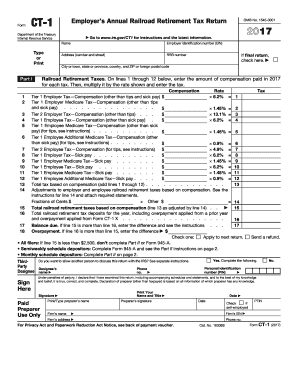
1 2017 Go to www.irs.gov/CT1 for instructions and the latest information. Name Employer identification number (EIN) Address (number and street) RRB number If final return, check here. City or town, state or province, country, and ZIP or foreign postal code Railroad Retirement Taxes. On lines 1 through 12 below, enter the amount of compensation paid in 2017 for each tax. Then, multiply it by the rate shown and enter the tax. Compensation Rate Tier 1 Employer Tax Compensation (othe.

This website is not affiliated with IRS

How it works

  1. Open form

    Open form follow the instructions

  2. Easily sign form

    Easily sign the form with your finger

  3. Share form

    Send filled & signed form or save

How to fill out the IRS CT-1 online

Filing the IRS CT-1 form, which is the employer's annual railroad retirement tax return, can be straightforward when approached step by step. This guide provides clear instructions on how to effectively complete this form online, ensuring compliance and accuracy in your tax reporting.

Follow the steps to fill out the IRS CT-1 form efficiently.

  1. Click the ‘Get Form’ button to obtain the IRS CT-1 form and open it in your online editor of choice.
  2. Begin by entering your name and employer identification number (EIN) at the top of the form. Ensure that your business address is complete, including city, state, and ZIP code. If this is a final return, check the appropriate box.
  3. In Part I, report the compensation amounts for each applicable line from 1 through 12. Be sure to multiply these amounts by the indicated tax rates and enter the resulting tax calculations next to each line.
  4. Calculate the total tax based on compensation by adding the amounts from lines 1 through 12 into line 13. Make any necessary adjustments on line 14 before calculating the final total taxes on line 16.
  5. If you have a balance due or an overpayment, fill out lines 17 and 18 as directed. Select the appropriate option regarding how you would like to apply any overpayment.
  6. Designate a third-party designee if applicable and provide the required contact information in the designated area.
  7. Sign the form where indicated, ensuring that you print your name and title as required. If applicable, a paid preparer should also complete their section.
  8. If necessary, complete Part II, the Record of Railroad Retirement Tax Liability. This section is only for those who have been monthly schedule depositors for the entire year. Fill in the monthly tax liabilities accurately.
  9. Complete Form CT-1(V) if making a payment with your CT-1. Include all required information and attach your payment when mailing the form.
  10. Once you have reviewed your form for accuracy and completeness, save your changes. You may then download, print, or share your completed IRS CT-1 as necessary.

Start your tax preparation now by filling out the IRS CT-1 online to ensure timely and accurate submission.

Get form

Experience a faster way to fill out and sign forms on the web. Access the most extensive library of templates available.

Related content

About Form CT-1, Employer's Annual Railroad...
Form CT-1 is used to report taxes imposed by the Railroad Retirement Tax Act (RRTA). Use...
Learn more
Instructions for Form CT-1, employer's annual...
Instructions for Form CT-1, employer's annual railroad retirement tax return. Instructions...
Learn more
2017 General Instructions for Forms W-2 and W-3
May 2, 2017 — Check the. “CT-1” checkbox on Form W-3, box b, “Kind of Payer,” to...
Learn more

Related links form

Greektown Casino Win/Loss Statement Request Harley-Davidson Transfer Request 2011 Horseshu W-2G ICS 214

Questions & Answers

Get answers to your most pressing questions about US Legal Forms API.

Contact support

Form CT-1 is primarily filed by employers within the railroad sector, as they are required to report specific employment taxes on this form. If your organization falls under this category, it is vital to understand the filing protocols. Regularly submitting the IRS CT-1 form helps maintain compliance and prevents potential issues with the IRS. Make sure you keep accurate records to support your filing.

To retrieve your EIN, start by visiting the IRS website and navigating to the EIN online application section. If you have lost or forgotten your EIN, you can also check your previous tax documents. Alternatively, contacting the IRS directly can help you recover your EIN number promptly. Keep in mind that having your EIN ready is crucial for filing forms like the IRS CT-1.

For mailing US Treasury payments, you should refer to the payment voucher's instructions, as the address can differ based on the payment type. Ensuring your payment goes to the correct address is crucial for timely processing and to avoid any penalties related to your IRS CT-1 obligations. Checking the IRS or Treasury department website can provide the latest and most accurate mailing information.

Filing IRS Schedule 1 may depend on specific financial situations, including additional income or adjustments you have. Schedule 1 is used to report income and several adjustments that are not included on the standard form. If you’re unsure, consulting with a tax professional can help clarify if it’s necessary in relation to your IRS CT-1 filings.

You should mail your CT-1 to the address indicated on the form itself or as outlined on the Connecticut Department of Revenue Services website. Correctly addressing your submission is vital to ensure its receipt and timely processing. Staying informed about where to send your IRS CT-1 can prevent costly mistakes.

Yes, you can file the CT-1 electronically through the Connecticut Department of Revenue Services’ online portal. Electronic filing often simplifies the process and ensures quicker processing times compared to traditional mail. Utilizing this method can help you keep a reliable record of your filing related to the IRS CT-1.

When mailing corporate extensions, you should find the specific mailing address for the extension form on the Connecticut Department of Revenue Services website. Each form may require a different address, so it is essential to verify this information. Proper mailing prevents delays and helps you stay on track with your IRS CT-1 responsibilities.

To mail your CT 3M, send it to the designated address provided by the Connecticut Department of Revenue Services. Make sure to check the latest mailing instructions on their official site, as addresses may change. Sending it to the correct location ensures that your form is processed in a timely manner, which is crucial for compliance and avoiding penalties related to your IRS CT-1 obligations.

The CT-1 tax form, or IRS CT-1, is essential for employers in the railroad industry to report their tax obligations accurately. Filing this form ensures that you meet your tax responsibility under the Railroad Retirement Tax Act. By using tools and guides available on the US Legal Forms platform, you can navigate the filing process confidently and efficiently.

The CT K-1 form is used to report income from partnerships in Connecticut, reflecting each partner's share of income. While separate from the IRS CT-1, understanding both forms helps you manage your tax liabilities effectively. If you encounter issues with these forms, consider using US Legal Forms for comprehensive guidance and assistance.

Get This Form Now!

Use professional pre-built templates to fill in and sign documents online faster. Get access to thousands of forms.
If you believe that this page should be taken down, please follow our DMCA take down processhere.
Get IRS CT-1
  • Adoption
  • Bankruptcy
  • Contractors
  • Divorce
  • Home Sales
  • Employment
  • Identity Theft
  • Incorporation
  • Landlord Tenant
  • Living Trust
  • Name Change
  • Personal Planning
  • Small Business
  • Wills & Estates
  • Packages A-Z
  • Affidavits
  • Bankruptcy
  • Bill of Sale
  • Corporate - LLC
  • Divorce
  • Employment
  • Identity Theft
  • Internet Technology
  • Landlord Tenant
  • Living Wills
  • Name Change
  • Power of Attorney
  • Real Estate
  • Small Estates
  • Wills
  • All Forms
  • Forms A-Z
  • Form Library
  • Legal Hub
  • About Us
  • Help Portal
  • Legal Resources
  • Blog
  • Affiliates
  • Contact Us
  • Delete My Account
  • Site Map
  • Industries
  • Forms in Spanish
  • Localized Forms
  • State-specific Forms
  • Forms Kit
  • Real Estate Handbook
  • All Guides
  • Notarize
  • Incorporation services
  • For Consumers
  • For Small Business
  • For Attorneys
  • USLegal
  • FormsPass
  • pdfFiller
  • signNow
  • altaFlow
  • DocHub
  • Instapage
Form Packages
  • Adoption
  • Bankruptcy
  • Contractors
  • Divorce
  • Home Sales
  • Employment
  • Identity Theft
  • Incorporation
  • Landlord Tenant
  • Living Trust
  • Name Change
  • Personal Planning
  • Small Business
  • Wills & Estates
  • Packages A-Z
Form Categories
  • Affidavits
  • Bankruptcy
  • Bill of Sale
  • Corporate - LLC
  • Divorce
  • Employment
  • Identity Theft
  • Internet Technology
  • Landlord Tenant
  • Living Wills
  • Name Change
  • Power of Attorney
  • Real Estate
  • Small Estates
  • Wills
  • All Forms
  • Forms A-Z
  • Form Library
Customer Service
  • Legal Hub
  • About Us
  • Help Portal
  • Legal Resources
  • Blog
  • Affiliates
  • Contact Us
  • Delete My Account
  • Site Map
  • Industries
  • Forms in Spanish
  • Localized Forms
  • State-specific Forms
  • Forms Kit
Legal Guides
  • Real Estate Handbook
  • All Guides
Prepared for you
  • Notarize
  • Incorporation services
Our Customers
  • For Consumers
  • For Small Business
  • For Attorneys
Our Sites
  • USLegal
  • FormsPass
  • pdfFiller
  • signNow
  • altaFlow
  • DocHub
  • Instapage
Social Media
Call us now toll free:
+1 833 426 79 33
As seen in:
© Copyright 1999-2026 airSlate Legal Forms, Inc. 17 Station Street, Suite 303, Brookline, MA 02445
  • Your Privacy Choices
  • Terms of Service
  • Privacy Notice
  • Content Takedown Policy
  • Bug Bounty Program
IRS CT-1
This form is available in several versions.
Select the version you need from the drop-down list below.
2022 IRS CT-1
Select form
  • 2022 IRS CT-1
  • 2020 IRS CT-1
  • 2019 IRS CT-1
  • 2018 IRS CT-1
  • 2017 IRS CT-1
  • 2016 IRS CT-1
Select form