Loading
Form preview
  • US Legal Forms
  • Other Templates
  • Tax Forms
  • Executive Department Treasury IRS Forms
  • Irs 990 - Schedule R 2018

Get Irs 990 - Schedule R 2018

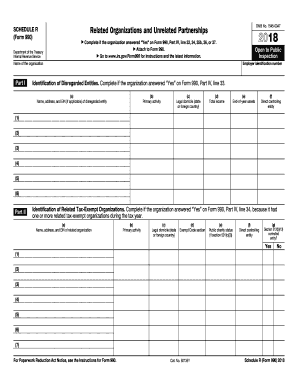
Es on Form 990, Part IV, line 33, 34, 35b, 36, or 37. Attach to Form 990. Go to www.irs.gov/Form990 for instructions and the latest information. Open to Public Inspection Employer identification number Name of the organization Part I Identification of Disregarded Entities. Complete if the organization answered Yes on Form 990, Part IV, line 33. (a) Name, address, and EIN (if applicable) of disregarded entity (b) Primary activity (c) Legal domicile (state or foreign country.

This website is not affiliated with IRS

How it works

  1. Open form

    Open form follow the instructions

  2. Easily sign form

    Easily sign the form with your finger

  3. Share form

    Send filled & signed form or save

How to fill out the IRS 990 - Schedule R online

Filling out the IRS 990 - Schedule R is an essential task for organizations that have related organizations or partnerships. This guide provides clear and supportive instructions to help users complete this form accurately and efficiently online.

Follow the steps to complete the IRS 990 - Schedule R online.

  1. Click ‘Get Form’ button to obtain the form and open it in the online editor.
  2. Identify whether your organization needs to complete Schedule R by confirming a 'Yes' answer on Form 990, Part IV, lines 33, 34, 35b, 36, or 37.
  3. In Part I, provide the identification details of disregarded entities if applicable. Fill in the name, address, and EIN of the disregarded entity, along with its primary activity, legal domicile, total income, end-of-year assets, and direct controlling entity.
  4. In Part II, list any related tax-exempt organizations. Include their names, addresses, EINs, primary activities, legal domiciles, exempt code sections, public charity status, and whether they are section 512(b)(13) controlled entities.
  5. In Part III, fill out details for related organizations taxable as partnerships. Specify their names, addresses, EINs, primary activities, legal domiciles, and details about their income and ownership percentages.
  6. In Part IV, provide information for related organizations taxable as a corporation or trust. List names, addresses, EINs, primary activities, legal domiciles, entity types, and ownership shares.
  7. In Part V, declare any transactions conducted with related organizations listed in earlier sections. Indicate whether such transactions occurred and provide details accordingly.
  8. In Part VI, report on unrelated organizations taxed as partnerships if applicable, detailing their names, addresses, EINs, primary activities, legal domiciles, and other required information.
  9. In Part VII, provide any supplemental information necessary for responses to questions on Schedule R.
  10. Once all sections have been completed accurately, save your changes and choose to download, print, or share the form as needed.

Start completing your IRS 990 - Schedule R online today for a smoother filing experience.

Get form

Experience a faster way to fill out and sign forms on the web. Access the most extensive library of templates available.

Related content

Instructions for Schedule R (Form 990)
Dec 26, 2024 — Schedule R (Form 990) is used by an organization that files. Form 990 to...
Learn more
Return of Organization Exempt From Income Tax
If “Yes,” complete Schedule R, Part I . . . . . . . . . . . 33. 34. Was the...
Learn more
Publication 3823 (Rev. 9-2014)
Agents approved by the Internal Revenue Service to file Schedule R (Form 941 and 940)...
Learn more

Related links form

WA DSHS 14-438 2001 MD VR-103 2013 NY MV-82 2004 KS Application for Concealed Carry Handgun License and Qualifying Information 2015

Questions & Answers

Get answers to your most pressing questions about US Legal Forms API.

Contact support

IRS Schedule R is used to disclose details about a nonprofit organization’s relationships with other organizations. This includes reporting any transactions that may impact the financial standing and governance of the organization. Utilizing the IRS 990 - Schedule R correctly is vital for compliance, as it ensures that all relationships are transparent to the IRS and the public.

In the context of IRS filings, Schedule R stands for 'Related Organizations and Unrelated Partnerships.' This component of the IRS 990 emphasizes the importance of transparency regarding a nonprofit's affiliations and transactions. A clear understanding of this schedule can aid nonprofits in effectively addressing their reporting obligations.

Filling out Form 990 can be complex, especially for first-time filers. The IRS 990 - Schedule R requires careful consideration of an organization’s relationships with related entities, which adds another layer of complexity. However, platforms like US Legal Forms can provide useful templates and guidance to simplify the process and ensure accurate completion.

Program service revenue reported on the IRS 990 - Schedule R includes income generated directly from a nonprofit's core activities. This can involve fees for services, grants, or sales related to the organization’s mission. Properly classifying program service revenue is crucial for accurate reporting and helps reflect the true financial performance of the organization.

Yes, a 501(c)(6) organization may need to file Schedule B if it receives contributions over a certain threshold during the tax year. Schedule B includes information about substantial donors, adding transparency to the organization’s funding sources. Understanding the requirements for filing both Schedule R and Schedule B is essential for maintaining compliance with the IRS.

FTB Schedule R is a California tax form that nonprofit organizations use to report the relationship between themselves and other entities. While it may resemble the IRS 990 - Schedule R, it serves the California Franchise Tax Board's requirements. Organizations operating in California should be aware of the differences to ensure compliance with both state and federal regulations.

The IRS 990 - Schedule R is specifically designed for reporting information about related organizations but does not directly relate to income tax in the conventional sense. Instead, it provides vital information on connections that may affect an organization’s financial standing. Properly completing this schedule can ensure that nonprofits remain compliant and avoid any tax complications.

The IRS 990 - Schedule R is a part of the Form 990 series that nonprofit organizations use to report their relationships with related organizations. This schedule requires organizations to disclose information about affiliates, their governance, and transactions with them. Understanding this schedule is crucial for transparency in nonprofit operations and helps maintain compliance with IRS regulations.

Yes, IRS Form 990 filings, including IRS 990 - Schedule R, are available online for public viewing. Websites like the IRS and certain nonprofit databases provide access to these forms, contributing to transparency within the sector. Organizations should maintain accurate records and ensure their forms are correctly filed to reflect their operations.

Yes, organizations can file IRS Form 990 electronically. E-filing simplifies the process, reduces errors, and expedites the reporting timeline for all forms, including IRS 990 - Schedule R. Using user-friendly platforms allows organizations to navigate the complexities of tax compliance effectively.

Get This Form Now!

Use professional pre-built templates to fill in and sign documents online faster. Get access to thousands of forms.
If you believe that this page should be taken down, please follow our DMCA take down processhere.
Get IRS 990 - Schedule R
  • Adoption
  • Bankruptcy
  • Contractors
  • Divorce
  • Home Sales
  • Employment
  • Identity Theft
  • Incorporation
  • Landlord Tenant
  • Living Trust
  • Name Change
  • Personal Planning
  • Small Business
  • Wills & Estates
  • Packages A-Z
  • Affidavits
  • Bankruptcy
  • Bill of Sale
  • Corporate - LLC
  • Divorce
  • Employment
  • Identity Theft
  • Internet Technology
  • Landlord Tenant
  • Living Wills
  • Name Change
  • Power of Attorney
  • Real Estate
  • Small Estates
  • Wills
  • All Forms
  • Forms A-Z
  • Other Templates
  • Legal Hub
  • About Us
  • Help Portal
  • Legal Resources
  • Blog
  • Affiliates
  • Contact Us
  • Delete My Account
  • Site Map
  • Industries
  • Forms in Spanish
  • Localized Forms
  • State-specific Forms
  • Forms Kit
  • Real Estate Handbook
  • All Guides
  • Notarize
  • Incorporation services
  • For Consumers
  • For Small Business
  • For Attorneys
  • USLegal
  • FormsPass
  • pdfFiller
  • signNow
  • altaFlow
  • DocHub
  • Instapage
Form Packages
  • Adoption
  • Bankruptcy
  • Contractors
  • Divorce
  • Home Sales
  • Employment
  • Identity Theft
  • Incorporation
  • Landlord Tenant
  • Living Trust
  • Name Change
  • Personal Planning
  • Small Business
  • Wills & Estates
  • Packages A-Z
Form Categories
  • Affidavits
  • Bankruptcy
  • Bill of Sale
  • Corporate - LLC
  • Divorce
  • Employment
  • Identity Theft
  • Internet Technology
  • Landlord Tenant
  • Living Wills
  • Name Change
  • Power of Attorney
  • Real Estate
  • Small Estates
  • Wills
  • All Forms
  • Forms A-Z
  • Other Templates
Customer Service
  • Legal Hub
  • About Us
  • Help Portal
  • Legal Resources
  • Blog
  • Affiliates
  • Contact Us
  • Delete My Account
  • Site Map
  • Industries
  • Forms in Spanish
  • Localized Forms
  • State-specific Forms
  • Forms Kit
Legal Guides
  • Real Estate Handbook
  • All Guides
Prepared for you
  • Notarize
  • Incorporation services
Our Customers
  • For Consumers
  • For Small Business
  • For Attorneys
Our Sites
  • USLegal
  • FormsPass
  • pdfFiller
  • signNow
  • altaFlow
  • DocHub
  • Instapage
Social Media
Call us now toll free:
+1 833 426 79 33
As seen in:
© Copyright 1999-2026 airSlate Legal Forms, Inc. 17 Station Street, Ste. 203, Brookline, MA 02445
  • Your Privacy Choices
  • Terms of Service
  • Privacy Notice
  • Content Takedown Policy
  • Bug Bounty Program
IRS 990 - Schedule R
This form is available in several versions.
Select the version you need from the drop-down list below.
2022 IRS 990 - Schedule R
Select form
  • 2022 IRS 990 - Schedule R
  • 2021 IRS 990 - Schedule R
  • 2020 IRS 990 - Schedule R
  • 2019 IRS 990 - Schedule R
  • 2018 IRS 990 - Schedule R
  • 2017 IRS 990 - Schedule R
  • 2016 IRS 990 - Schedule R
Select form