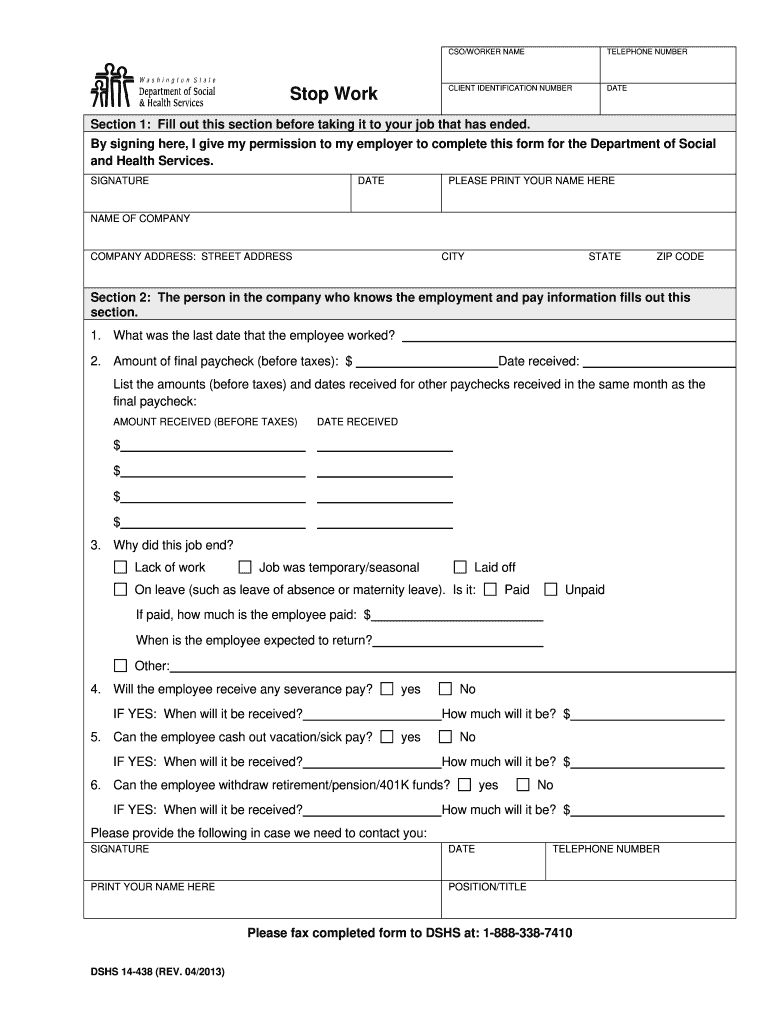
On to my employer to complete this form for the Department of Social and Health Services. SIGNATURE PLEASE PRINT YOUR NAME HERE DATE NAME OF COMPANY COMPANY ADDRESS: STREET ADDRESS CITY STATE ZIP CODE Section 2: The person in the company who knows the employment and pay information fills out this section. 1. What was the last date that the employee worked? 2. Amount of final paycheck (before taxes): $ Date received: List the amounts (before taxes) and dates received for other paychecks.
Loading

Open form follow the instructions

Easily sign the form with your finger

Send filled & signed form or save
How to fill out the WA DSHS 14-438 online
Filling out the WA DSHS 14-438 form online is a straightforward process that ensures a smooth submission for individuals and employers. This guide will walk you through each section and field of the form, making it easy to complete with confidence.
Follow the steps to complete the WA DSHS 14-438 form effectively.
- Press the ‘Get Form’ button to acquire the form and open it in the editor.
- Begin by filling out the client identification number, worker name, and contact details in the designated fields at the top of the form.
- In Section 1, provide your signature and printed name, along with the date and name and address of your employer. This section must be completed prior to taking it to the job that has ended.
- In Section 2, the designated person from the company completes the employment and pay information. Start by entering the last date the employee worked and the amount of their final paycheck before taxes. Be sure to note the date when that paycheck was received.
- List any other paychecks received in the same month as the final paycheck, detailing each amount before taxes and the corresponding dates of receipt.
- Indicate the reason for the job ending. Options include lack of work, job was temporary/seasonal, laid off, or on leave. If on leave, specify if it is paid or unpaid, and if paid, state the amount and expected return date.
- Decide whether the employee will receive severance pay, and if so, include the amount and when it will be received.
- Indicate whether the employee can cash out vacation or sick pay. If applicable, state the amount and when it will be received.
- Confirm if the employee can withdraw retirement or pension funds, including how much and the timing of when those funds will be received.
- Finally, ensure to have the designated company person's signature, printed name, telephone number, and position/title filled out before submitting the form.
- Once all information is completed, review the form for accuracy, then save changes, download, print, or share the form as needed.
Complete the WA DSHS 14-438 form online to ensure timely processing and avoid delays.
Experience a faster way to fill out and sign forms on the web. Access the most extensive library of templates available.
Related content
DSHS 14-438 (REV. 07/2015). Stop Work. DSHS MAILING ADDRESS. DSHS PO BOX 11699 TACOMA, WA...
Get answers to your most pressing questions about US Legal Forms API.
How to apply for DSHS benefits in Washington?
To apply for DSHS benefits in Washington, you can fill out an application online, by mail, or in person at your local DSHS office. It's important to have all necessary documents ready to streamline the process. For additional support and detailed information on the WA DSHS 14-438, check out the US Legal Forms platform, which can help you navigate the application steps efficiently.
What verification documents do I need for DSHS Washington State?
When applying for DSHS benefits in Washington State, you will need to provide various verification documents, such as proof of identity, income, and residency. You may also need to show your expenses to determine eligibility accurately. If you're unsure what to submit, the guidelines for WA DSHS 14-438 or resources from the US Legal Forms platform can guide you through the process.
How long does it take to get approved for food stamps in Washington State?
In Washington State, the typical processing time for food stamps is about 30 days after you submit your application. However, factors like missing documentation or the workload at the DSHS office can cause delays. For clarity on the WA DSHS 14-438 and to ensure your application is complete, you can rely on the US Legal Forms platform.
What is the DSHS stop work form for Washington State?
The DSHS stop work form allows individuals in Washington to report that they are no longer working or have had a reduction in hours. This form is essential for maintaining eligibility for benefits, such as food stamps. If you need assistance with this process or information about the WA DSHS 14-438, the US Legal Forms platform can provide valuable resources.
What is the maximum income to qualify for food stamps in Washington?
In Washington State, the maximum income for food stamps varies based on household size and other factors. Generally, the gross income limit is around 200% of the federal poverty line. For the most accurate information specific to your situation, consider consulting the WA DSHS 14-438 guidelines or visiting the US Legal Forms platform for help with documentation.
How to submit documents on Washington Connection?
Submitting documents on Washington Connection is straightforward. First, you will need to create an account or log in. Once logged in, follow the prompts to upload your documents, including any relevant forms like the WA DSHS 14-438. This online system is designed to streamline the process, making it easier for you to manage your benefits.
How to submit documents to DSHS Washington state?
To submit documents to DSHS Washington state, consider using the WA DSHS 14-438 online portal for a convenient digital option. You may also mail your documents or deliver them in person to a local DSHS office. Make sure to check if you need to include any specific forms that accompany your documents. Keeping copies of everything submitted is always a good practice.
How do I submit documents to DSHS Washington State?
You can submit documents to DSHS Washington State through several methods, including online submissions using the WA DSHS 14-438, via mail, or in person at your local office. Make sure to gather all necessary documents relevant to your benefits. Utilizing online submission can offer quicker processing times, but confirm that your documents are complete and legible.
How do I report changes to food stamps in Washington state?
To report changes to your food stamps in Washington state, you should contact the Department of Social and Health Services (DSHS) directly. You can report changes online through the WA DSHS 14-438 form, by phone, or in person. It's important to keep your information updated to ensure you receive the correct benefits. Remember to provide necessary details such as changes in income or household size.
How can I check the status of my food stamp case Washington State?
To check the status of your food stamp case in Washington State, use the DSHS client portal, which provides real-time updates. It's important to have your case number ready for access. If online options are inconvenient, don't hesitate to contact your local DSHS office for help. Remember to look into WA DSHS 14-438 for more assistance.
Use professional pre-built templates to fill in and sign documents online faster. Get access to thousands of forms.
If you believe that this page should be taken down, please follow our DMCA take down process here.