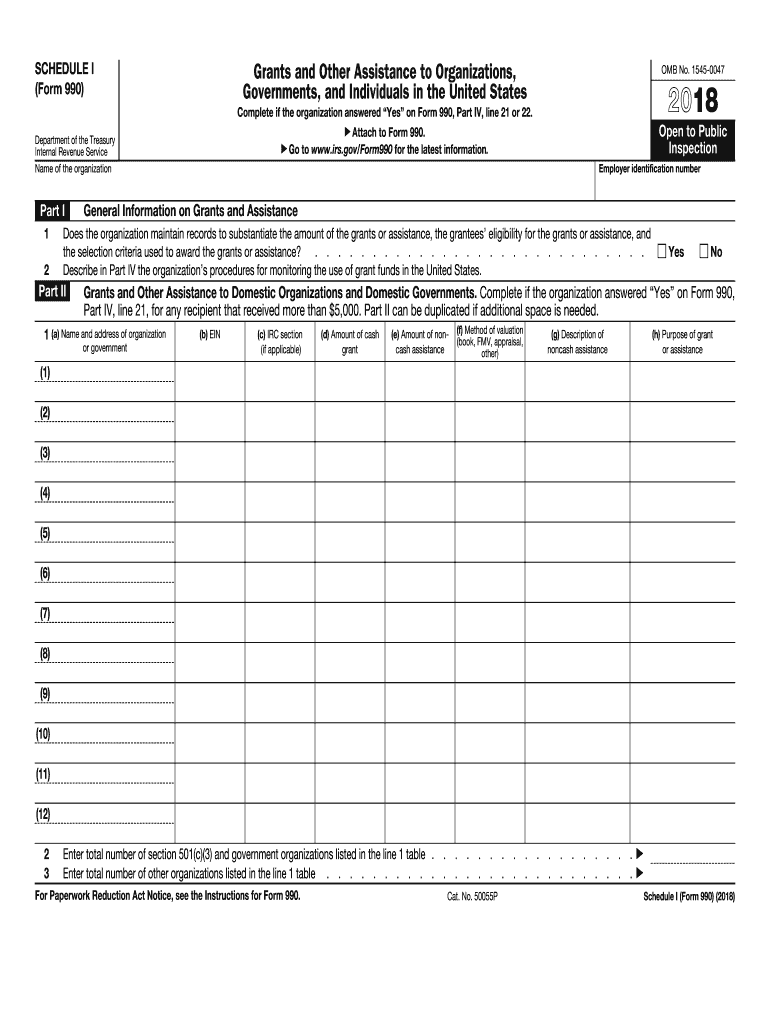
IV, line 21 or 22. Attach to Form 990. Go to www.irs.gov/Form990 for the latest information. Department of the Treasury Internal Revenue Service Name of the organization Part I OMB No. 1545-0047 Open to Public Inspection Employer identification number General Information on Grants and Assistance Does the organization maintain records to substantiate the amount of the grants or assistance, the grantees eligibility for the grants or assistance, and the selection criteria used to a.

Open form follow the instructions

Easily sign the form with your finger

Send filled & signed form or save
How to fill out the IRS 990 - Schedule I online
This guide provides a comprehensive overview of how to fill out the IRS 990 - Schedule I online. Designed for organizations that provide grants and assistance, this form will help you document your contributions to domestic organizations, governments, and individuals.
Follow the steps to successfully complete Schedule I online.
- Press the 'Get Form' button to access the Schedule I form and open it in your preferred editor.
- Begin with Part I, where you will answer if the organization maintains records for grants. Indicate 'Yes' or 'No' and describe the monitoring procedures for grant usage in the narrative section provided.
- Move to Part II to list any domestic organizations or governments that received more than $5,000 in grants. For each recipient, fill in the following details: name and address, employer identification number (EIN), IRC section if applicable, amount of cash grant, amount of noncash assistance, method of valuation, a description of noncash assistance, and the purpose of the grant.
- For Part III, complete this section only if you provided grants to individuals. Similar to Part II, specify the type of assistance, number of recipients, amounts for cash and noncash assistance, and methods of valuation.
- In Part IV, provide any supplemental information required to support your responses in the previous sections. If additional space is needed, you can duplicate this part.
- Once all sections are completed, review your entries for accuracy. You can then save your changes, download a copy, or print and share the document as needed.
Complete your IRS 990 - Schedule I online today to ensure compliance and proper documentation of your organization's grants and assistance.
Experience a faster way to fill out and sign forms on the web. Access the most extensive library of templates available.
Related content
Schedule I (Form 990) is for reporting grants and assistance to organizations...
Continuation of Grants and Other Assistance to Governments and Organizations in the U.S...
1. Contributions, gifts, grants, etc., received (attach schedule). 2. Check ▷ if the...
Get answers to your most pressing questions about US Legal Forms API.
What is the IRS schedule I?
The IRS Schedule I is a supplement to the Form 990 that focuses on the detail of user charges and other payments made to support a nonprofit's mission. It provides insights into how an organization generates revenue and allocates funds for various programs. Filing this schedule correctly is essential for maintaining transparency and compliance with IRS regulations. Platforms like Uslegalforms can assist you in correctly filling out Schedule I to meet all legal requirements.
What is schedule I on 990?
Schedule I on the IRS 990 form specifically addresses grants and other assistance provided by the organization. It outlines various aspects, including the total amount of assistance given, the recipients, and the purpose of these grants. This schedule is crucial for understanding how nonprofits allocate resources and support their mission. For those seeking clarity in their reporting, Uslegalforms can offer templates and guidelines specific to Schedule I.
Who is required to file Form 990 IRS?
Any tax-exempt organization, including charities and nonprofits, that meets specific income thresholds must file the IRS 990 form. This includes organizations with gross receipts exceeding $200,000 or total assets over $500,000. The need for transparency and accountability drives this requirement. Uslegalforms can provide the necessary tools and templates to simplify the filing process for your organization.
Which entities are generally not required to file the Form 990?
Certain organizations are typically exempt from filing the IRS 990 form, including churches, government entities, and organizations with annual gross receipts of $50,000 or less. Additionally, some private foundations may have different reporting requirements. It's vital to verify your organization’s status to avoid unnecessary penalties. Uslegalforms can help you determine your filing obligations and ensure you stay informed.
Who must file a 990 with the IRS?
Most tax-exempt organizations in the United States must file an IRS 990 form annually, including charities and nonprofits. There are specific thresholds regarding gross receipts and total assets that determine which form to file, including the simplified versions like 990-N or 990-EZ. Understanding the filing requirements is crucial to maintaining your organization's tax-exempt status. Uslegalforms offers guidance to ensure you comply with all IRS regulations.
What happens if a nonprofit does not file 990?
If a nonprofit fails to file the IRS 990 form, it may face significant penalties, including fines and potential loss of tax-exempt status. The IRS automatically revokes this status after three consecutive years of non-filing. This can lead to severe consequences, including additional scrutiny and decreased public trust. To ensure compliance, nonprofits should rely on platforms like Uslegalforms to guide them through their filing obligations.
What is a Schedule L on a 990?
Schedule L on the IRS 990 form details transactions between the nonprofit and related parties, such as officers, directors, and key employees. It is essential for transparency, as it helps the IRS assess potential conflicts of interest. Nonprofits must accurately report these relationships to maintain compliance and trust with the public. If you need assistance navigating these requirements, consider using Uslegalforms, which offers resources to help simplify the process.
What three areas are expenses divided into on Form 990?
On Form 990, expenses are generally divided into three main categories: program services, management and general expenses, and fundraising expenses. Understanding these divisions helps organizations accurately represent their spending. This structure ensures transparent and responsible financial reporting. Familiarity with IRS 990 - Schedule I is crucial for accurately navigating this form.
What does Schedule 1 mean on FAFSA?
Schedule 1 on FAFSA relates to additional financial information that may impact your eligibility for federal student aid. It covers various incomes and resources that may affect your calculated need. Clarity on this aspect can enhance your chances of receiving aid. Insights into IRS 990 - Schedule I can prove useful when applying for financial aid as well.
What does Schedule 1 and 2 mean?
Schedule 1 typically reports additional income and adjustments to income for taxpayers, while Schedule 2 addresses various tax credits and other requisite payments. Understanding these distinctions can help ensure you're reporting accurately. Using tools like uslegalforms can ensure you're on track. Proper knowledge of IRS 990 - Schedule I further assists in clarifying these aspects.
Use professional pre-built templates to fill in and sign documents online faster. Get access to thousands of forms.
If you believe that this page should be taken down, please follow our DMCA take down process here.
This form is available in several versions. Select the version you need from the drop-down list below.