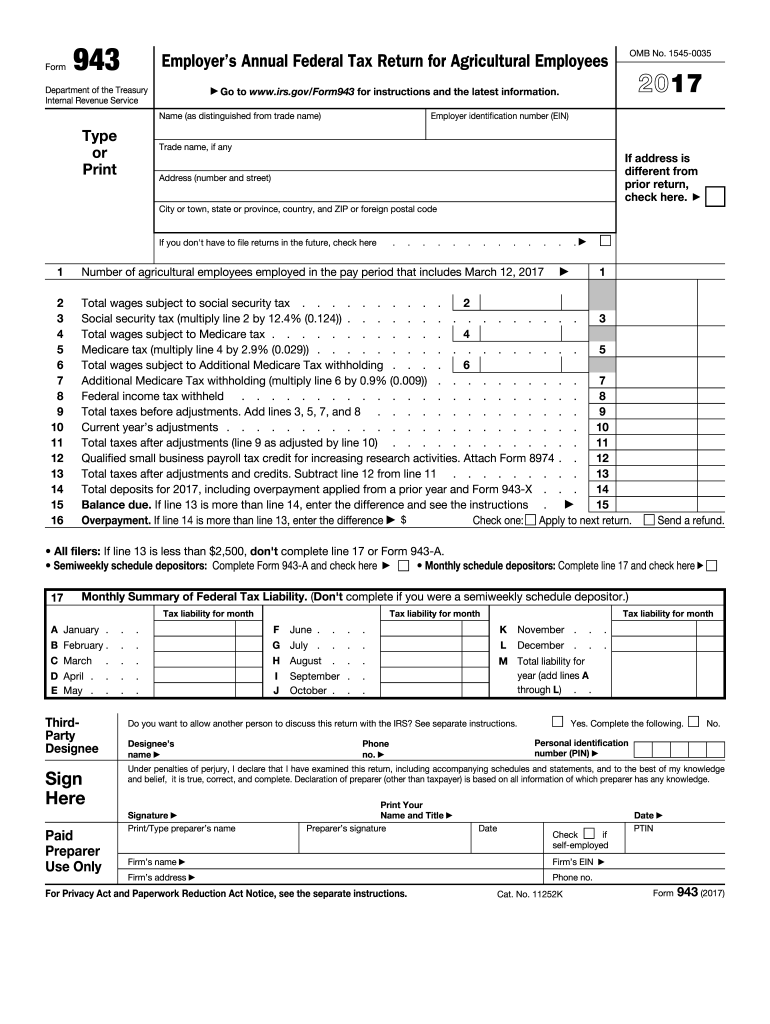
Declaration of preparer (other than taxpayer) is based on all information of which preparer has any knowledge. Paid Preparer Use Only Designee s name Print Your Name and Title Preparer s signature Firm s name Firm s address Date Check if self-employed Firm s EIN For Privacy Act and Paperwork Reduction Act Notice, see the separate instructions. No. Personal identification number (PIN) Phone no. Signature Print/Type preparer s name Yes. Comple.

Open form follow the instructions

Easily sign the form with your finger

Send filled & signed form or save
How to fill out the IRS 943 online
Filling out the IRS 943 form online can simplify the process of reporting your annual federal tax for agricultural employees. This guide will walk you through each step required to accurately complete the form, ensuring you meet all necessary requirements.
Follow the steps to successfully complete the IRS 943 online.
- Press the ‘Get Form’ button to access the online version of the IRS 943 form.
- Enter your employer identification number (EIN) in the designated field. Ensure that this number is correct as it is vital for identification.
- Provide your trade name, if applicable, to accurately describe your business. If there is no trade name, you may skip this field.
- If your address has changed since your last return, check the box indicating this change. Complete your address details, including the street address, city or town, state or province, country, and ZIP code.
- Indicate if you do not plan to file returns in the future by checking the appropriate box.
- Report the number of agricultural employees employed during the pay period that includes March 12 of the year indicated.
- Fill in the total wages that are subject to social security tax. This total will be calculated from your payroll records.
- Calculate the social security tax by multiplying the figure from the previous step by 12.4% (0.124) and enter the result.
- Provide the total wages that are subject to Medicare tax.
- Calculate the Medicare tax by multiplying the total wages subject to Medicare tax by 2.9% (0.029) and enter the amount.
- Enter the total wages subject to Additional Medicare Tax withholding as applicable.
- Calculate the Additional Medicare Tax withholding by multiplying the amount entered in the previous step by 0.9% (0.009) and enter the result.
- List the federal income tax withheld during the relevant tax year.
- Add up the total taxes before adjustments by combining lines for Medicare and social security taxes.
- Complete the current year’s adjustments according to your records.
- Calculate the total taxes after adjustments by summarizing the values from the previous fields.
- If applicable, report any qualified small business payroll tax credits being claimed.
- Determine the total taxes owed after adjustments and credits and complete the balance due or overpayment section as needed.
- Consider your payment method and decide if you want to apply any overpayment to the next return or request a refund.
- After completing all fields, ensure all information is correct, then save your work, download the completed form, print it, or share as needed.
Complete your IRS 943 form online today for a smooth filing experience.
Experience a faster way to fill out and sign forms on the web. Access the most extensive library of templates available.
Related content
Mar 24, 2025 — File this form if you paid wages to one or more farmworkers and the wages...
—Use Form 943 to report income tax withheld and employer and employee social security...
May 2, 2017 — 943. Check this box if you are an agricultural employer and file Form 943...
Get answers to your most pressing questions about US Legal Forms API.
Can I file form 943 online?
Yes, you can file IRS 943 online through the IRS website or using authorized e-filing software. Online filing can simplify the process and provide faster confirmation of submission. Additionally, online resources like uslegalforms can assist you in preparing your form accurately, ensuring that your submission meets all IRS requirements.
Who qualifies for 943?
To qualify for IRS 943, you must be an employer in the agricultural sector, paying wages to farm workers. Additionally, if you report annual wages instead of quarterly, IRS 943 is specifically designed for you. Understanding these criteria will help you file accurately and minimize any tax-related issues.
Do I file both 941 and 943?
Typically, you should not file both IRS 941 and 943 in the same tax year, as each form serves a distinct purpose. If you operate an agricultural business and meet the qualifications for IRS 943, that should be your primary focus. Clarity on which form to use is essential, and you can use uslegalforms to ensure you stay compliant.
Who is eligible for exemption from withholding?
Certain criteria define who may be exempt from withholding federal income tax, including individuals with very low income or those who expect no tax liability. Additionally, many agricultural workers file IRS 943 and may have specific exemptions related to their employment. To determine eligibility, you may want to consult a tax professional or explore comprehensive resources available on uslegalforms.
Who needs to file form 944?
IRS Form 944 is designed for smaller employers who owe less than a certain amount in payroll taxes each year. If your annual payroll tax liability is below the threshold, you can file the 944 instead of the 941 or 943. However, keep in mind that whichever form you need, uslegalforms can assist you in navigating these requirements smoothly.
What is IRS Form 8949?
IRS Form 8949 is utilized for reporting sales and exchanges of capital assets, including stocks and securities. It is important to accurately complete this form to maximize your tax benefits and avoid penalties. While not directly related to IRS 943, understanding all tax forms you may encounter can help you manage your overall tax situation effectively.
What is the difference between a 941 and 943?
The IRS 941 form is used by employers to report federal payroll taxes, while the IRS 943 form is specifically for agricultural employers. Understanding this distinction is crucial, as it ensures that you are filing the correct form for your business type. If you are involved in agriculture and report employee wages annually, the IRS 943 is the right choice for you.
Can 1099s be sent digitally?
Yes, 1099s can be sent digitally to recipients if you have their consent. Digital delivery is a convenient method that aligns with modern practices. However, make sure to comply with IRS regulations regarding electronic delivery. If you need assistance with digital submissions, US Legal Forms can help facilitate the process.
Can form 943 be filed electronically?
Yes, Form 943 can be filed electronically through the IRS e-File system. Electronic filing helps streamline the process, making it quicker and easier to submit your form. Be sure to check the filing requirements and have all relevant information on hand. US Legal Forms can assist you in navigating the electronic filing system effectively.
What is the electronic filing rule for 1099?
The electronic filing rule for 1099s requires businesses to e-file if they are submitting 250 or more forms. However, to encourage electronic filing, the IRS accepts e-filing for any number of forms. Compliance with these rules is vital to avoid fines and penalties. Consider using US Legal Forms to ensure you meet all electronic filing requirements.
Use professional pre-built templates to fill in and sign documents online faster. Get access to thousands of forms.
If you believe that this page should be taken down, please follow our DMCA take down process here.
This form is available in several versions. Select the version you need from the drop-down list below.