Loading
Get Ga Dor 900 2019-2026
How it works
-

Open form follow the instructions
-

Easily sign the form with your finger
-

Send filled & signed form or save
How to fill out the GA DoR 900 online
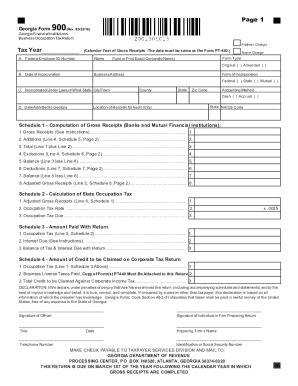
Filling out the GA DoR 900, the Georgia Financial Institutions Business Occupation Tax Return, online can be streamlined and straightforward. This guide will walk you through each section of the form, ensuring you have all the necessary information to complete it accurately.
Follow the steps to fill out the GA DoR 900 with ease.
- Click ‘Get Form’ button to obtain the form and open it in the editor.
- Enter the 'Tax Year' in the designated field, ensuring it reflects the calendar year during which gross receipts were received.
- Provide your Federal Employer ID Number (FEIN) in section A, and indicate if there is an address or name change.
- Fill in the 'Date of Incorporation' and 'Business Address' accurately with the complete address, including city, county, and zip code.
- Select the 'Form of Incorporation' by checking the appropriate box indicating whether it is federal, state, or mutual.
- Choose the 'Accounting Method' by selecting either cash or accrual, as this will determine how gross receipts are calculated.
- Complete 'Schedule 1' by entering the gross receipts, any additions, exclusions, and deductions to arrive at the adjusted gross receipts.
- Calculate the state occupation tax based on the adjusted gross receipts and enter it in the corresponding schedules.
- In 'Schedule 4', report the amounts for occupation tax and any credits you're claiming associated with business license taxes.
- Review the 'Declaration' section, ensuring signatures are provided by the officer and/or the preparer of the return.
- Once all fields are correctly filled, save your changes, and choose to download, print, or share the completed form as needed.
Complete your GA DoR 900 online to ensure timely and accurate submission.
Claiming 1 allowance means that a little less tax will be withheld from your paycheck than if you claimed 0 allowances. Here's when I would recommend you claim one allowance. If you're filing status is single this is the safe choice. ... Though it will be smaller than if you claim zero allowances.