Loading
Get Ca Ftb 3809 2019
How it works
-

Open form follow the instructions
-

Easily sign the form with your finger
-

Send filled & signed form or save
How to fill out the CA FTB 3809 online
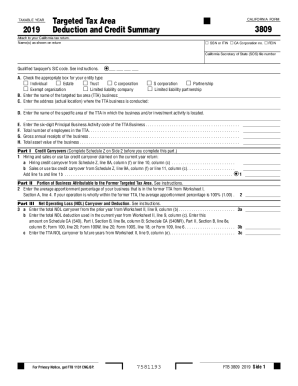
The California FTB 3809 form is designed for taxpayers involved in targeted tax areas to claim various credits and deductions. Filling it out online allows for a more streamlined process, ensuring accuracy and ease of submission.
Follow the steps to complete the form efficiently.
- Click ‘Get Form’ button to obtain the CA FTB 3809 and open it for editing.
- Enter the taxable year in the designated field at the top of the form.
- Indicate your entity type by checking the appropriate box in Section A.
- Provide your name(s) as they appear on your tax return.
- Fill in your Social Security Number (SSN) or Individual Taxpayer Identification Number (ITIN), California Corporation number, and Federal Employer Identification Number (FEIN) as needed.
- List the name of the targeted tax area (TTA) business in Section B.
- Complete Section C by entering the physical address where the TTA business is conducted.
- In Section D, specify the name of the specific area within the TTA related to your business activities.
- Enter the six-digit Principal Business Activity code in Section E.
- In Section F, provide the total number of employees working in the TTA.
- Input the gross annual receipts of your business in Section G.
- Fill in the total asset value of your business in Section H.
- Complete Part I for credit carryovers, entering amounts as indicated for hiring and sales or use tax credit.
- Proceed to Part II to indicate the average apportionment percentage of your business in the former TTA.
- In Part III, fill out the net operating loss (NOL) carryover and deduction amounts as applicable.
- Complete Schedule Z for credit limitations and carryovers.
- Review all entries for completeness and accuracy before submitting.
- Once satisfied, save changes, and proceed to download, print, or share the completed form.
Start filling out your CA FTB 3809 online today to ensure timely and accurate submission.
Get form
Experience a faster way to fill out and sign forms on the web. Access the most extensive library of templates available.
Combined State and Federal 1099 Filing. A select number of states allow the IRS to automatically transmit the 1099 information to them once it's been filed. This service is only available if you file electronically.
Get This Form Now!
Use professional pre-built templates to fill in and sign documents online faster. Get access to thousands of forms.