Loading
Get Ak Dor 6310 2020-2026
How it works
-

Open form follow the instructions
-

Easily sign the form with your finger
-

Send filled & signed form or save
How to fill out the AK DoR 6310 online
Filling out the AK DoR 6310 form online for the income tax education credit can seem complex, but with clear guidance, it is manageable. This guide provides step-by-step instructions to help you navigate each section of the form efficiently.
Follow the steps to complete your AK DoR 6310 online.
- Click ‘Get Form’ button to obtain the form and open it in the online editor.
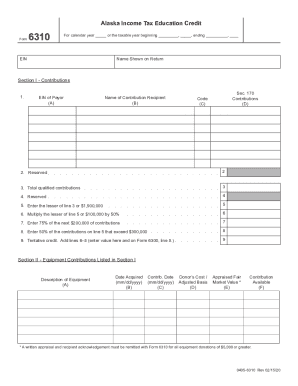
- In the top section, enter the calendar year or the taxable year for which you are filing. Provide the relevant EIN and your name as shown on your tax return.
- Move to Section I - Contributions. Begin by entering the EIN of the payor in the designated field. Make sure to list all contributions for which credit is claimed.
- In Column C, report the code that corresponds to the recipient of the contribution based on the provided table. Include the appropriate code in this section.
- For Column D, list any contributions qualifying as charitable contributions under IRC Sec. 170. Calculate the total of these contributions and enter it on line 3.
- On line 5, enter the lesser value of the total contributions from line 3 or $1,900,000. This value is crucial for your submission.
- Proceed to line 6 and multiply the lesser amount from line 5 or $100,000 by 50%. Record this value for later calculation.
- On line 7, enter 75% of the next $200,000 of contributions. Ensure accuracy in your multiplication and addition.
- For line 8, calculate 50% of any contributions exceeding $300,000 that were recorded on line 5. Document this amount accurately.
- Line 9 requires you to add the values from lines 6, 7, and 8 to find your tentative credit. Record this value as it will be referenced on Form 6300.
- Next, move to Section II - Equipment Contributions. Provide a description for each equipment contribution, including essential identifying information.
- Enter the date you acquired the equipment in Column B and the date you transferred the title to the recipient in Column C.
- In Column D, state the donor's cost or adjusted basis related to federal tax returns. For Column E, include the appraised fair market value of the equipment.
- Finally, ensure that any equipment valued over $5,000 is accompanied by a written appraisal and recipient acknowledgment, which must be submitted with Form 6310.
- Once you have completed the fields, you can save changes, download a copy, print, or share the completed form as necessary.
Complete your AK DoR 6310 online today and ensure your income tax education credit is filed correctly.
The Standard Deduction for employees who claim Single or Head of Household has changed from $3,000 to $4,600. The Standard Deduction for employees who claim Married Filing a Separate Return or Married Filing a Joint Return - Both Spouses Working has changed from $1,500 to $3,000.