Loading
Form preview
  • US Legal Forms
  • Other Templates
  • Tax Forms
  • Executive Department Treasury IRS Forms
  • Irs 941-pr 2016

Get Irs 941-pr 2016

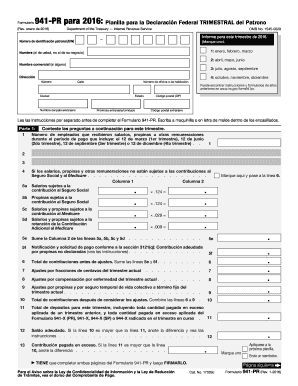
Para este trimestre de 2016. N mero de identificaci n patronal (EIN) (Marque uno). 1: enero, febrero, marzo Nombre (el de usted, no el de su negocio) 2: abril, mayo, junio Nombre comercial (si alguno) 3: julio, agosto, septiembre Direcci n 4: octubre, noviembre, diciembre N mero Calle N mero de oficina o de habitaci n Ciudad Nombre del pa s extranjero Puede encontrar instrucciones y formularios de a os anteriores en www.irs.gov/form941pr. C digo postal (ZIP) Estado.

This website is not affiliated with IRS

How it works

  1. Open form

    Open form follow the instructions

  2. Easily sign form

    Easily sign the form with your finger

  3. Share form

    Send filled & signed form or save

How to fill out the IRS 941-PR online

This guide provides comprehensive instructions on how to complete the IRS 941-PR form online. Designed for a broad audience, it offers clear step-by-step guidance to ensure accurate filling and submission of this important tax document.

Follow the steps to successfully fill out the IRS 941-PR online.

  1. Click ‘Get Form’ button to access the IRS 941-PR form and open it in your preferred editing tool.
  2. Fill in your employer identification number (EIN) and select the applicable quarter of the year, choosing from January to March, April to June, July to September, or October to December.
  3. Enter your name as the responsible person, not the business name, and provide any commercial name if applicable.
  4. Complete the address section with your street number, street name, city, state, and ZIP code, ensuring all information is current.
  5. In Part 1, report the total number of employees who received wages or tips during the reporting period.
  6. Input the amounts of wages, tips, and other compensation that are subject to federal tax in the subsequent fields, completing any required calculations for Social Security and Medicare contributions.
  7. Sum the totals for contributions before adjustments and correctly fill in any adjustments for the current quarter, if applicable.
  8. Calculate the total contributions after considering adjustments and ensure these figures are accurate.
  9. Enter the total deposits for the quarter, including any amounts applied from previous quarters.
  10. Determine any balance due by calculating the difference between total contributions and deposits, and mark any overpayment, if applicable.
  11. In the next part, indicate your deposit schedule and provide details regarding your business obligations for the quarter.
  12. Respond to all questions regarding your business operations and whether you have ceased operations or need to file for every quarter.
  13. If a third party will be communicating about the form, provide their contact details and consent.
  14. Sign and date the form in the appropriate space, ensuring it is completed accurately and truthfully.
  15. After completing both pages of the IRS 941-PR form, review it for accuracy, and save your changes before proceeding to download or print the document.

Start filling out your IRS 941-PR online today to ensure your tax obligations are met efficiently.

Get form

Experience a faster way to fill out and sign forms on the web. Access the most extensive library of templates available.

Related content

About Form 941 (PR), Employer's Quarterly Federal...
Nov 12, 2024 — Employers in Puerto Rico use this form to: Report income taxes, social...
Learn more
Document 6186
“Employment Tax, Total” includes paper and electronic Forms 940, 940-EZ,. 940-PR, 941...
Learn more
Publication 3823 (Rev. 9-2014)
MeF will accept Forms 940, 940-PR, 941, 941-PR, 941-SS, 943, 943-PR, 944, and 945. The...
Learn more

Related links form

CA UCSF 756-020Z 2012 FL Baptist Health Form 4023 2008 IA DHS 470-4389 2009 IL IL444-4737 2002

Questions & Answers

Get answers to your most pressing questions about US Legal Forms API.

Contact support

Form 941 should be filed with the IRS at the address outlined in the form's instructions. It's crucial to follow postal guidelines to avoid complications in processing your submission. If you are unsure, using a platform like uslegalforms can guide you through the filing process and ensure you meet all requirements. Accurate filing helps maintain compliance with IRS regulations associated with the IRS 941-PR.

You should file your IRS 941 PR form with the IRS at the specified address in the instructions for the form. Depending on your specific situation, the address may vary, especially if you are submitting a payment. Ensuring your form reaches the correct location is vital to avoid delays. Always check the official guidelines or use uslegalforms to confirm you are filing correctly.

The primary difference between 941 and 941 PR is their geographical applicability. The IRS 941 form is used by employers in the United States to report employment taxes, while the 941 PR specifically applies to employers in Puerto Rico. Understanding these differences ensures you file the correct form to comply with the IRS. For convenience, consider using uslegalforms, which can help you determine the right form for your situation.

The 1040 PR form is filed by residents of Puerto Rico who have earned income. This includes local wages, self-employment income, in most cases, and certain forms of investment income. If you fall into this category, ensuring your compliance with IRS 941-PR regulations is essential. Utilize platforms like uslegalforms to simplify the filing process with guided instructions.

To mail form IL 941, you should send it to the address specified on the form instructions. Typically, this will depend on whether you are including a payment or not. Properly addressing your submission will help ensure the IRS 941-PR is processed without delays. Always check the official IRS website for the most updated mailing address.

Receiving a refund check connected to your IRS 941-PR indicates that you overpaid your employment taxes during a previous quarter. This can occur due to erroneous calculations or adjustments linked to employee wages. To manage this effectively, always review your filings to ensure accuracy and minimize overpayments.

To determine if you are a monthly or quarterly depositor for the IRS 941-PR, check your average tax liability during the previous year. If your tax liability is $50,000 or less, you are typically a quarterly depositor. If it exceeds this amount, you usually fall under monthly reporting, which requires more frequent payments.

The IRS 941-PR is a specific version of the IRS 941 report tailored for employers in Puerto Rico. It serves the same purpose as the standard 941 but includes distinct considerations relevant to the unique tax structure in Puerto Rico. If you operate in Puerto Rico, familiarize yourself with the rules outlined in the 941-PR to ensure compliance.

The IRS 941 report is also commonly known as the Employer's Quarterly Federal Tax Return. This document reports employment taxes, specifically withholding from employee wages for social security, Medicare, and federal income tax. Understanding this term helps clarify discussions about your tax responsibilities as an employer.

Yes, you can file the IRS 941-PR yourself, but it's advisable to understand all requirements before proceeding. Ensure that you gather all necessary information, double-check your calculations, and stay updated on any changes to tax laws. If you prefer assistance, services like US Legal Forms can guide you through the process.

Get This Form Now!

Use professional pre-built templates to fill in and sign documents online faster. Get access to thousands of forms.
If you believe that this page should be taken down, please follow our DMCA take down processhere.
Get IRS 941-PR
  • Adoption
  • Bankruptcy
  • Contractors
  • Divorce
  • Home Sales
  • Employment
  • Identity Theft
  • Incorporation
  • Landlord Tenant
  • Living Trust
  • Name Change
  • Personal Planning
  • Small Business
  • Wills & Estates
  • Packages A-Z
  • Affidavits
  • Bankruptcy
  • Bill of Sale
  • Corporate - LLC
  • Divorce
  • Employment
  • Identity Theft
  • Internet Technology
  • Landlord Tenant
  • Living Wills
  • Name Change
  • Power of Attorney
  • Real Estate
  • Small Estates
  • Wills
  • All Forms
  • Forms A-Z
  • Other Templates
  • Legal Hub
  • About Us
  • Help Portal
  • Legal Resources
  • Blog
  • Affiliates
  • Contact Us
  • Delete My Account
  • Site Map
  • Industries
  • Forms in Spanish
  • Localized Forms
  • State-specific Forms
  • Forms Kit
  • Real Estate Handbook
  • All Guides
  • Notarize
  • Incorporation services
  • For Consumers
  • For Small Business
  • For Attorneys
  • USLegal
  • FormsPass
  • pdfFiller
  • signNow
  • altaFlow
  • DocHub
  • Instapage
Form Packages
  • Adoption
  • Bankruptcy
  • Contractors
  • Divorce
  • Home Sales
  • Employment
  • Identity Theft
  • Incorporation
  • Landlord Tenant
  • Living Trust
  • Name Change
  • Personal Planning
  • Small Business
  • Wills & Estates
  • Packages A-Z
Form Categories
  • Affidavits
  • Bankruptcy
  • Bill of Sale
  • Corporate - LLC
  • Divorce
  • Employment
  • Identity Theft
  • Internet Technology
  • Landlord Tenant
  • Living Wills
  • Name Change
  • Power of Attorney
  • Real Estate
  • Small Estates
  • Wills
  • All Forms
  • Forms A-Z
  • Other Templates
Customer Service
  • Legal Hub
  • About Us
  • Help Portal
  • Legal Resources
  • Blog
  • Affiliates
  • Contact Us
  • Delete My Account
  • Site Map
  • Industries
  • Forms in Spanish
  • Localized Forms
  • State-specific Forms
  • Forms Kit
Legal Guides
  • Real Estate Handbook
  • All Guides
Prepared for you
  • Notarize
  • Incorporation services
Our Customers
  • For Consumers
  • For Small Business
  • For Attorneys
Our Sites
  • USLegal
  • FormsPass
  • pdfFiller
  • signNow
  • altaFlow
  • DocHub
  • Instapage
Social Media
Call us now toll free:
+1 833 426 79 33
As seen in:
© Copyright 1999-2026 airSlate Legal Forms, Inc. 17 Station Street, Suite 303, Brookline, MA 02445
  • Your Privacy Choices
  • Terms of Service
  • Privacy Notice
  • Content Takedown Policy
  • Bug Bounty Program
IRS 941-PR
This form is available in several versions.
Select the version you need from the drop-down list below.
2023 IRS 941-PR
Select form
  • 2023 IRS 941-PR
  • 2022 IRS 941-PR
  • 2021 IRS 944-PR
  • 2020 IRS 941-PR
  • 2019 IRS 941-PR
  • 2018 IRS 941-PR
  • 2017 IRS 941-PR
  • 2016 IRS 941-PR
  • 2015 IRS 941-PR
  • 2014 IRS 941-PR
  • 2003 IRS 941-PR
  • 1995 IRS 941-PR
  • 2021 Form 941 Pr
Select form